
Two kinds of people go looking for a MarkItDown alternative. The first ran pip install markitdown, pointed it at a PDF report, and got back a wall of text with the table dissolved into loose numbers. The second doesn't write Python at all and hit a wall on step one.
Both problems are real, and neither means MarkItDown is bad. Microsoft's tool has passed 150,000 GitHub stars for a reason, per coverage of its milestone. It just has a narrow strong zone and a couple of blind spots that the star count hides.
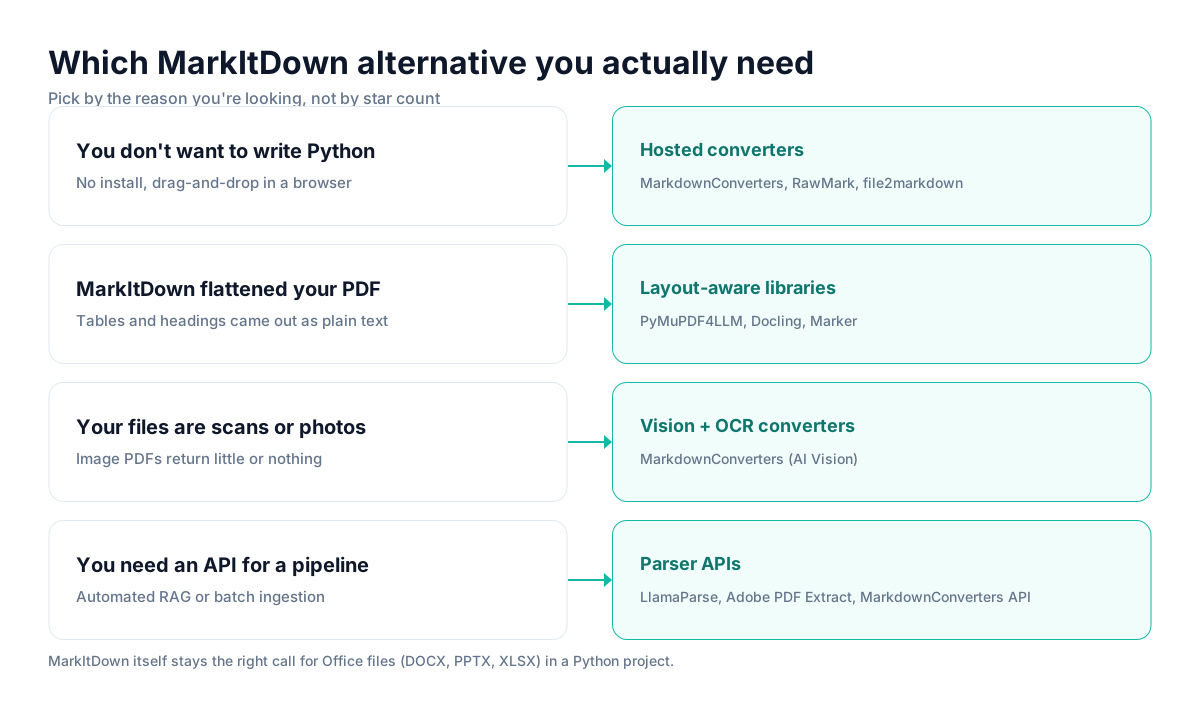
This guide sorts the alternatives by the reason you're actually here: you don't want to code, MarkItDown mangled your PDF, you have scans, or you need an API. Pick the row that matches your problem.
The ranking lens is workflow fit, not popularity. The most-starred tool is often the wrong one for a specific job.
First, what MarkItDown is actually good at
MarkItDown is a Python library (and CLI) that converts a dozen formats to Markdown, and for Office files it's genuinely excellent. DOCX, PPTX, and XLSX go in with their structure intact and come out as clean Markdown, because those formats store headings, tables, and styles explicitly. It's MIT-licensed, it's one dependency, and it drops into a Python project in a few lines.
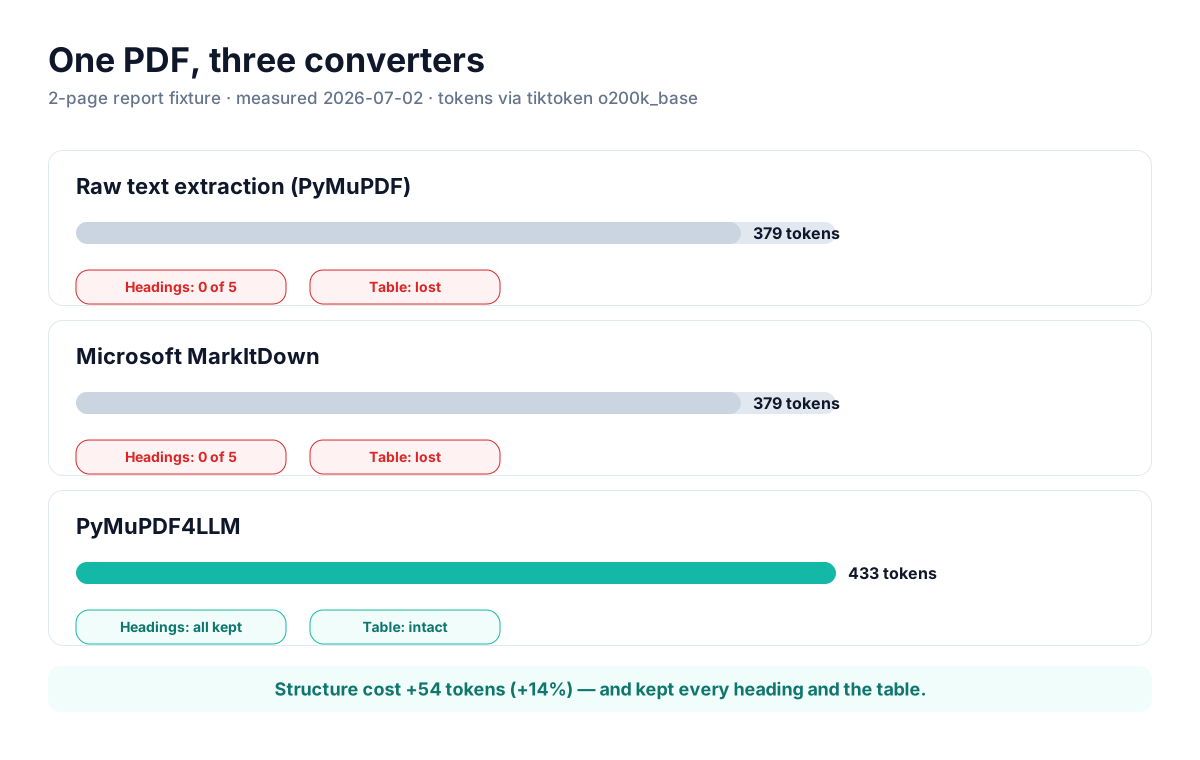
The blind spot is PDFs. MarkItDown reads them with plain text extraction, not layout analysis. We ran a two-page report with a five-column revenue table through it: the output had zero Markdown headings, and the table came out as one value per line, so nothing connected "APAC" to its numbers. A layout-aware library on the same file kept every heading and produced a clean pipe table. Full method and numbers are in our PDF converter benchmark.
The second blind spot is access: it needs Python 3.10+ and someone comfortable running scripts. No GUI, no upload button.
Practical rule: keep MarkItDown for Office files in a Python project. Swap it out when you need no-code access, trustworthy PDF tables, OCR, or an API.
The alternative that fits your reason
If you don't want to write Python
The whole barrier here is setup, so the fix is a hosted converter with an upload box.
1. MarkdownConverters. Our own tool, judged on the same terms as everyone else. It converts PDF, Word, PowerPoint, EPUB, and images to LLM-ready Markdown in the browser, and it's the only option in this section that also runs vision OCR on scanned pages. Best strength: one interface for messy real-world files including scans. Main limitation: free-tier caps on volume and file size. Real friction: server-side processing, so it's wrong for documents that can't leave your network.
2. RawMark. RawMark positions itself precisely as the hosted MarkItDown alternative, no Python, no install, no signup. If you specifically want MarkItDown-style output without the environment, it's the closest match. Best strength: zero setup. Main limitation: inherits the same PDF weaknesses as the engine it mirrors. Real friction: thinner feature set than a full converter app.
3. file2markdown. file2markdown is a web UI that runs Microsoft MarkItDown as its backend, with previews and batch processing. It's the literal "MarkItDown, but hosted" answer, which also means its PDF handling is exactly as good, or as limited, as MarkItDown's. Best strength: same engine, no code. Main limitation: same PDF blind spot. Real friction: you're still bound to MarkItDown's extraction quality.
If MarkItDown flattened your PDF
You need layout analysis, not text extraction. These stay code-first but read PDFs properly.
4. PyMuPDF4LLM. The one that won our benchmark outright: every heading preserved, table converted to clean pipe syntax, sub-second processing. Best strength: best structure preservation we measured, near-zero compute. Main limitation: quality drops on complex multi-column layouts. Real friction: AGPL licensing needs a legal check before it ships in commercial software.
5. Docling. IBM's document toolkit does deep layout understanding, including a dedicated table model, and tends to top academic benchmarks on complex PDFs. Best strength: highest fidelity on hard documents. Main limitation: heavier and slower than lightweight parsers. Real friction: more setup and compute than a one-file library.
6. Marker. A GPU-accelerated, accuracy-first PDF converter that's a common "safe default" in 2026 open-source roundups. Best strength: strong accuracy on dense, real-world PDFs. Main limitation: GPU-hungry and slower. Real friction: a commercial license kicks in above a revenue threshold, so check terms before building on it.
If your files are scans, photos, or an API job
Two edge cases MarkItDown doesn't cover well. For scans and photos, you need OCR: either a vision-based converter like MarkdownConverters' AI Vision, or a standalone OCR pass in front of a code library. Plain extraction on an image PDF returns close to nothing. For an automated pipeline, reach for a parser API, LlamaParse and Adobe's PDF Extract are the common picks, or the MarkdownConverters API if you want the same OCR-capable engine behind a REST call.
Head-to-head
| Tool | No code? | PDF tables | Scans / OCR | Best for |
|---|---|---|---|---|
| MarkItDown | No (Python) | Weak | No | Office files in Python |
| MarkdownConverters | Yes | Good | Yes (AI Vision) | Mixed real-world files, no code |
| RawMark / file2markdown | Yes | Weak (MarkItDown engine) | No | MarkItDown output, hosted |
| PyMuPDF4LLM | No (Python) | Strong | No | Fast, clean PDF structure |
| Docling / Marker | No (Python) | Strong | Partial | Complex, high-fidelity PDFs |
| LlamaParse / Adobe API | API | Strong | Yes | Automated RAG pipelines |
Which one to actually pick
If you're a Python developer whose inputs are mostly DOCX and PPTX, stay on MarkItDown; you don't have a problem to solve. The moment PDFs with tables enter the mix, add PyMuPDF4LLM as your PDF path and let MarkItDown keep the Office work. When those PDFs get gnarly, dense financial filings, multi-column papers, step up to Docling or Marker and accept the extra compute.
If you don't write code, the question is just whether you have scans. No scans, and you want MarkItDown-style output? RawMark or file2markdown. Scans, photos, or a mix of everything? MarkdownConverters, because it's the one no-code option that OCRs. And if this is feeding an automated system, skip the manual tools entirely and wire in a parser API.
The mistake I see most is treating MarkItDown's star count as a verdict on every format. It's a verdict on Office files. For PDFs, scans, and no-code workflows, the right tool is almost always something else, and often something smaller.
Frequently asked questions
Is there a hosted MarkItDown with no Python?
Yes, several. MarkdownConverters, RawMark, and file2markdown all give you a browser upload with no install. file2markdown runs MarkItDown as its backend, so it's the same engine without the setup.
Why is MarkItDown bad at PDFs?
It uses text extraction, not layout analysis. In our test, PDF output had no headings and the table became one value per line. Office formats work well because they store structure; PDFs don't.
Best alternative for scanned documents?
A vision-based converter like MarkdownConverters, or a dedicated OCR step before a code library. MarkItDown doesn't OCR scans on its own.
Should I still use MarkItDown?
For Office files in a Python project, yes, it's a strong default. For no-code use, reliable PDF tables, OCR, or an API, use one of the alternatives above.
If you like what MarkItDown does but can't run Python, or you're tired of its PDFs coming out flat, MarkdownConverters gives you the same job in the browser, with layout-aware PDF handling and OCR for scans. Try it on the file MarkItDown struggled with.
Related reading
Best PDF to Markdown converters 2026
The full benchmark behind the MarkItDown numbers here.
Convert PDF to Markdown for ChatGPT & Claude
Getting accurate answers from uploaded documents.
RAG document processing guide
Why conversion quality decides retrieval quality.