
You export the quarterly report to PDF, drop it into ChatGPT, and ask a simple question: which region grew fastest? The model answers instantly, confidently, and wrong. Not because it can't read. Because of what it was given: somewhere between the PDF and the prompt, the revenue table got shredded into a column of orphaned values, and nothing connects "APAC" to "+29.7%" anymore.
One bad answer in a chat window is annoying. The same failure inside a RAG pipeline or an automated report workflow is worse, because nobody is looking at the converted text anymore. The garbage gets embedded, indexed, and retrieved for months.
The converter you pick decides more about your AI output quality than the model you pick. So instead of paraphrasing marketing pages, we built a two-page revenue-report PDF (headings, a 4-column data table, bullet and numbered lists), ran it through the leading free tools on July 2, 2026, and measured what came out.
By the end of this guide you'll know which converter fits your situation, and, just as useful, which popular tool quietly flattens PDFs into text soup.
One report, three converters, measurable results
Here's exactly what we did, so you can reproduce it. We generated a realistic two-page PDF (a fictional Q2 revenue review with a regional sales table, product-mix bullets, and a numbered risk list), then converted it with each tool that runs locally. We counted output tokens with OpenAI's o200k_base tokenizer, the one GPT-4o uses, and checked two things by hand: did headings survive as headings, and did the table survive as a table.
What we did not do matters too. This fixture is a born-digital PDF; we didn't test scanned documents in this run (that's an OCR problem, covered below). And the browser-based tools don't fit a scripted harness, so they're assessed on capability and workflow rather than measured output. When a claim below comes from our measurement, we say so. When it doesn't, it's judgment, labeled as judgment.
| Tool | Output tokens | Headings kept | Table kept as table |
|---|---|---|---|
| Raw text extraction (PyMuPDF) | 379 | 0 of 5 | No |
| Microsoft MarkItDown | 379 | 0 of 5 | No, one value per line |
| PyMuPDF4LLM | 433 | All (9 heading marks) | Yes, clean pipe table |
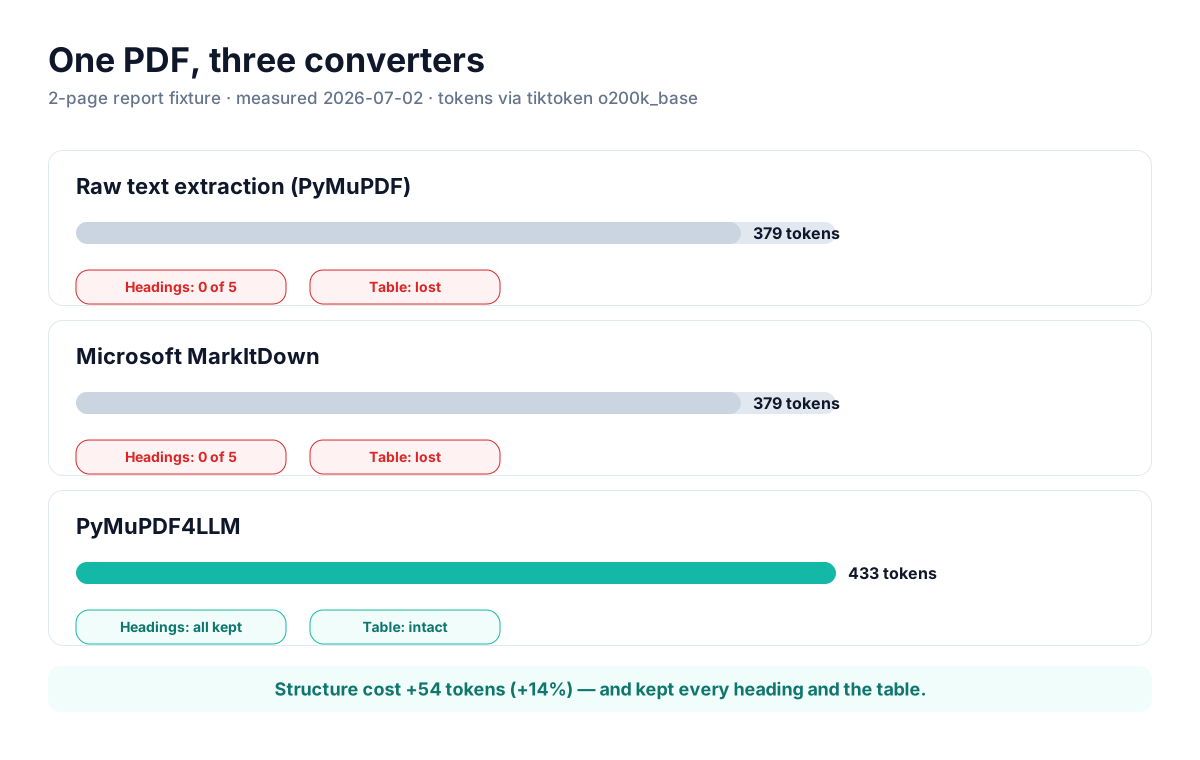
Measured 2026-07-02 on a 2-page fixture PDF; tokens via tiktoken o200k_base. Character-level content survived in every tool; structure didn't.
The failure isn't lost characters, it's lost structure
Every tool preserved every number. "1,988,410" came through intact in all three outputs. What differed was the shape around the numbers. Here's the same table region, before and after.
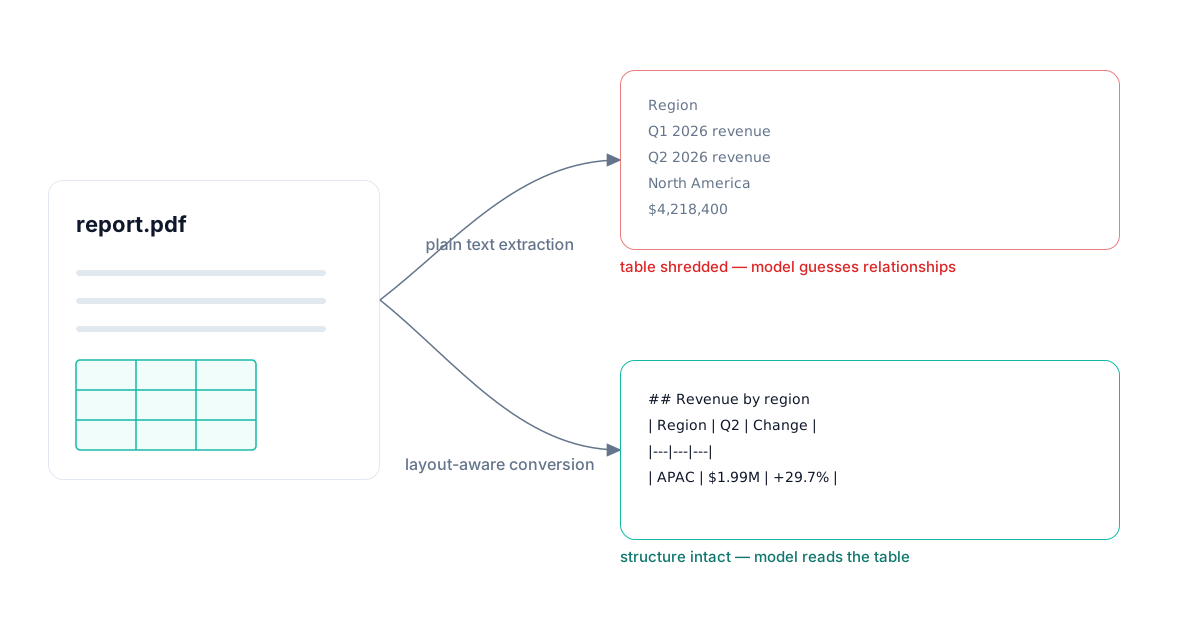
MarkItDown's PDF output:
Region

Q1 2026 revenue

Q2 2026 revenue

Change

New accounts

North America
...
PyMuPDF4LLM's output of the same region:
## 1. Revenue by region

|Region|Q1 2026 revenue|Q2 2026 revenue|Change|New accounts|
|---|---|---|---|---|
|North America|$4,218,400|$4,876,120|+15.6%|37|
|EMEA|$2,904,750|$2,761,300|−4.9%|21|
|APAC|$1,532,900|$1,988,410|+29.7%|44|
That difference seems cosmetic. It isn't. Ask a model "which region added the most new accounts?" against the first output and it has to guess which orphaned number belongs to which region, across a 40-line gap. Against the second output, the answer is one table lookup. Structure also cost only 54 extra tokens (+14%) in our measurement. Cheap insurance.
Practical rule: judge a PDF converter on one question first: does a data table come out as a Markdown table? If it fails that, nothing else about it matters for AI work.
The five free tools worth your time
1. MarkdownConverters (browser, no code)
Our own tool, so read this entry with that in mind; the trade-offs below are as honest as the ones we give everyone else. MarkdownConverters' PDF converter is a browser upload flow built specifically for AI workflows: it targets clean, LLM-ready Markdown rather than visual fidelity, handles scanned pages with AI Vision OCR, and converts Word, PowerPoint, EPUB, and images through the same interface. There's a free tier; no install, no Python.
- Best strength: the only tool in this list where scanned PDFs and photos of documents work without setting up a separate OCR pipeline.
- Main limitation: free-tier caps on conversions and file size; heavy monthly volume means a paid plan.
- Real friction: processing happens server-side. If your documents can't leave your machine or network, use a local library instead.
2. Microsoft MarkItDown (Python library/CLI)
MarkItDown is the most popular file-to-Markdown project on GitHub by a wide margin (160k+ stars, MIT license), and for Office formats it earns that: DOCX, PPTX, and XLSX go in with real structure and come out as real Markdown, because those formats store their structure explicitly.
PDFs are its weak spot, and our test showed exactly how weak: zero headings, no table markup, cells emitted one per line. That's the pdfminer text-extraction backend doing what text extraction does. If your pipeline is mostly Office documents with occasional PDFs, MarkItDown is still a fine default. If it's mostly PDFs, look elsewhere.
- Best strength: one dependency that converts a dozen formats, backed by Microsoft, integrates in five lines of Python.
- Main limitation: PDF output is flat text. In our measured test it preserved no structure at all.
- Real friction: Python 3.10+ only, no GUI; someone on the team has to own the script.
3. PyMuPDF4LLM (Python library)
PyMuPDF4LLM won our structure test outright: every heading preserved, the table converted to clean pipe syntax, and the whole file processed in under a second on a laptop. It does real layout analysis rather than raw extraction, which is exactly what the "4LLM" in the name promises.
Two caveats from outside our test. Academic benchmarking across many document types is less flattering: the READoc benchmark scores it below heavier tools like MinerU and Marker on complex real-world PDFs, so expect quality to drop on academic papers and dense multi-column layouts. And the underlying PyMuPDF is AGPL-licensed with a commercial option, which your legal team may care about.
- Best strength: best structure preservation of anything we measured, at trivial compute cost.
- Main limitation: quality falls off on complex layouts where GPU-based tools (Marker, MinerU, Docling) pull ahead.
- Real friction: AGPL licensing needs a check before it ships inside commercial software.
4. pdf2md.morethan.io (browser, open source)
The veteran of this list. pdf2md is a free, open-source, in-browser converter that's been the default "just need this one PDF as Markdown" answer for years, and it still ranks at the top of Google for good reason: drag a file in, copy Markdown out, no account, and the conversion runs in your browser rather than on a server.
Its own repository describes the parser as experimental, and that matches how I'd position it: right for simple, born-digital documents in ones and twos; wrong for scans (no OCR), tables you care about, or anything you need to automate.
- Best strength: zero-friction one-off conversions with client-side processing.
- Main limitation: experimental parser; no OCR, so scanned PDFs return nothing useful.
- Real friction: no API or batch mode; every file is a manual trip through the browser.
5. CloudConvert (browser + API)
CloudConvert is the generalist: 200+ formats, a mature API, and infrastructure that's been running since 2012. PDF-to-Markdown is one route among hundreds, and that's both the pitch and the problem. You get dependable file handling and automation on the free credit allowance, but the output is generic conversion output, not Markdown tuned for LLM consumption.
- Best strength: one account covers every conversion your team will ever ask for, with a real API.
- Main limitation: not AI-focused; don't expect layout-aware Markdown or OCR tuned for downstream prompting.
- Real friction: free usage is credit-capped; regular volume pushes you onto paid packages quickly.
Head-to-head: pick by the weakest step in your workflow
| Tool | Type | Scanned PDFs | Automation | Main friction |
|---|---|---|---|---|
| MarkdownConverters | Web app | Yes (AI Vision OCR) | Batch + API on paid plans | Free-tier caps; server-side |
| MarkItDown | Python lib/CLI | No (plugin/extra setup) | Yes, scriptable | Flat, structure-less PDF output |
| PyMuPDF4LLM | Python lib | No (needs OCR step) | Yes, scriptable | AGPL license; complex layouts |
| pdf2md.morethan.io | Browser tool | No | No | Experimental parser, manual only |
| CloudConvert | Web app + API | Limited | Yes, credit-metered | Generic output, not AI-tuned |
Which converter is right for you
If you're a developer building a document pipeline and your inputs are born-digital PDFs, start with PyMuPDF4LLM; it won our structure test and costs nothing to try. When your corpus turns out to be messier than expected (multi-column papers, dense financial filings), that's the moment to evaluate the heavier GPU tools like Marker or Docling rather than fighting a lightweight parser.
If your inputs are mostly Office files with the occasional PDF, MarkItDown is the pragmatic single dependency. Its Office conversions are genuinely good; just route important PDFs around it.
If you don't write code, or your stack includes scanned documents, use MarkdownConverters: it's the only option here where a scan, a photo, and a digital PDF all go through the same drop zone. For a single simple file once a quarter, pdf2md.morethan.io remains the fastest zero-setup answer. And if your team already lives in CloudConvert for other formats, its PDF-to-MD route is fine for non-critical documents.
The amateur mistake is picking by star count or by whichever tool a listicle put first. The professional move is picking for your weakest input: the scanned contract, the 40-row table, the file someone will feed to ChatGPT without checking the conversion.
Frequently asked questions
Is Microsoft MarkItDown good for PDFs?
For PDFs specifically, no. In our test its PDF output had zero headings and the table arrived one value per line. It's excellent for DOCX, PPTX, and XLSX, where document structure is stored explicitly. Treat it as an Office-to-Markdown tool that tolerates PDFs, not a PDF tool.
Do I lose data converting PDF to Markdown?
You lose structure before you lose characters. Every tool we measured kept every number intact; the difference was whether tables and headings survived as Markdown structure. That structure is what lets an AI model answer questions accurately, so it's the thing to check first.
What about scanned PDFs?
Scans are images, so text-extraction tools return little or nothing. You need OCR: either a separate OCR pass in front of a code library, or a converter with vision built in. That's the main reason our converter runs AI Vision on scanned pages, and it's covered in depth in our guide to uploading PDFs to Claude.
Does Markdown really use fewer tokens than PDF?
Against raw HTML or noisy extraction, yes, often dramatically. Against clean flat text, structured Markdown actually costs slightly more (+14% in our measurement) and is worth every token, because structure is what the model reasons over. Full numbers are in our PDF vs Markdown token comparison.
If your team regularly feeds PDFs, scans, or Office documents to ChatGPT, Claude, or a RAG system and nobody wants to babysit a Python script, MarkdownConverters' free PDF to Markdown converter was built for exactly that job. Try it on your ugliest document first.
Related reading
PDF vs Markdown for AI: token usage compared
Real token counts for the same document across formats.
Convert PDF to Markdown for ChatGPT & Claude
The workflow for getting accurate answers from uploaded documents.
RAG document processing guide
Why conversion quality decides retrieval quality.