
You've seen the claim: convert your documents to Markdown and cut token usage by 70%. It shows up in every "prepare your docs for AI" post, usually with no source. So you try it, run your PDF through a converter, count the tokens, and the number barely moves. Sometimes it goes up.
That's not a mistake on your end. The 70% figure is comparing against a worst case nobody explains, and applying it to an ordinary document quietly falls apart.
So we measured it properly. One realistic document, rendered into the formats people actually feed to AI, counted with the real GPT-4o tokenizer. The results are below, and the honest version of the token story is more helpful than the myth: Markdown's savings depend entirely on what you're converting from.
Here's where the tokens really go, and where the savings are real.
The measurement: one document, three formats
We built a realistic 1,400-word vendor security review, seven sections, three data tables, headings, and lists, the kind of document that actually gets fed to an LLM. Then we produced it in the three forms people upload: the raw HTML source (what web scraping returns), plain text extracted from the PDF (what "just upload the PDF" often becomes), and clean Markdown from a layout-aware converter. Every version was counted with tiktoken's o200k_base encoding, the tokenizer GPT-4o and GPT-4.1 use.
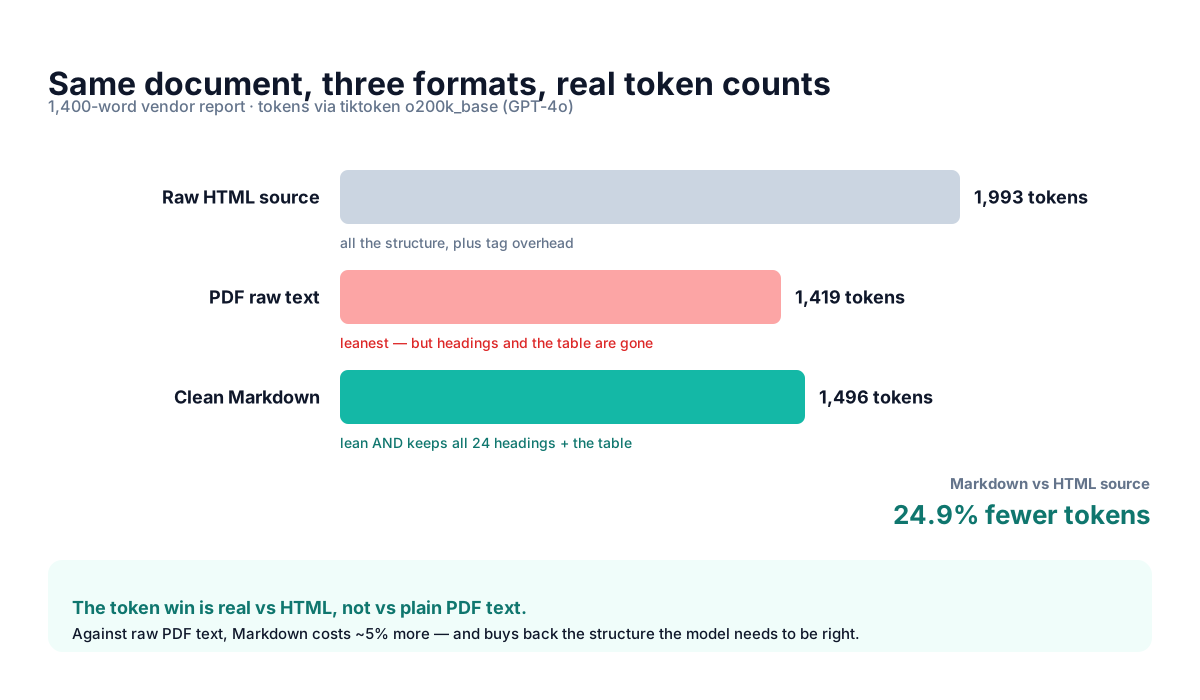
Measured 2026-07-02. Results were within 1% on the GPT-4 (cl100k) tokenizer too, so the ratios aren't model-specific.
Three numbers, three lessons. Read left to right and the whole "does Markdown save tokens" debate resolves.
vs HTML, the savings are real: about 25%
The raw HTML came in at 1,993 tokens; the Markdown at 1,496. That's a 24.9% reduction, and it's the legitimate version of the token-savings story.
The reason is simple: HTML carries structure as tags, and the model pays for every one. <td class="muted"> costs tokens that | conveys for a fraction of the price. My test HTML was clean, minimal styling, no scripts. A real web page with inline styles, tracking scripts, and nested navigation would push that gap far wider, which is exactly where the inflated "70%" numbers come from: they're measuring against bloated production HTML, then quoting the result as if it applied to everything.
Field note: if your source is a web page, converting to Markdown is a genuine 25%-and-up token cut. That's the one case where "Markdown saves tokens" is unambiguously true.
vs raw PDF text, Markdown costs more, and should
Here's the result that surprises people. Plain text pulled straight from the PDF was 1,419 tokens, the leanest of the three. Clean Markdown was 1,496, about 5% more. So on a text-based PDF, converting to Markdown doesn't save tokens at all. It spends a few.
What those extra tokens buy is the entire point. The raw text extraction kept 1,419 tokens by throwing away structure: zero heading markers, and the three data tables flattened into loose columns of numbers with nothing tying a value to its row. The Markdown spent its extra 77 tokens keeping all 24 headings and rebuilding the tables as real pipe tables. We showed exactly what that flattening looks like in our converter benchmark: a revenue table reduced to a stack of orphaned figures.
So the trade is 5% more tokens for a document the model can actually reason over. Ask "which region had the highest cross-region egress" against the flattened text and the model is guessing which number sits in which cell. Ask it against the Markdown table and it's a lookup. Spending 5% to move an answer from "plausible guess" to "correct" is the best token deal in this whole article.
Practical rule: on born-digital PDFs, don't convert to Markdown to save tokens. Convert to preserve structure. The token count is roughly a wash; the accuracy isn't.
Where the big token savings actually hide: scanned pages
There is a format where Markdown saves you a fortune, and it's not in the chart above, because it isn't text at all. It's the scanned document, the contract someone photographed, the invoice exported as an image PDF.
When you hand a model an image, it doesn't read characters, it tokenizes pixels. On GPT-4o in high detail, an image costs 85 base tokens plus 170 for every 512-pixel tile, so a single page-sized scan runs about 765 tokens before the model has understood one word, per an analysis of GPT-4o's image tokenizer. A ten-page scanned contract is roughly 7,600 image tokens, and the model still has to OCR it, imperfectly, from the pixels.
Convert that same ten-page scan to Markdown text first and you're back in the ~1,500-token range for a document this dense, with the added benefit that the text is now certain instead of guessed. That's the genuine multiple-times saving, and it only exists for image-based inputs. Our AI Vision converter exists specifically for this path: OCR the scan once, up front, so every downstream prompt is cheap text instead of expensive pixels.
What this costs at scale
A 77-token difference sounds like rounding error, and for a one-off prompt it is. It stops being trivial in two situations: high volume, and repetition.
At GPT-4o's input price of $2.50 per million tokens, the HTML-to-Markdown saving of ~500 tokens per document works out to about $1.25 for every 1,000 documents processed once. Modest. But a RAG system doesn't process a document once; it retrieves and re-sends chunks on every query, and a busy assistant answering thousands of questions a day against a bloated corpus pays that overhead over and over. The scanned-document case is where it turns real: swapping 7,600 image tokens for 1,500 text tokens on ten-page scans, across a document set of any size, is the difference between a workable budget and a surprising invoice.
| Source format | Tokens (this doc) | Convert to Markdown? |
|---|---|---|
| HTML / web page | 1,993 | Yes, ~25% token cut |
| Born-digital PDF (text) | 1,419 (raw) / 1,496 (MD) | Yes, for structure, not tokens |
| Scanned / image PDF | ~765 per page (image) | Yes, big savings + accuracy |
| Plain text, already clean | ~1,419 | Only if you need tables/headings back |
So should you convert to Markdown?
Almost always yes, but rarely for the reason the myth gives. If you're pulling from web pages, do it for the real 25%-plus token cut. If you're working with scanned or photographed documents, do it to escape image-token pricing and unreliable OCR-on-the-fly, this is where the dramatic savings actually live. If you're handling ordinary text PDFs, do it for structure and accuracy, and treat the token count as a wash.
The one case where converting for token savings doesn't pay: clean plain text you already have, where you don't need tables or headings reconstructed. There, raw text is marginally leaner and fine.
The amateur framing is "Markdown saves tokens." The professional framing is "Markdown is the cheapest way to keep a document both compact and structured, and against images and HTML, compact wins big." Pick your format by what you're converting from, not by a number someone quoted without measuring it.
Frequently asked questions
Does Markdown use fewer tokens than PDF?
Not against raw text from a born-digital PDF, there it's about 5% more, because it keeps the tables and headings raw extraction discards. Markdown does save against HTML (~25% in our test) and against scanned pages sent as images.
How much does Markdown save vs HTML?
About 25% on a clean document (1,496 vs 1,993 tokens in our measurement), and considerably more on real web pages heavy with scripts and inline styles. The tags are the overhead.
Is the "70% token savings" claim true?
Only against a worst-case baseline, bloated HTML or a document image. Against ordinary text or a text PDF, the real difference is small. Treat any unsourced 70% figure as marketing.
What's the cheapest way to feed a document to an LLM?
Clean Markdown, because it's both lean and structured. Raw text is a hair cheaper but loses tables; images are by far the most expensive. Convert once, up front, then send text.
If you're feeding web pages, PDFs, or scans to an LLM and want them lean and structured instead of bloated or flattened, MarkdownConverters turns them into clean, AI-ready Markdown, with OCR for the scanned files where the real savings hide.
Related reading
Best PDF to Markdown converters 2026
The structure benchmark behind the numbers here.
ChatGPT file upload limits
Why the context window, not the upload cap, decides answer quality.
RAG document processing guide
Where format choice compounds across every query.