
You drop a 300-page contract into ChatGPT, ask which clause covers early termination, and get an instant, specific, plausible answer. It cites "Section 14.2." You check. There is no Section 14.2. The clause you wanted is on page 211, and the model never looked there.
The upload worked. The file was well under any size limit. And the answer was still wrong, because "ChatGPT accepted my file" and "ChatGPT read my file" are two different things, and almost nobody is told where the line sits.
This guide covers the limits that actually matter: which file types work, how big a file ChatGPT can hold, how much of it the model reads at once, and how many files you can attach. Then the part the limit pages skip, why staying under the limits still isn't enough, and what to do about it.
Limits shift as OpenAI ships new models, so I'll flag where the numbers are stable and where they drift.
What file types can ChatGPT read?
Most of them. ChatGPT reads standard document, spreadsheet, presentation, data, code, and image formats. OpenAI doesn't publish a fixed list of allowed extensions, so the reliable rule is: if it's a common office or data file, it works; if it's media or an app, it doesn't.
| Category | Works | Notes |
|---|---|---|
| Documents | PDF, DOCX, TXT, Markdown, RTF, EPUB | Best results when structure survives (see below) |
| Spreadsheets | XLSX, CSV | Lower size cap; large sheets get sampled |
| Presentations | PPTX | Speaker notes often dropped |
| Data & code | JSON, XML, most source files | Read as plain text |
| Images | PNG, JPG, WebP, GIF | Read via vision; text extracted by OCR |
| Not supported | Video, audio, .exe/.app, password-protected files | Convert or transcribe first |
One gap worth naming: audio and video are out, so a recorded meeting or a lecture has to be transcribed before ChatGPT can use it. That's a conversion step, not a dead end, and it's the same idea running underneath everything below: get your content into a form the model reads well.
How big a file, and how many words, can ChatGPT actually handle?
Here's the answer most pages give, and it's only half true: ChatGPT allows up to 512MB per file, and caps text and document files at roughly 2 million tokens each, about 1.5 million words, according to OpenAI's file uploads FAQ. Spreadsheets top out lower (around 50MB), images around 20MB.
So a 1.5-million-word file uploads without complaint. The catch: the model can't look at 1.5 million words at once. It reads through a context window, its working memory, and as of 2026 that window runs roughly 128,000 to 200,000 tokens depending on the model, about 200 to 300 pages, per DataStudios' analysis of ChatGPT's long-document behavior.
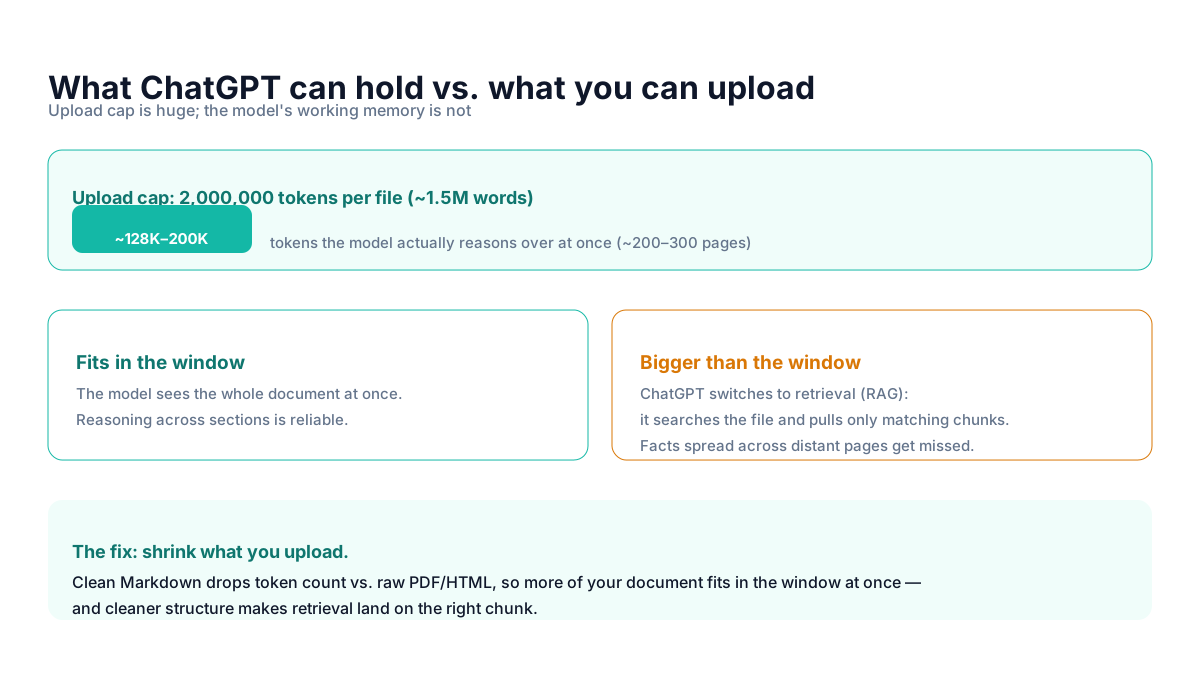
When your document fits inside the window, ChatGPT reads all of it and reasoning across sections is dependable. When it's bigger, the system switches to retrieval: it indexes the file, and for each question pulls in only the chunks that look relevant. That's how a 900-page file "works" at all, and also why it quietly fails on the contract question, the answer lived in a chunk the search didn't rank highly.
Practical rule: the number that governs answer quality isn't the upload cap, it's whether your document fits in the context window. Aim to keep the content you actually need under ~150K tokens (~200 pages of clean text).
How many files can you upload at once?
Up to 10 files in a single chat for most users. Beyond that, your plan sets a rolling ceiling.
| Plan | Per chat | Rolling limit |
|---|---|---|
| Free | Up to 10 | ~3 uploads per day |
| Plus / Pro | Up to 10 | ~80 files every few hours |
These rolling numbers move around more than any other limit here, OpenAI tunes them by load and plan, so treat them as ballpark and check the current figures if you're near the edge. The stable takeaway: ten files per chat, and every one of them competes for the same context window. Attaching ten large PDFs doesn't give the model ten documents to reason over; it gives it a retrieval problem across all ten.
Why the file that fits still gives bad answers
Size isn't the only thing that gets lost between your file and the model. Format is. When ChatGPT ingests a PDF, it extracts the text, and PDF text extraction routinely flattens tables into loose columns of numbers and strips the heading hierarchy that told you which section you were in.
We measured this on a two-page report with a five-column revenue table. Extracted as plain text, the table came out as a stack of orphaned values, "Region," "Q2 2026 revenue," "APAC," "$1,988,410," on separate lines with nothing connecting them. Ask "which region grew fastest" against that, and the model is guessing which number belongs to which row. Full numbers are in our PDF converter benchmark.
So there are two independent failure modes, and they stack:
- Too big for the window: the model retrieves fragments and misses cross-page facts.
- Structure destroyed on ingest: even the fragments it does read are scrambled, so tables and relationships are unreliable.
A clean, well-structured document is smaller and clearer, which is exactly why the fix below addresses both at once.
How to get accurate answers from uploaded files
Ordered by effort, quickest first.
1. Convert to clean Markdown before uploading
This is the highest-leverage move and the cheapest. Markdown keeps headings as headings and tables as tables while dropping the layout overhead that bloats PDF and HTML. Cleaner structure helps retrieval land on the right chunk, and the lower token count means more of your document fits in the window at once. Our PDF to Markdown converter is built for this; you can also point people at the upload workflow guide for the step-by-step.
2. Upload only the part you need
If you only care about the financials, don't upload the whole annual report. Splitting a 900-page file down to the 40 relevant pages keeps everything inside the context window, which turns an unreliable retrieval problem back into a document the model reads whole.
3. Tell the model where to look
For files that must stay large, name the section in your prompt: "Using the Termination section (around page 210), summarize the early-exit terms." That nudges retrieval toward the right chunk instead of leaving it to guess. It's a patch, not a fix, but it's the fastest thing you can do without touching the file.
4. For scans and photos, expect an OCR step
A scanned PDF is an image, so plain text extraction returns little or nothing and ChatGPT's own reading of it is hit-or-miss. Run it through a converter with vision-based OCR first so the text and tables actually come through. This is where the extra step pays for itself, and it's the one most people skip.
Which approach fits your situation
If you're asking a quick question of a small, clean document, just upload it, none of this applies until files get big or messy. If you're working with reports, contracts, or anything with tables you'll ask about, convert to Markdown first; it's the single change that most improves answer accuracy.
If your file is genuinely huge and can't be trimmed, accept that you're in retrieval territory: ask narrow, section-specific questions and verify anything that depends on connecting distant facts. And if your source is a scan, a photo, or an audio recording, plan for a conversion step before ChatGPT ever sees it.
The amateur move is to upload the rawest possible file and trust the confident answer. The professional move is to spend thirty seconds making the document smaller and cleaner, because the model's answer is only ever as good as what fits in its window.
Frequently asked questions
What file types can ChatGPT read?
Standard document, spreadsheet, presentation, data, code, and image formats, PDF, DOCX, PPTX, XLSX, CSV, TXT, Markdown, JSON, most code files, and PNG/JPG. Not video, audio, executables, or password-protected files. There's no official whitelist; common office and data formats work.
How many words can ChatGPT process from a file?
Files are capped at about 2 million tokens (~1.5 million words), but the model only reasons over its context window at once, roughly 128K–200K tokens, about 200–300 pages. Above that, it retrieves fragments rather than reading the whole file.
How many files can you upload to ChatGPT at once?
Up to 10 per chat. Free accounts get roughly 3 uploads a day; Plus and Pro get much higher rolling limits. The exact rolling numbers change, so verify if you're near the edge.
Why does ChatGPT give wrong answers about my PDF?
Either the file is bigger than the context window (so it only sees retrieved chunks and misses distant facts), or PDF extraction scrambled the tables and headings. Converting to clean Markdown addresses both.
If you regularly feed PDFs, reports, or scans to ChatGPT and keep getting answers you can't trust, converting them to clean Markdown first is the fix. MarkdownConverters' free converter turns documents and scanned pages into structured, LLM-ready Markdown, smaller files, better answers.
Related reading
Convert PDF to Markdown for ChatGPT & Claude
The step-by-step workflow for accurate document answers.
PDF vs Markdown for AI: token usage compared
Why format changes how much fits in the window.
Best PDF to Markdown converters 2026
Which tools keep tables and headings intact.