
How to Convert CSV Files: An LLM-Ready Markdown Guide
Learn how to convert CSV files into clean, token-efficient Markdown for RAG and AI models. This guide covers web app, API, encoding errors, and chunking.
You've probably already felt the failure mode. A CSV export looked harmless, you pushed it into your RAG pipeline, and now retrieval is noisy, answers are inconsistent, and the model keeps grounding on the wrong row or the wrong header. The file isn't “broken” in the spreadsheet sense. It's broken for LLM ingestion.
That gap matters. CSV is a transport format, not a reasoning format. Large language models work better when tabular data arrives with stable structure, predictable chunk boundaries, and fewer wasted tokens. If you're trying to figure out how to convert CSV files for ChatGPT, Claude, or an internal retrieval system, the target shouldn't just be “openable.” It should be clean, structured Markdown.
The practical work is less about conversion in the generic sense and more about preserving meaning while stripping noise. That means handling encodings, delimiters, type preservation, malformed headers, and schema normalization before you ever embed a chunk.
Why Your LLM Needs Clean Markdown Not Raw CSV
A common failure case looks like this. A team exports a spreadsheet, uploads the raw CSV into a RAG pipeline, chunks it as plain text, and gets answers that cite the wrong row, miss the right entity, or blend two records into one. The file was valid enough for Excel. It was not structured enough for retrieval.
CSV is an interchange format. It preserves rows and delimiters, but it carries very little meaning on its own once it leaves the spreadsheet. LLM pipelines care about meaning at the chunk level. If the file includes repeated header rows, empty columns, notes above the table, mixed date formats, or commas inside quoted fields, the parser may still succeed while retrieval quality drops. The model sees noisy text instead of stable structure.
That is why clean Markdown works better for this step.
Markdown gives rows context the model can use
A good Markdown conversion does more than restyle a table. It turns raw records into a format with visible structure: headings, labels, grouped sections, and consistent column names. Those cues help chunkers split data in sensible places and help retrievers match the right evidence later.
For example, a row under ## Accounts Receivable with normalized fields such as Region, Amount, and Report Date is easier to retrieve than a bare comma-separated line with no section context. In practice, that means fewer false matches across similar rows and less confusion when two tables share overlapping column names.
Teams that already work on data prep for business analysts will recognize the pattern. Data becomes more useful when the format matches the task. For RAG and fine-tuning, that usually means converting exported tables into clean, predictable Markdown instead of passing raw CSV through unchanged.
Token efficiency is part of data quality
Messy CSV conversion wastes tokens in ways that are easy to miss. Repeated headers, null-heavy columns, inconsistent whitespace, metadata rows, and escaped characters all add text that the model has to read but cannot use well. In a retrieval pipeline, that noise reduces the amount of useful evidence you can fit into the context window.
I treat token efficiency as a preprocessing requirement, not a cost optimization. If a chunk spends half its budget on broken table syntax and duplicate labels, recall gets worse. The retriever may still return something relevant, but the generator has less room for the fields that answer the question.
This is also why Markdown usually outperforms raw exports in LLM workflows. The trade-off is explained well in this comparison of Markdown vs other formats for LLM workflows. The short version is straightforward. LLMs perform better with stable, low-noise structure than with a file format that was designed for spreadsheet exchange.
The Easiest Way to Convert CSVs with the Web App
If the goal is speed, a browser-based workflow is the fastest route from spreadsheet export to usable Markdown. This is the path I'd recommend when you need to inspect output immediately, test a few files, or hand a repeatable process to a non-engineering teammate.
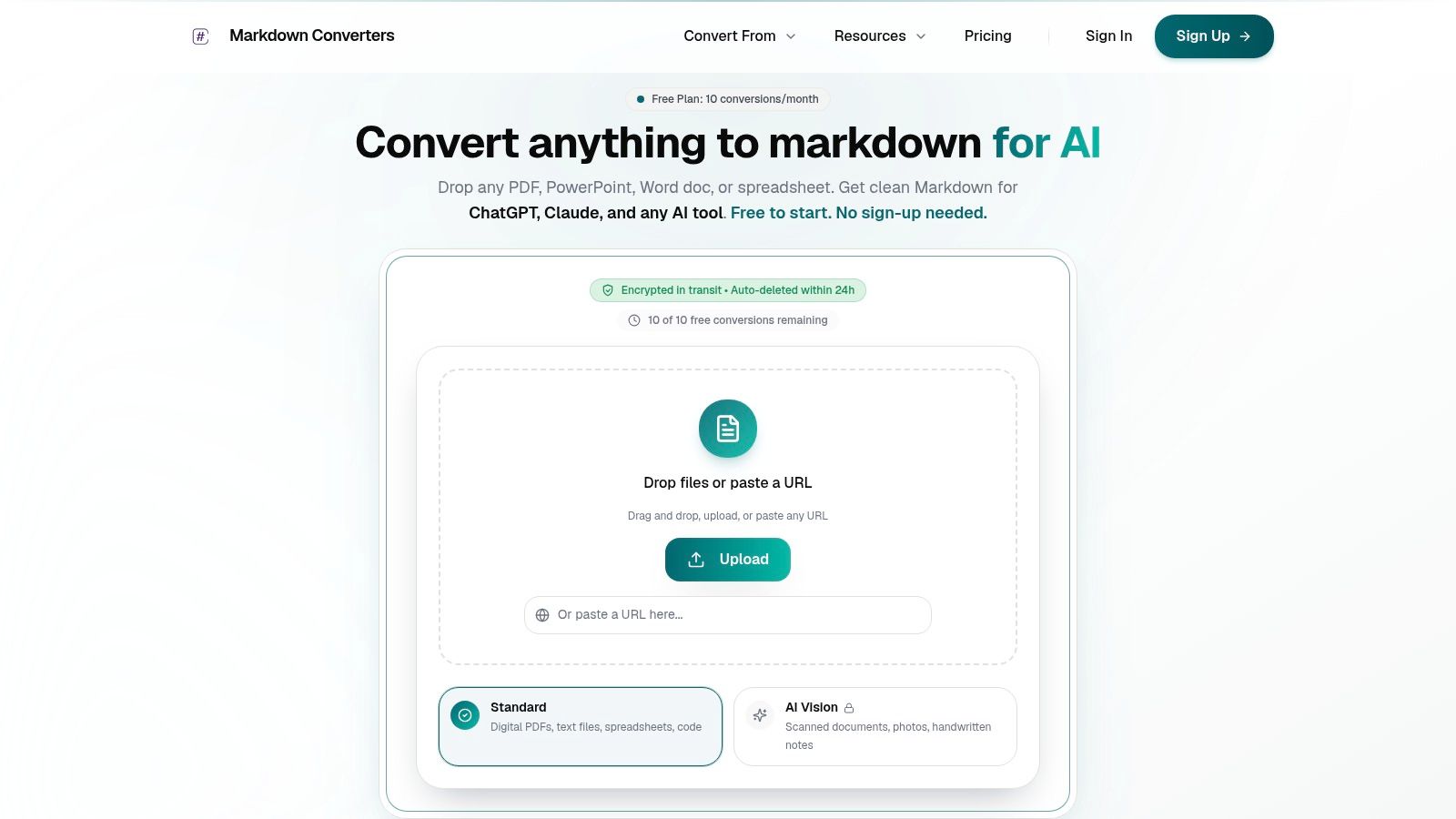
Drag and drop a local CSV
For a file on your machine, the workflow is straightforward:
- Open the CSV conversion tool.
- Drag your
.csvfile into the upload area. - Let the converter parse the file.
- Review the Markdown output before copying or exporting it.
This works best when the file already has a clear header row and a consistent delimiter. You'll usually get a Markdown table immediately, which is enough for quick use in ChatGPT, Claude, or a prototype RAG pipeline.
Paste a CSV URL instead
If the file lives on a public URL, use the URL input instead of downloading it first. That's useful when your source is a recurring export, a shared data endpoint, or a hosted document in a research workflow.
The practical advantage is speed, but there's another benefit. URL-based conversion reduces the small mistakes people make when they manually resave CSVs from Excel or Numbers. Those manual edits often change delimiters, strip leading zeros, or re-encode the file without anyone noticing.
When a CSV already looks “fine” in a spreadsheet, the safest move is still to inspect the Markdown output before ingestion. Rendering hides a lot of structural problems.
What to look for in the output
Don't stop at “it converted.” Check whether it converted correctly.
Use this quick review list:
- Header integrity: Make sure the first row in Markdown reflects actual column names, not a filename, report title, or export timestamp.
- Row alignment: Scan a few rows to confirm values didn't slide under the wrong columns.
- Type preservation: IDs, postal codes, account numbers, and other text-like numerics should still look exactly right.
- Noise removal: Blank rows, duplicated headers, and footnotes should be gone or isolated.
For many business datasets, that's enough. You upload, validate visually, then move the Markdown into a prompt, a knowledge base, or a pre-processing queue.
When the web app is the right choice
The UI route is best when the dataset is moderately sized, you need a result now, and you want human review before embedding. It's also useful for testing whether your CSV issue is in the file itself or in your own ingestion code.
What it won't do by itself is replace engineering discipline. If you're processing recurring exports from multiple systems, the UI should become your validation tool, not your whole pipeline.
Automating Conversions with the REST API
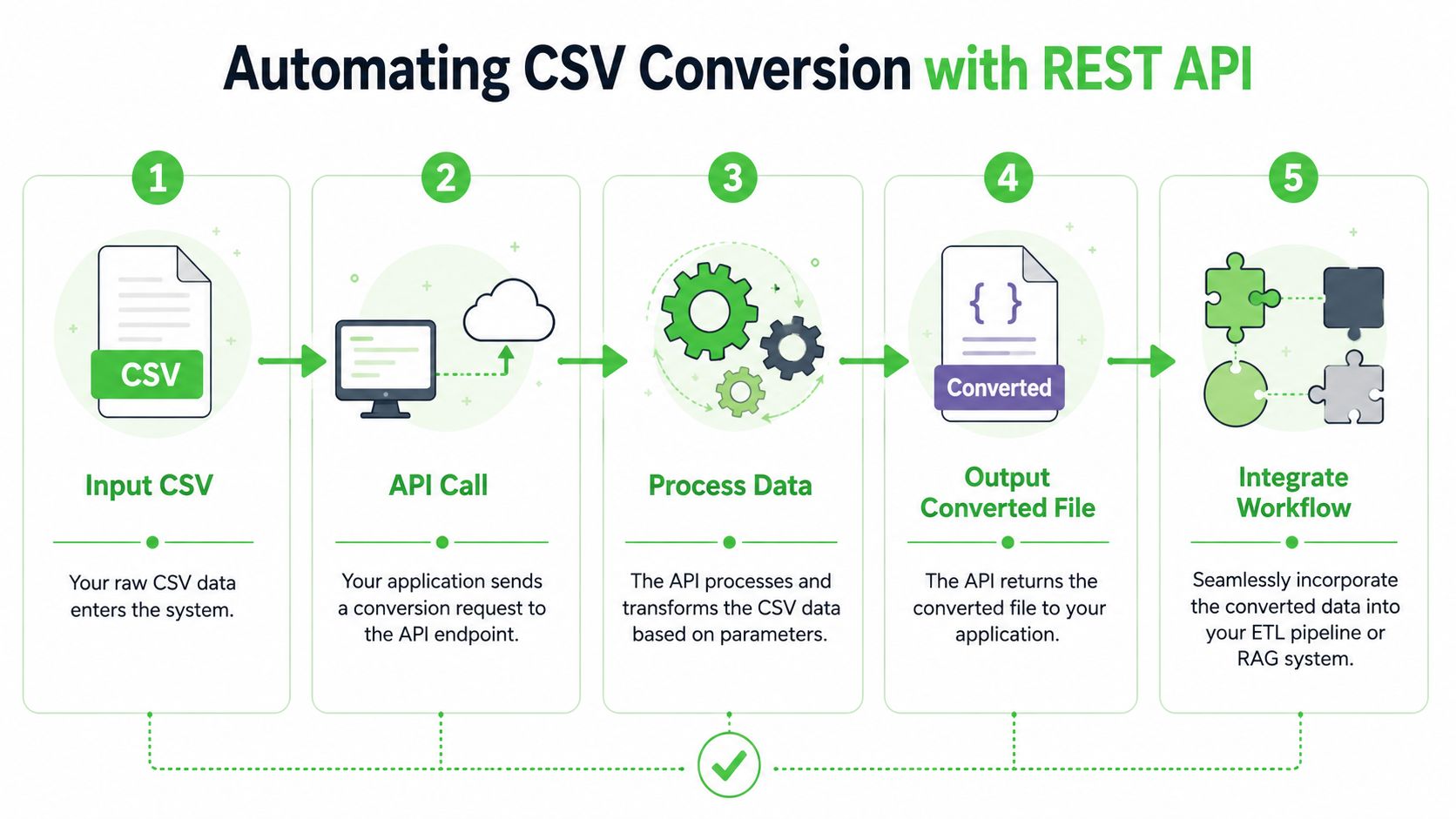
Once conversion becomes a recurring ingestion step, manual upload stops scaling. The better pattern is to treat CSV-to-Markdown as part of ETL. Files arrive, validation runs, conversion happens, Markdown lands in storage, and your retriever consumes only the normalized output.
That's where an API belongs. It gives you one conversion surface for scheduled jobs, internal tools, and RAG ingestion workers.
Use the API when file shape drifts
A big reason teams automate this is that CSV shape drifts over time. A vendor adds two metadata rows. A partner export switches delimiter. Someone prepends the filename to row one. The conversion step has to be resilient to that drift.
For non-standard CSVs with metadata lines or filename headers, a programmatic line-by-line parsing approach that skips metadata rows and dynamically assigns columns is reported to achieve a 98%+ success rate when error handling is embedded (programmatic parsing approach for unstructured CSVs).
That result matches what tends to work in practice. Hard-coded skiprows settings are fragile. Streaming logic with explicit checks is much more tolerant.
A practical Python example
Below is a simple pattern for sending a CSV file to a conversion endpoint and receiving Markdown back. Replace the placeholder URL and token with your actual values from the conversion endpoint documentation.
import requests
from pathlib import Path

API_URL = "https://api.example.com/convert"
API_TOKEN = "YOUR_API_TOKEN"
CSV_PATH = Path("input.csv")
OUTPUT_PATH = Path("output.md")

headers = {
    "Authorization": f"Bearer {API_TOKEN}"
}

with CSV_PATH.open("rb") as f:
    files = {
        "file": (CSV_PATH.name, f, "text/csv")
    }
    data = {
        "output_format": "markdown"
    }

    response = requests.post(API_URL, headers=headers, files=files, data=data, timeout=120)
    response.raise_for_status()

markdown_text = response.text
OUTPUT_PATH.write_text(markdown_text, encoding="utf-8")

print(f"Saved Markdown to {OUTPUT_PATH}")
This pattern is intentionally boring. That's good. Boring ingestion code is easier to monitor and harder to break.
Add normalization before conversion
The conversion request shouldn't be the first thing your job does. Run a lightweight pre-check first.
A production-safe sequence looks like this:
- Validate file presence: Confirm the file exists and isn't empty.
- Inspect the opening lines: Catch metadata rows, export titles, and malformed headers early.
- Identify delimiter and encoding: Don't assume comma and UTF-8 if files come from multiple systems.
- Normalize schema names: Trim whitespace, standardize casing, and make column names explicit.
- Store the Markdown separately: Keep raw CSV and cleaned Markdown as separate artifacts.
Operational advice: Treat the raw CSV as evidence, not as the object you retrieve from.
For truly messy CSVs, parse first and convert second
If the file is known to be irregular, it's worth normalizing with Python before you hit the converter. This is especially true when row one contains a filename or report identifier and the actual table begins later.
import pandas as pd

rows = []
current_geo = None

with open("messy.csv", "r", encoding="utf-8", errors="replace") as f:
    try:
        for line in f:
            line = line.strip()
            if not line:
                continue

            if line.endswith(".csv"):
                current_geo = line.replace(".csv", "")
                continue

            if line.startswith("col1,") or line.startswith("date,"):
                header = line.split(",")
                continue

            values = line.split(",")
            if len(values) == len(header):
                rows.append([current_geo] + values)
    except EOFError:
        pass

df = pd.DataFrame(rows, columns=["Geography"] + header)
df.to_markdown(index=False)
The exact header logic will differ by file, but the pattern is what matters. Read line by line, skip metadata, attach context explicitly, then convert from a known schema.
Troubleshooting Common CSV Conversion Errors
Most CSV problems aren't dramatic. They're subtle. The file opens, the rows appear visible, and nobody notices the corruption until retrieval starts returning impossible answers.
Three issues cause most of the trouble: encoding mismatches, delimiter confusion, and parser failure around quoting.
Encoding and delimiter issues
A large share of CSV import problems come from the file not matching the assumptions of the tool opening it. 68% of CSV import failures in spreadsheet software stem from incorrect encoding or delimiter mismatches, and 42% of enterprise CSV errors involve non-UTF-8 files in global environments (common CSV import problems and their causes).
That matches the usual pattern in multilingual pipelines. A file exported in Europe may use semicolons. Another file from an older system may arrive in a legacy encoding. Both can look normal in one application and fail in another.
Typical symptoms
| Symptom | Likely cause | What to do |
|---|---|---|
é, ñ, or currency symbols look garbled |
Wrong encoding assumption | Open the file in a text editor, identify encoding, then import explicitly |
| Entire row appears in one column | Wrong delimiter | Check whether the file uses semicolons, tabs, or commas |
| Columns shift unpredictably after import | Mixed quoting or delimiter collision | Re-import with explicit delimiter and quote handling |
Leading zeros and type damage
This is the most common spreadsheet-driven corruption I see in legal, finance, and operations exports. Someone double-clicks the CSV, Excel opens it, and identifier columns are auto-cast to numbers. Account 00123 becomes 123. That damage then propagates downstream.
The fix is procedural, not magical:
- Import instead of open: Use an import workflow that lets you define column types.
- Force text for identifier columns: Anything that is an ID should be treated as text unless you have a strong reason otherwise.
- Check the raw file when unsure: If the CSV contains the zeros but the sheet doesn't, the problem happened during import, not export.
A CSV can preserve the right value while your spreadsheet silently displays the wrong one.
Quoting problems that break parsers
CSV parsers expect a consistent relationship between delimiters and quotes. Real exports often violate that expectation. A comma inside a notes field, an unmatched quote in a comment, or a line break inside a cell can split one row into many.
If you see row counts changing after conversion, assume quoting is involved until proven otherwise.
Use this triage sequence:
- Open the raw file in a text editor, not only in a spreadsheet.
- Inspect a broken row and the row before it.
- Look for stray double quotes, embedded commas, or line breaks inside text fields.
- Re-parse with explicit quoting settings, or clean the file before conversion.
The important habit is diagnosis before retry. Re-running the same parser with the same assumptions usually just reproduces the same corruption faster.
Advanced Strategies for RAG and Large Files
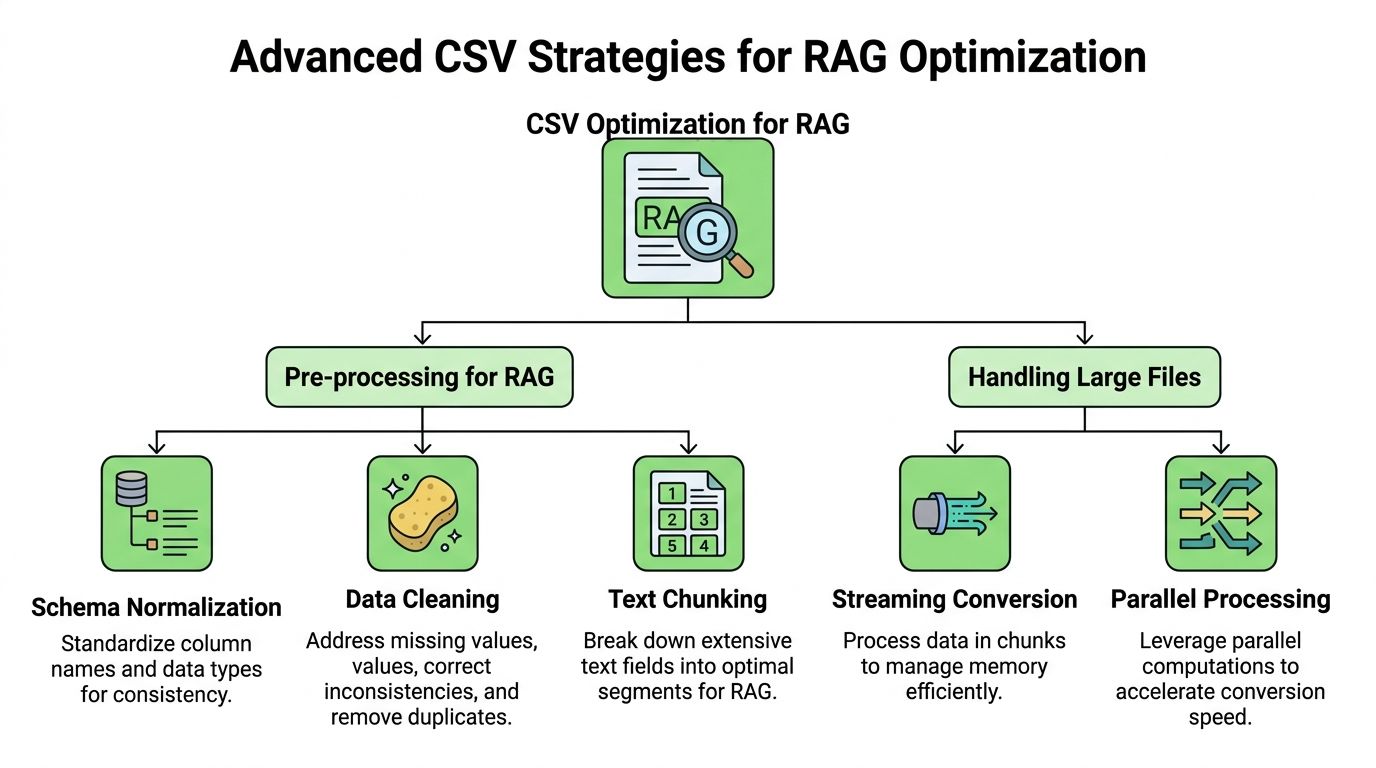
A retrieval pipeline usually fails long before embedding. The breakage starts in document shape. A 200,000 row CSV converted into one Markdown table is hard to chunk, expensive to embed, and noisy to retrieve. The goal is not just conversion. The goal is Markdown that preserves meaning at the unit your retriever can return.
Chunk by retrieval unit, not by spreadsheet shape
A single wide table often mixes multiple ideas into one embedding. That hurts recall. If one row is the thing a user will ask about, chunk by row. If the answer depends on a set of related rows, chunk by group.
Use this rule:
- Row-level chunks for records such as cases, invoices, tickets, products, or patients
- Grouped chunks for time series, regional summaries, or category rollups
- Hybrid chunks when the table matters, but a short prose summary improves searchability
I usually decide chunk shape by reading likely queries first. If the question is "How many open cases are in the north region?", a region-level chunk is enough. If the question is "What happened to case 10428?", row-level chunks are a better fit.
Wrap tables with metadata the model can use
A Markdown table without context is weak retrieval material. Column names help, but they rarely tell the model what the dataset represents, which system produced it, or what time window it covers.
A better pattern is to add lightweight metadata above the table:
# Open cases by region
Source system: legal_ops_export
Reporting period: 2026 Q1

| region | open_cases |
|---|---|
| north | 12 |
That structure gives the embedding model terms like legal_ops_export and 2026 Q1 that may appear in user queries. It also creates cleaner chunk boundaries than a raw table dump.
Large-file handling should be streaming-first
Large CSVs punish naive conversion code. Reading the full file into memory, normalizing every field, and then writing one final Markdown artifact is where jobs stall or crash.
Stream rows in chunks instead. Validate each batch. Write intermediate Markdown files or NDJSON records as you go. This makes three things easier: memory stays predictable, bad rows are easier to isolate, and retries only rerun the failed portion.
For Python pipelines, that usually means pandas.read_csv(..., chunksize=...) for convenience or the built-in csv module for tighter control over parsing and memory.
import pandas as pd
from pathlib import Path

source = "large_export.csv"
out_dir = Path("md_chunks")
out_dir.mkdir(exist_ok=True)

for i, chunk in enumerate(pd.read_csv(source, chunksize=5000)):
    chunk = chunk.fillna("")
    lines = []

    for _, row in chunk.iterrows():
        lines.append(f"## Case {row['case_id']}")
        lines.append(f"Region: {row['region']}")
        lines.append(f"Status: {row['status']}")
        lines.append(f"Summary: {row['summary']}")
        lines.append("")

    (out_dir / f"chunk_{i:04d}.md").write_text("\n".join(lines), encoding="utf-8")
That output is easier to embed than one monolithic table, and it fails in smaller, recoverable pieces.
Exclude columns that add tokens but not retrieval value
Source exports often contain fields that matter to the application and do nothing for search. Carrying them into Markdown increases token count and muddies embeddings.
Common examples:
- Operational metadata: sync timestamps, retry counts, ETL run IDs
- Display helpers: spreadsheet formulas, color labels, sort keys
- Machine IDs with no query value: internal hashes or opaque foreign keys
- Sparse notes fields full of boilerplate: repeated disclaimers, HTML fragments, or template text
Keep columns that help answer a user question. Drop columns that only helped the source system run.
Normalize repeated text before conversion
Large exports often repeat the same disclaimer, footer, or template sentence in every row. That creates avoidable token waste and can dominate similarity search. Strip repeated boilerplate before you generate Markdown, or move it to one dataset-level note if it matters.
This also applies to HTML blobs copied into CSV cells. Remove tags, collapse whitespace, and decide whether the field belongs in retrieval at all. A noisy description_html column can easily become the largest part of the chunk without adding useful evidence.
Preserve one stable schema for downstream chunking
RAG pipelines get brittle when conversions produce different field names across files. acct_id in one export, account_id in another, and Account ID in a third will create messy templates and inconsistent prompts.
Standardize headers before Markdown generation. Standardize date formats too. A stable schema makes it easier to reuse chunk templates, metadata filters, and evaluation sets across datasets. That consistency matters more at scale than any one conversion trick.
Open cases by region
Source system: legal_ops_export
Reporting period: 2026 Q1
| region | open_cases |
|---|---|
| north | 12 |
That context creates a much stronger anchor for retrieval and reranking.

### Large-file handling should be streaming-first

When files get large, avoid loading everything into memory just to produce one Markdown artifact. Stream, validate in chunks, and write intermediate outputs. This reduces failure risk and makes bad rows easier to isolate.

For AI-focused CSV transformation, pre-load validation, type normalization, delimiter standardization, and deduplication matter for more than cleanliness. Following those practices can yield **60–70% token savings**, while skipping them can cause **25–30% token inflation** due to unstructured noise ([CSV transformation best practices for AI workflows](https://www.topetl.com/blog/top-10-best-practices-for-csv-data-transformation)).

That's why selective exclusion matters. If a column is irrelevant to retrieval, don't carry it into Markdown.

#### Columns that usually deserve exclusion

- **Internal audit fields:** Import timestamps, row hashes, sync IDs, and retry counts.
- **Display-only formatting fields:** Color labels, spreadsheet formulas rendered as text, or helper columns.
- **High-cardinality junk:** Machine-generated identifiers with no retrieval value.

> **Retrieval heuristic:** Keep columns that help a model answer a question. Drop columns that only helped a source system operate.

### Deduplication improves retrieval clarity

Near-duplicate rows create noisy neighbors in a vector index. If your export contains slight textual variants of the same record, retrieval can anchor on the wrong copy. Deduplication before embedding is often worth more than aggressive prompt engineering later.

I'd also normalize dates into ISO 8601 and standardize column names before Markdown generation. That gives you consistency across snapshots and reduces the chance that the same concept gets embedded under slightly different labels.

When converting CSV files for LLM workloads, this is the part most tutorials miss. **Conversion quality is not just about readable output. It's about retrieval behavior after indexing.**

## Frequently Asked Questions

### Should I convert every CSV to Markdown before using it with an LLM

For most RAG and prompt-based workflows, yes. Raw CSV is harder to chunk, harder to inspect, and easier to corrupt during preprocessing. Markdown gives you readable structure and makes errors visible earlier.

### What should I do with very large CSV files

Stream them instead of loading them whole when possible. Normalize schema first, then split the output into retrieval-sized Markdown documents. For large datasets, row groups or topic-based chunks usually work better than one massive table.

### Can I just use pandas and skip a dedicated conversion service

You can, and for controlled internal data that may be enough. Pandas is strong when you already know the file shape, delimiter, encoding, and schema. Dedicated conversion services become more useful when inputs vary, non-technical teammates need the same output, or you want one consistent pipeline across many file types.

### Why does my CSV look right in Excel but wrong after conversion

Because Excel display isn't the same thing as raw file integrity. Spreadsheet apps often hide encoding issues, auto-convert data types, and strip formatting from identifiers. Always inspect the raw file or the converted Markdown if the data will feed a model.

### What's the safest way to preserve IDs and account numbers

Import those columns as text. Don't let spreadsheet software guess. If an identifier matters for compliance, linking, or retrieval, treat it as a string from the start.

### Should each row become its own chunk in RAG

Sometimes. If a row is a complete record, row-level chunking works well. If a row only makes sense with surrounding rows or shared headers, group them into small logical sections and keep the contextual heading above the table.

### How do I know whether the conversion succeeded

Don't rely on visual appearance alone. Check header accuracy, row alignment, type preservation, missing values, and whether the final Markdown still reflects the original meaning of the dataset.

---

If you need a faster path from messy files to AI-ready output, [Markdown Converters](https://markdownconverters.com) is worth trying. It handles CSV and many other formats, returns structured Markdown that fits RAG workflows, and gives you both a web interface for quick jobs and an API for automated pipelines.
Related Articles
Markdown Reader Windows: Best Tools for 2026
Markdown reader windows - Find the best markdown reader for Windows in 2026. Compare top tools to open, edit, and preview Markdown files effortlessly
Read articleHow to Download a Folder from Dropbox Without Losing Your
Learn how to download a folder from Dropbox quickly and easily, with step-by-step instructions for 2026.
Read articleOCR Handwriting Recognition: A Practical Guide for 2026
Unlock the power of your handwritten data. Our guide to OCR handwriting recognition covers methods, metrics, and how to integrate it into RAG workflows.
Read article