
OCR Handwriting Recognition: A Practical Guide for 2026
Unlock the power of your handwritten data. Our guide to OCR handwriting recognition covers methods, metrics, and how to integrate it into RAG workflows.
You've probably got a stack of handwritten notes, scanned forms, or old meeting pages sitting somewhere in your workflow right now, and the problem isn't storing them. The problem is making them usable. OCR handwriting recognition turns those static pages into text that people can search, copy, audit, and feed into tools that do work with the content.
That sounds straightforward until you try it on real handwriting. A note with slanted cursive, a faded archive scan, or a photo of a whiteboard can break a basic OCR engine quickly. Handwriting recognition became difficult for a simple reason, static images don't expose clean character boundaries, so systems have to infer meaning from shape, spacing, and context, not just detect letters one by one as described in the historical overview.
The good news is that the field has moved a long way from brittle template matching. Deep-learning approaches using CNNs and RNNs pushed some mature systems close to 99% accuracy by the 2010s, but the practical lesson is more important than the number, modern handwriting OCR is a pipeline, not a magic trick historically documented here. If you understand the pipeline, you can judge tools better and build workflows that survive contact with messy documents.
From Scribbled Notes to Searchable Data
A records team opens a box of old intake forms, and every page contains valuable information trapped in ink. A product manager sees the same problem in a different form, handwritten workshop notes from three teams, all inconsistent, all hard to search, all too easy to ignore once the meeting ends. OCR handwriting recognition exists to turn that pile of static pages into digital text that can be searched, summarized, routed, and reused.
What changes when handwriting becomes text
The significant benefit isn't solely digitization. Once handwriting is converted into text, legal teams can search for names and dates, healthcare teams can find handwritten annotations faster, and government archives can make scanned material easier to index and review. That matters because handwritten scans and forms are still common in those environments, and the shift from brittle template matching to statistical and neural methods enabled much broader deployment as noted in the historical progression.
Modern handwriting OCR is often called HTR, short for Handwritten Text Recognition. In plain English, it means software that reads handwriting from images, not from live pen strokes. That distinction matters because a scanned page gives the system only pixels, not the original motion of the pen.
Practical rule: If the document is already a static image, plan for a harder problem than printed-text OCR. The model has to infer structure, spacing, and context from a frozen snapshot.
This is why the field took so long to mature. Early commercial systems in the mid-1990s were mostly confined to standardized forms with constrained handwriting historical reference. General handwritten material, cursive notes, faded scans, and mixed layouts were a different class of problem.
Why this still matters in practice
That old constraint is still visible in modern projects. A tool can look impressive on neat samples and then struggle on a box of real documents. The difference between a demo and production is usually not the model name, it's the variability in the input. Handwriting OCR is a bridge between physical records and digital systems, but it only works when the bridge is built for the documents you have.
A handwriting OCR tool that looks perfect on clean samples can still fail on the notes your team needs most.
How Handwriting OCR Actually Works
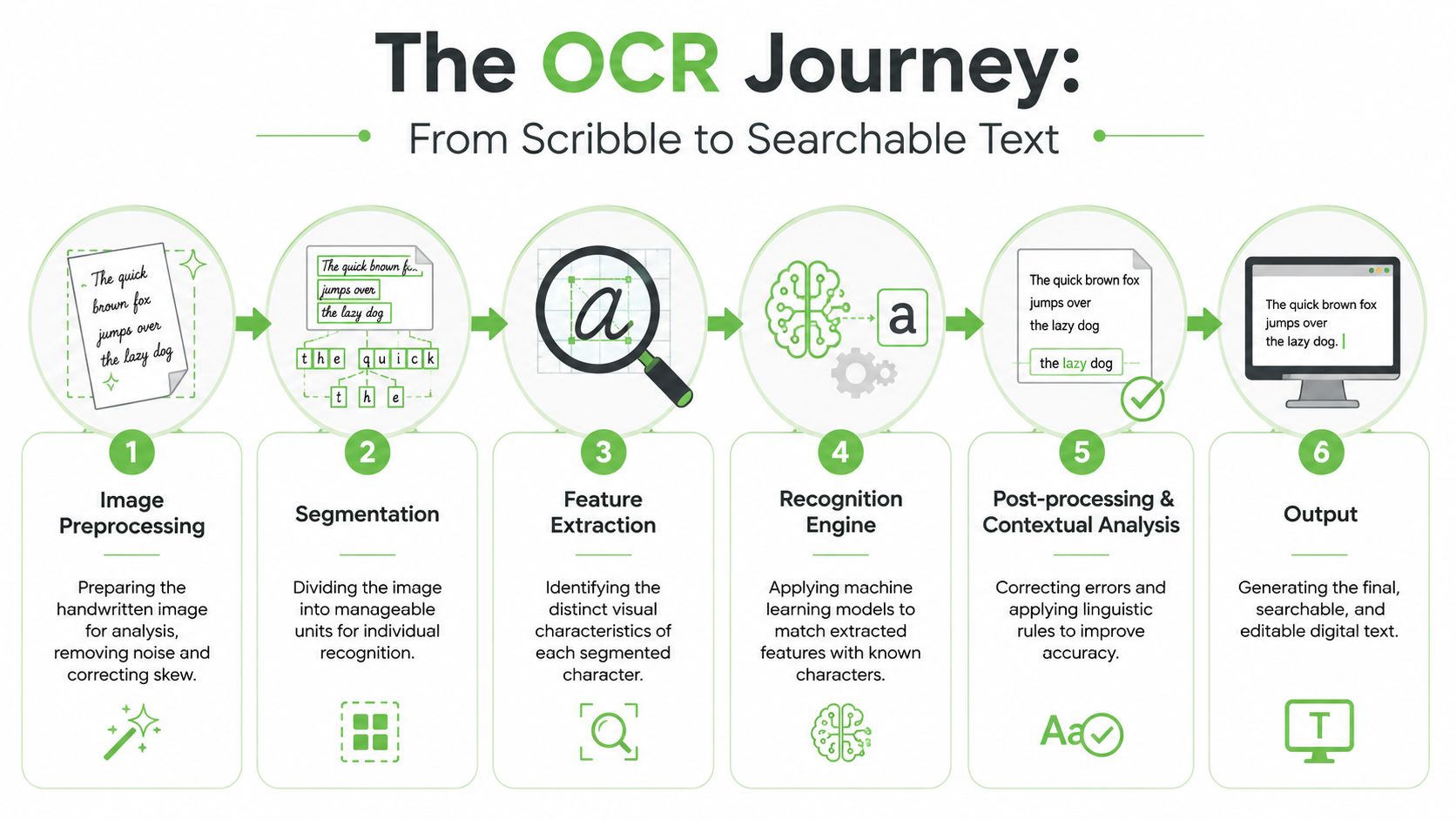
A useful way to think about handwriting OCR is as an archivist's workflow. The archivist doesn't read a page in one magical move. First, the page is cleaned up. Then the text is deciphered. Then the transcription is checked against context. OCR systems do something similar, even when they use modern neural networks.
Preprocessing cleans the page first
Before recognition starts, the image often needs cleanup. Research on handwriting OCR stresses that skew correction, noise removal, and binarization can substantially improve recognition because they reduce ambiguity before transcription begins preprocessing guidance. If a scan is tilted, speckled, or too gray, the model wastes effort interpreting image defects as if they were part of the writing.
That's why preprocessing isn't cosmetic. It changes what the recognizer sees. A simple example is a slightly rotated notebook page, the handwriting may be fine, but the angle makes line detection harder and can trigger downstream errors. Another example is a faded photocopy with background noise, where cleaning the image can make letters stand out enough for the model to separate them from the paper texture.
Recognition makes the best guess
The recognition engine turns visual patterns into text. In earlier systems, this was often framed as character identification, but modern handwriting OCR works better when treated as a vision-and-language problem. Transformer-based models and multimodal systems can use surrounding context to resolve ambiguous glyphs, which is why context matters so much in handwritten material multimodal guidance.
That context is the difference between a lone squiggle and a likely word. A model reading “Mon” next to a date or a schedule item has more clues than one staring at a single letter in isolation. The best systems don't just detect shapes, they combine shape with language patterns.
Postprocessing repairs obvious mistakes
Even strong recognition output needs cleanup. Postprocessing can correct common errors, apply dictionary rules, and preserve document structure so the result is more useful than raw text. In archival and enterprise workflows, layout-aware logic becomes critical, because a page with headings, notes, and tables is not the same thing as a plain paragraph.
Markdown Converters' OCR-to-Markdown guide is a useful example of that idea in practice, because the output format matters as much as the transcription itself. If the structure survives, downstream systems have a far easier job.
Comparing Key Handwriting Recognition Approaches
Handwriting recognition choices are easier to understand when you separate two questions. The first is whether the system reads live pen strokes or static images. The second is whether the engine is a classic OCR pipeline or a modern multimodal model that reasons over visual context. Those are different decisions, and teams often blur them together.
Online and offline recognition solve different problems
Online recognition captures the act of writing, usually through a pen device or tablet. It has access to stroke order, timing, and motion, which makes its job easier. Offline recognition works from a scanned page or photo, so it has to infer everything from pixels. For most enterprise and archive use cases, offline recognition is the primary problem.
Classic OCR and deep learning are not equivalent
Older systems relied on hand-engineered features and narrower assumptions about shape. They can still work in controlled settings, but they're fragile when handwriting varies widely. Modern systems lean on deep learning, especially CNNs, RNNs, and transformer-based multimodal models, because they handle messy layout and ambiguous writing better when context is available vision-and-language framing.
| Comparison of Handwriting OCR Methods | Input Data | Key Technology | Best For |
|---|---|---|---|
| Online recognition | Pen strokes, timing, motion | Sequence modeling on live handwriting data | Note-taking apps, stylus-based capture |
| Offline recognition | Scanned pages, photos, PDFs | CNNs, RNNs, transformers, multimodal OCR | Archives, forms, meeting notes, historical documents |
| Classic OCR pipelines | Static images | Hand-crafted features and older sequence models | Controlled forms and cleaner layouts |
| Deep learning OCR | Static images plus context | Vision-language models and postprocessing | Real-world handwriting with varied style and layout |
The most useful distinction for product work is not academic purity, it's its capacity to handle diverse and challenging inputs. If the writing comes from photos of notebooks, old forms, or degraded scans, deep-learning OCR is usually the more practical place to start. If the input is structured and consistent, lighter pipelines can still be efficient.
Decision rule: Match the engine to the document, not to the marketing claim. A model that looks strong on benchmark pages can still underperform on your own handwriting mix.
That matters even more when documents contain tables, annotations, or mixed printed and handwritten sections. A system built only for character recognition can miss the structure that makes the content useful later.
Measuring Success and Evaluating Accuracy
People often ask whether a handwriting OCR tool is “accurate.” That question sounds reasonable, but it hides the core issue. Accuracy on what document set, with what handwriting, and for what downstream task? A transcription model that looks acceptable in a demo can still create too much cleanup work for production.
CER and WER tell different stories
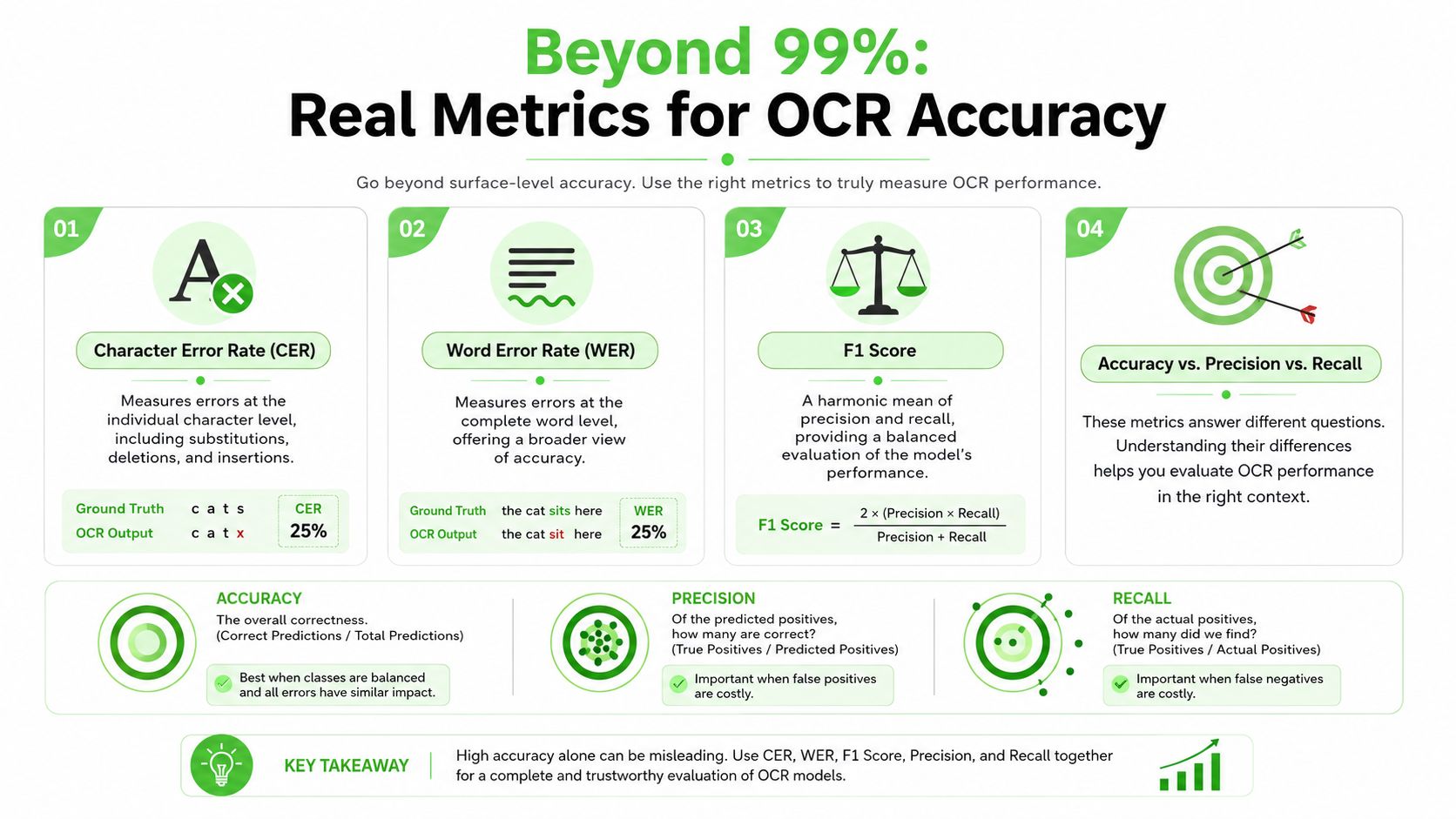
Character Error Rate, or CER, measures mistakes at the character level. Word Error Rate, or WER, measures mistakes at the word level. The simplest analogy is a spelling test, CER counts letter-level damage, while WER tells you whether the actual word survived intact.
That distinction matters because a single misplaced character might be tolerable in one workflow and disastrous in another. A product team searching notes for a person's name usually cares more about whether the whole word is right. A digitized archive team may care about both.
A 2023 historical-document workflow reported 4.52% CER and 13.57% WER on its validation dataset, which is a useful benchmark because the numbers come from a hard handwritten-document scenario rather than a clean printed corpus benchmark results. Single-digit CER is a strong sign on difficult material, but WER often tells the more practical story for business use.
Ask for your own evaluation set
The more important question is how a system behaves on your documents. Practitioner guidance stresses that handwriting OCR performance varies sharply by handwriting style, paper quality, and document type, so teams should benchmark with their own samples and track word-error rates instead of trusting generic claims evaluation advice. That advice is especially relevant when your input mix includes cursive notes, degraded scans, and forms in the same pipeline.
Improving OCR accuracy starts with the right test set, because a model that handles one document family well may fail unnoticed on another. For product work, that means assembling a representative sample before you compare vendors.
Common Failure Modes and Best Practices
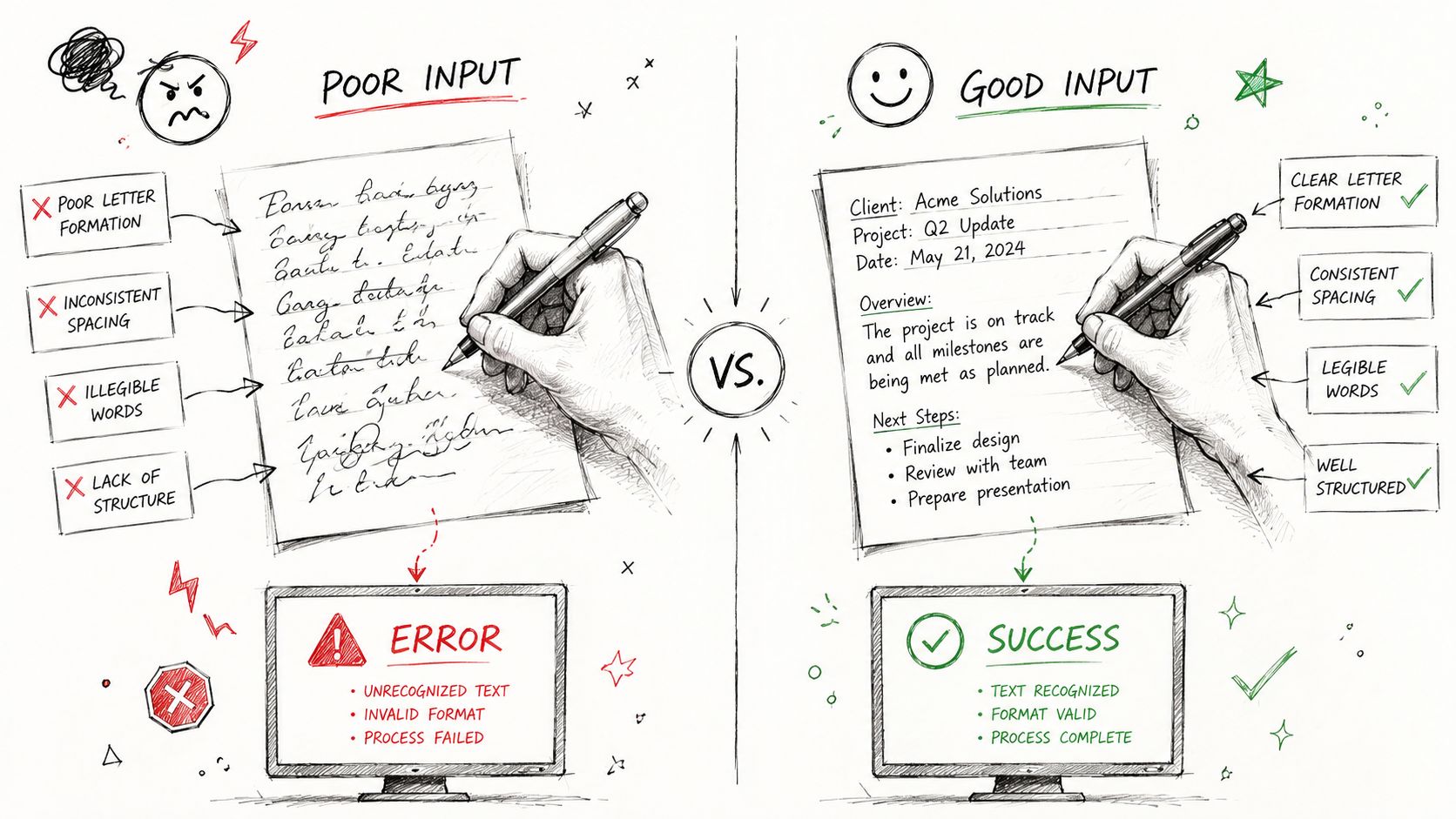
The same engine that handles one neat page can struggle badly on another that looks similar to a human eye. Handwriting OCR fails for predictable reasons, and most of them trace back to the input, not the model name. If you treat the input as the main variable, the failure modes become much easier to manage.
The usual trouble spots
Low-resolution photos blur small strokes. Poor contrast hides ink against paper. Unusual handwriting styles confuse the recognizer. Complex layouts, such as tables, side notes, or crossed-out annotations, create structure problems that pure text extraction can't solve cleanly.
That's why practical performance is highly input-dependent. Research on handwriting OCR stresses that preprocessing like skew correction, noise removal, and binarization can substantially improve recognition by reducing the variability and ambiguity that cause downstream transcription errors preprocessing evidence.
Best practices that actually help
- Capture cleaner source images: A sharper scan or photo is easier to process than a compressed image taken at an angle.
- Normalize the page first: Skew correction and noise removal can help the recognizer see the letters rather than the artifacts around them.
- Test mixed document types separately: Forms, cursive notes, and archival scans can behave very differently, so don't average them together too early.
- Use confidence scores and review routing: A low-confidence transcription should be sent to a human instead of trusted blindly.
Those last two points matter a lot in production. A system that marks uncertainty is more useful than one that outputs text with no signal about quality.
Production rule: If the OCR output will feed compliance, search, or automation, route uncertain lines to review instead of treating every transcription as final.
The same evaluation mindset applies to tool selection. A fast recognizer with weak structure handling can be the wrong choice if your documents have tables or margin notes. In those cases, structured outputs matter more than a raw text dump because the output has to survive downstream parsing.
Integrating OCR into Modern AI Workflows like RAG
A handwritten page is only useful to an AI system if the system can retrieve the right part later. Raw text alone often isn't enough. If headings, lists, tables, and paragraph boundaries get flattened, a retrieval pipeline has to guess where one idea ends and the next begins. That creates brittle chunking, weak grounding, and harder answers from the model downstream.
Structured output is the missing layer
The power of Markdown extends beyond a simple formatting preference. In a RAG pipeline, structured Markdown preserves headings, lists, and tables in a way that's much easier to chunk, index, and retrieve than a flat transcription. The model gets cleaner boundaries, and the retrieval layer gets stronger anchors.
That matters for handwritten notes just as much as for scanned PDFs. A meeting page with an agenda, action items, and a table of decisions should not be collapsed into one text blob. If it is, downstream search and retrieval become noisy. OCR for scanned documents is relevant here because the same ingestion logic applies when the source is handwritten rather than typed.
Why raw OCR often isn't enough
LLMs do better when the document structure survives the conversion step. That is one reason modern OCR should be thought of as part of an end-to-end knowledge pipeline, not as a standalone transcription tool. When output is token-efficient and well structured, the retrieval system spends less context on noise and more on meaning.
Here's a practical example. A handwritten workshop note can be converted into headings for topics, bullet lists for action items, and a small table for owners and dates. That structure makes it much easier for a chat assistant to answer questions like “What did we decide?” or “Who owns the follow-up?” than a plain paragraph dump would.
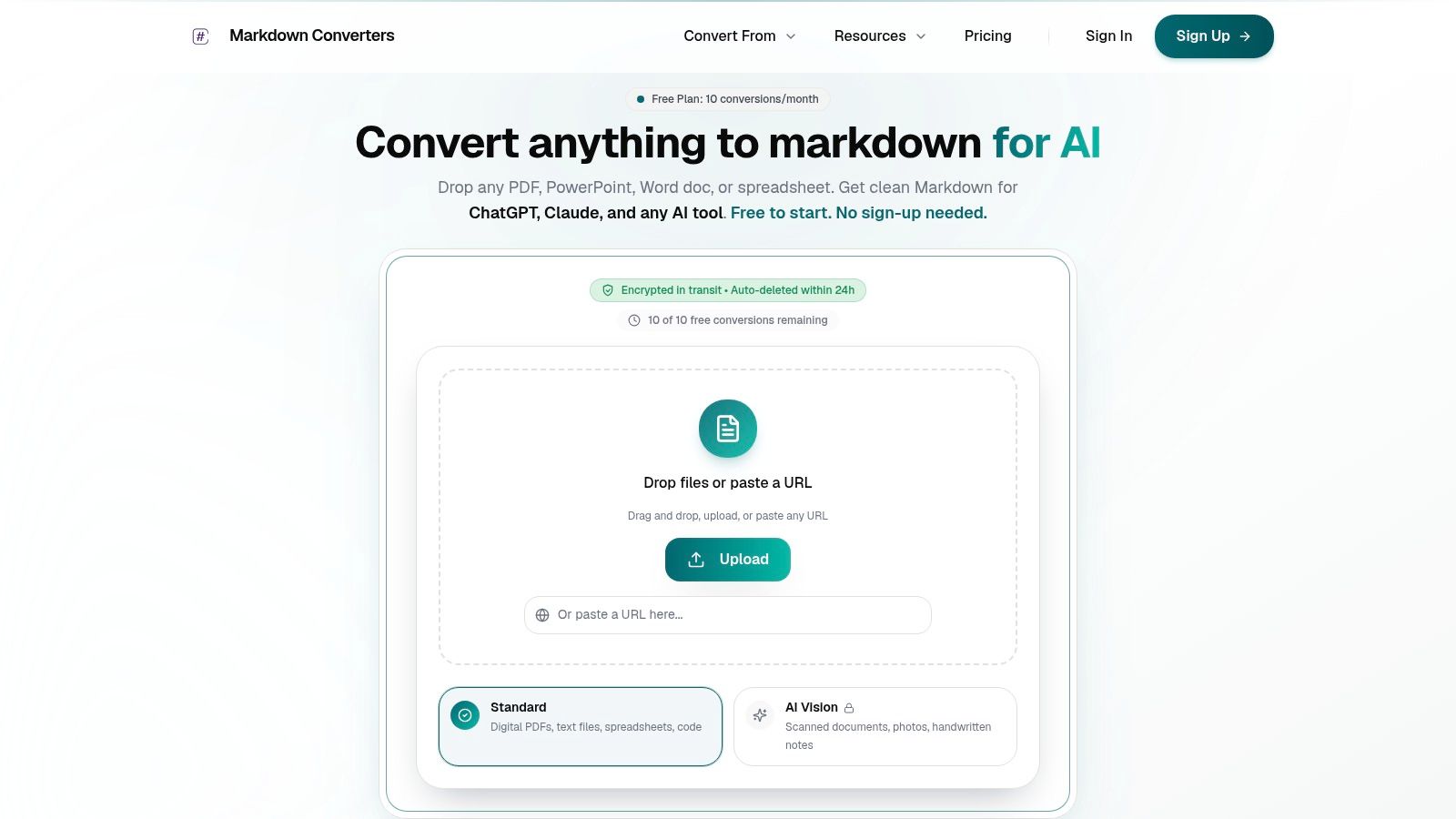
The product angle is simple. Markdown Converters is one option that reads handwritten notes and returns structured Markdown, which fits a RAG pipeline more naturally than raw OCR text. That kind of output is especially useful when the goal isn't just transcription, but reuse.
Later in the workflow, the same structure helps when teams compare notes across documents, build searchable archives, or create agent loops that need stable document chunks. The OCR step stops being a dead end and becomes the front door to a larger AI system.
If you want a related example of how extraction can move from images into AI-friendly formats, the discussion around handwriting-to-Markdown workflows shows why structure is so important for downstream retrieval. The central idea is the same, OCR output that preserves meaning is far easier to use than OCR output that only preserves characters.
The Future of Unlocking Handwritten Knowledge
Handwriting OCR has moved from a narrow recognition problem to a broader information problem. The key lesson is that success depends on the full path from source image to usable output. If the input is messy, the transcription will suffer. If the model ignores context, ambiguity will remain. If the output is flattened, downstream AI systems lose the structure they need.
The strongest systems now behave less like isolated OCR tools and more like document intelligence layers. They clean the page, recognize the writing, preserve structure, and hand off data in a format that another system can effectively use. That is the fundamental shift, from digitizing ink to making knowledge available.
Multimodal AI is pushing that shift further by treating handwriting as part of a larger vision-and-language task. That doesn't remove the hard parts. It just gives teams better tools for handling them. The practical goal for 2026 is not “perfect OCR,” it's reliable extraction, clear confidence handling, and structured output that fits the rest of the stack.
A CTA for Markdown Converters. If you're turning handwritten notes, scans, or mixed-format documents into something an LLM or RAG pipeline can use, try converting a sample page and compare the Markdown output against your current OCR flow.
Related Articles
10 Best MD Editors for Developers & Writers in 2026
Find the best MD editor for any workflow. Our 2026 guide reviews 10 top tools for developers, writers, and RAG pipelines, from Obsidian to Typora.
Read articleMarkdown Reader Windows: Best Tools for 2026
Markdown reader windows - Find the best markdown reader for Windows in 2026. Compare top tools to open, edit, and preview Markdown files effortlessly
Read articleHow to Download a Folder from Dropbox Without Losing Your
Learn how to download a folder from Dropbox quickly and easily, with step-by-step instructions for 2026.
Read article