
How to Integrate APIs: A Step-by-Step Guide for 2026
Learn how to integrate APIs into your applications with our 2026 guide. Master auth, requests, error handling, & real-world AI workflows with code examples.

You're probably in one of two situations right now. Either you've got an API key and a vague sense that this should be straightforward, or you've already made a few requests and discovered that “it works on my laptop” isn't the same as a production integration.
A lot of guides on how to integrate APIs stop at the first successful request. That's useful for five minutes. It doesn't help much when you're building an AI workflow that has to ingest PDFs, DOCX files, web pages, and scanned documents without dropping data or failing undetected halfway through a batch job.
A better example is a document conversion pipeline for retrieval-augmented generation. Your model doesn't want a raw PDF. It wants structured, predictable text. Clean Markdown, preserved headings, sane tables, and output you can chunk without inventing your own parser. That's where API integration stops being a generic backend skill and turns into a core engineering capability.
Why API Integration Is a Core Skill for Modern AI
An ML engineer gets handed a folder full of knowledge base documents and asked to build a RAG system. The data looks usable at first. Then you open it. Half the files are PDFs with broken line wraps, some are DOCX exports with inconsistent heading levels, and a few are scans that need OCR before they're useful at all.
That's the point where API integration becomes the difference between a prototype and a working system. Your LLM stack can only reason over content that has already been normalized, extracted, and made predictable. APIs are the glue between those stages. They connect storage, conversion, OCR, chunking, embedding, and retrieval into one pipeline that can run repeatedly without manual cleanup.
The broader shift is hard to ignore. The global API management market is growing at a 28% CAGR, which reflects how central APIs have become to enterprise integration and automation, according to API management market statistics. In practice, that means more of your software work is really orchestration work. You aren't just writing app logic. You're coordinating services with different contracts, limits, and failure modes.
APIs are where AI workflows become operational
A RAG pipeline is a good example because every weak assumption shows up fast:
- Input variation breaks naive scripts. A clean HTML page and a scanned PDF need different preprocessing paths.
- Structure matters. If headings, lists, and tables collapse into a text blob, retrieval quality drops.
- Automation multiplies small mistakes. One bad parser is annoying. One bad parser inside a nightly ingestion job is expensive.
Practical rule: If an AI workflow depends on external content, the integration layer is part of the model system, not a separate plumbing task.
When engineers ask how to integrate APIs, they usually mean “how do I send requests?” However, the core question is broader. How do you connect one service to another in a way that survives messy inputs, changing schemas, and a backlog full of edge cases? That's the skill.
The Pre-Integration Checklist
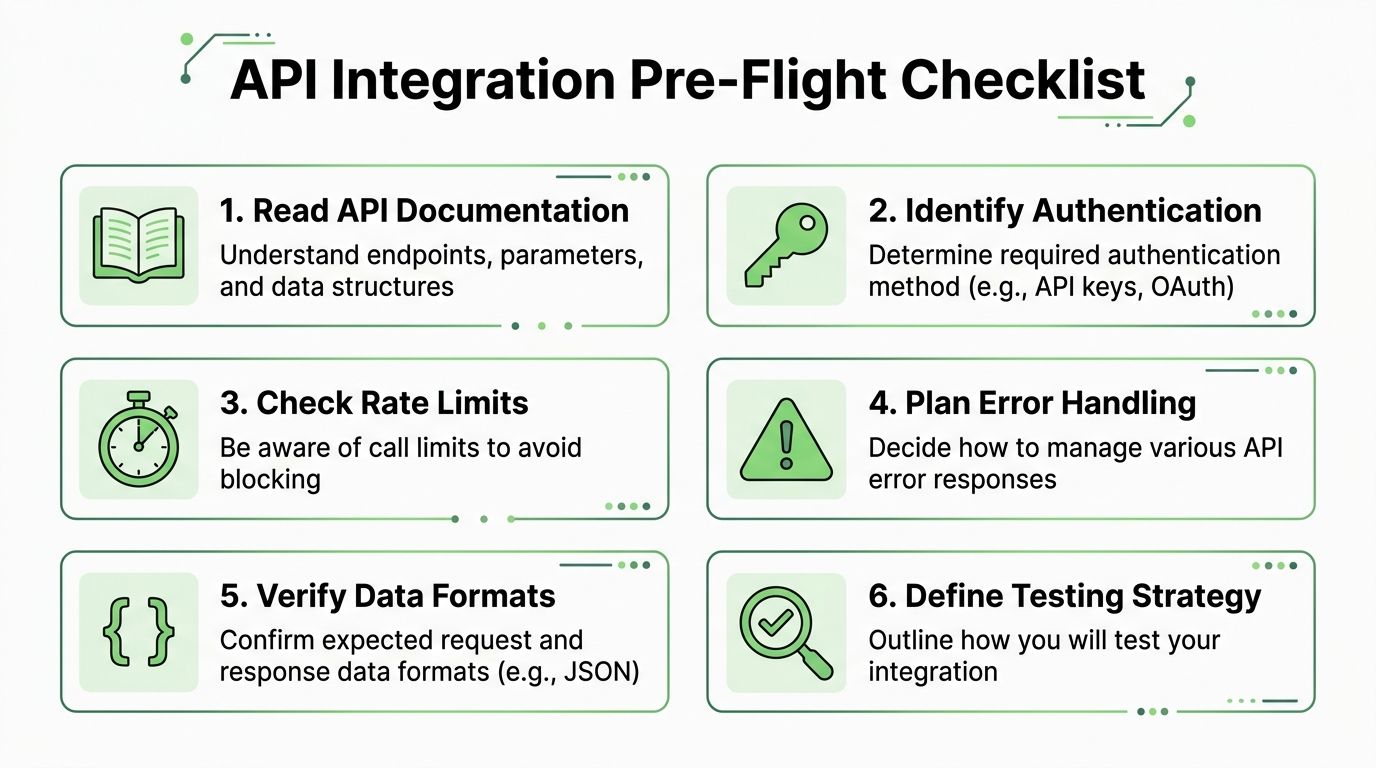
The fastest way to waste a day is to code before you know the contract. Most integration problems aren't caused by obscure bugs. They come from missing one detail in the docs, using the wrong auth header, assuming a response shape, or discovering rate limits only after the batch job starts failing.
Read the docs like an engineer, not a shopper
Don't skim for the happy-path example and jump to coding. Read for operational details.
Start with these questions:
What is the base URL and versioning pattern?
You need to know whether versioning lives in the path, headers, or both.Which endpoints matter for the first milestone?
For a document conversion flow, that's usually one auth endpoint pattern, one conversion endpoint, and one status or retrieval endpoint if processing is asynchronous.What does authentication require?
“Uses API keys” isn't enough. You need the exact header name, whether the key is prefixed, and whether test and production credentials behave differently.What are the request and response schemas?
Check required fields, optional fields, MIME expectations, and whether output always arrives in the same JSON shape.How does the API report failure?
If the provider uses machine-readable error codes, your code can branch intelligently instead of matching strings.
Pick tools that reduce ambiguity
For first contact with an API, use tools that make the wire format obvious.
A practical stack looks like this:
| Tool | Best use | Why it helps |
|---|---|---|
curl |
Fast auth and header checks | Shows the raw request shape |
| Postman | Manual endpoint exploration | Good for storing environments and comparing responses |
Python requests |
Batch jobs, ETL, quick scripts | Minimal ceremony |
Node.js with axios or native fetch |
Services and app backends | Fits event-driven apps well |
A few habits save real time:
- Create a minimal test payload first. Don't start with the largest file in the folder.
- Store secrets in environment variables. Hardcoded keys leak into logs, screenshots, and git history.
- Write down expected success and failure cases. You'll need them again when you automate tests.
Most integrations don't fail because HTTP is hard. They fail because the engineer made two or three unchecked assumptions before the first request.
For document conversion work, also verify what “done” means before you write code. Are you expecting plain text, structured Markdown, OCR output, metadata, warnings, or all of them? If you don't define that upfront, you'll build the wrong parser and discover it only after downstream chunking starts behaving strangely.
Mastering Authentication and Your First Request
Authentication is where many integrations stall. Not because it's conceptually difficult, but because small mistakes look identical from the outside. Wrong header name, expired token, malformed bearer prefix, environment mismatch. They all feel like “the API doesn't work.”
By 2026, more than 30% of the increase in API demand is projected to come from AI tools using LLMs, according to this API trends analysis. That matters because AI-native systems make a lot of service-to-service calls. Clean authentication handling isn't just setup work anymore. It's part of operating AI workflows safely.
Start with the simplest authentication path
Many APIs begin with one of these patterns:
- API key in a header
- Bearer token
- OAuth
- Signed requests
If you're integrating a conversion API into an internal pipeline, an API key in a header is usually the easiest starting point. OAuth is common when users grant access to their own third-party accounts, but it adds token refresh logic and more moving parts.
For a practical auth reference, the Markdown Converters authentication docs are the kind of page you want open while testing, because the exact header shape matters more than any generic explanation.
If you want another concise reference for getting the basics right before building a larger client, DocuWriter.ai's quick start is a useful companion because it focuses on the sequence that gets you from credentials to a successful call with minimal ceremony.
Make one small request first
Don't begin with file upload logic. Begin with a lightweight authenticated request that proves four things: your key is valid, your base URL is correct, your headers are correct, and your environment is wired properly.
A curl example:
curl -X GET "https://api.markdownconverters.com/v1/health" \
  -H "Authorization: Bearer $MARKDOWN_CONVERTERS_API_KEY" \
  -H "Accept: application/json"
A Python example with requests:
import os
import requests

api_key = os.environ["MARKDOWN_CONVERTERS_API_KEY"]

response = requests.get(
    "https://api.markdownconverters.com/v1/health",
    headers={
        "Authorization": f"Bearer {api_key}",
        "Accept": "application/json",
    },
    timeout=30,
)

print(response.status_code)
print(response.text)
A Node.js example with axios:
const axios = require("axios");

async function testAuth() {
  const apiKey = process.env.MARKDOWN_CONVERTERS_API_KEY;

  const response = await axios.get(
    "https://api.markdownconverters.com/v1/health",
    {
      headers: {
        Authorization: `Bearer ${apiKey}`,
        Accept: "application/json",
      },
      timeout: 30000,
    }
  );

  console.log(response.status);
  console.log(response.data);
}

testAuth().catch((err) => {
  if (err.response) {
    console.error(err.response.status, err.response.data);
  } else {
    console.error(err.message);
  }
});
If you get a success response, stop and save that request. It becomes your baseline. When a later POST request fails, you'll know auth worked and can focus on payload shape instead of reopening every possible cause.
A few first-request rules are worth keeping:
- Log the status code and body during early testing. Don't suppress errors too soon.
- Set explicit timeouts. Hanging forever is harder to debug than failing clearly.
- Keep the first script disposable. Your goal is proof, not architecture.
Handling API Requests and Responses
A successful GET request proves you can talk to the API. It doesn't prove your integration does useful work. Real value starts when you send content, receive structured output, and pass that output to the next stage without manual cleanup.
That's the moment where request design starts to matter. For a document conversion workflow, you're often choosing between sending a file, sending a source URL, or doing both in separate paths depending on the source system.
Send a real conversion request
A clean pattern is to build one small wrapper around the conversion endpoint and keep the interface narrow. Input goes in as either a URL or file reference. Output comes back as a structured object your app can validate.
For request examples and payload patterns, the Markdown Converters API examples are useful because they show what the API expects when you move beyond auth checks.
A Python example that submits a URL for conversion might look like this:
import os
import requests

api_key = os.environ["MARKDOWN_CONVERTERS_API_KEY"]

payload = {
    "source_url": "https://example.com/report.pdf",
    "output_format": "markdown",
    "ocr": True
}

response = requests.post(
    "https://api.markdownconverters.com/v1/convert",
    headers={
        "Authorization": f"Bearer {api_key}",
        "Content-Type": "application/json",
        "Accept": "application/json",
    },
    json=payload,
    timeout=120,
)

response.raise_for_status()
data = response.json()

print(data)
If you work with media pipelines too, the shape will feel familiar. The same disciplined approach applies whether you're converting documents or transcoding video. RenderIO's cloud FFmpeg API guide is a good example of that broader principle. Build the request carefully, then treat the response contract as the actual product you depend on.
Parse responses like they might be incomplete
Don't write parsing logic that assumes every field is always present. Good APIs are consistent, but production code should still be defensive.
Check for things like:
- Status fields that tell you whether processing completed or is still pending
- Warnings that indicate partial extraction, OCR issues, or format anomalies
- Markdown output in the field you intend to store
- Metadata such as source identifiers, content type, or provenance if your pipeline needs traceability
A practical parsing pattern in Python:
markdown = data.get("markdown")
warnings = data.get("warnings", [])
status = data.get("status")

if status != "completed":
    raise RuntimeError(f"Conversion not completed: {status}")

if not markdown:
    raise ValueError("Missing markdown in API response")

if warnings:
    print("Warnings returned by conversion:")
    for warning in warnings:
        print("-", warning)
Parse for what you need, validate what must exist, and preserve the rest for logs or audit trails.
That's especially important in RAG systems. If you accept malformed output unnoticed, your ingestion job may still “succeed” while embeddings get generated from incomplete content. The breakage won't show up until users start asking questions and retrieval returns fragments that don't match the original document.
Building Resilient Integrations That Do Not Break
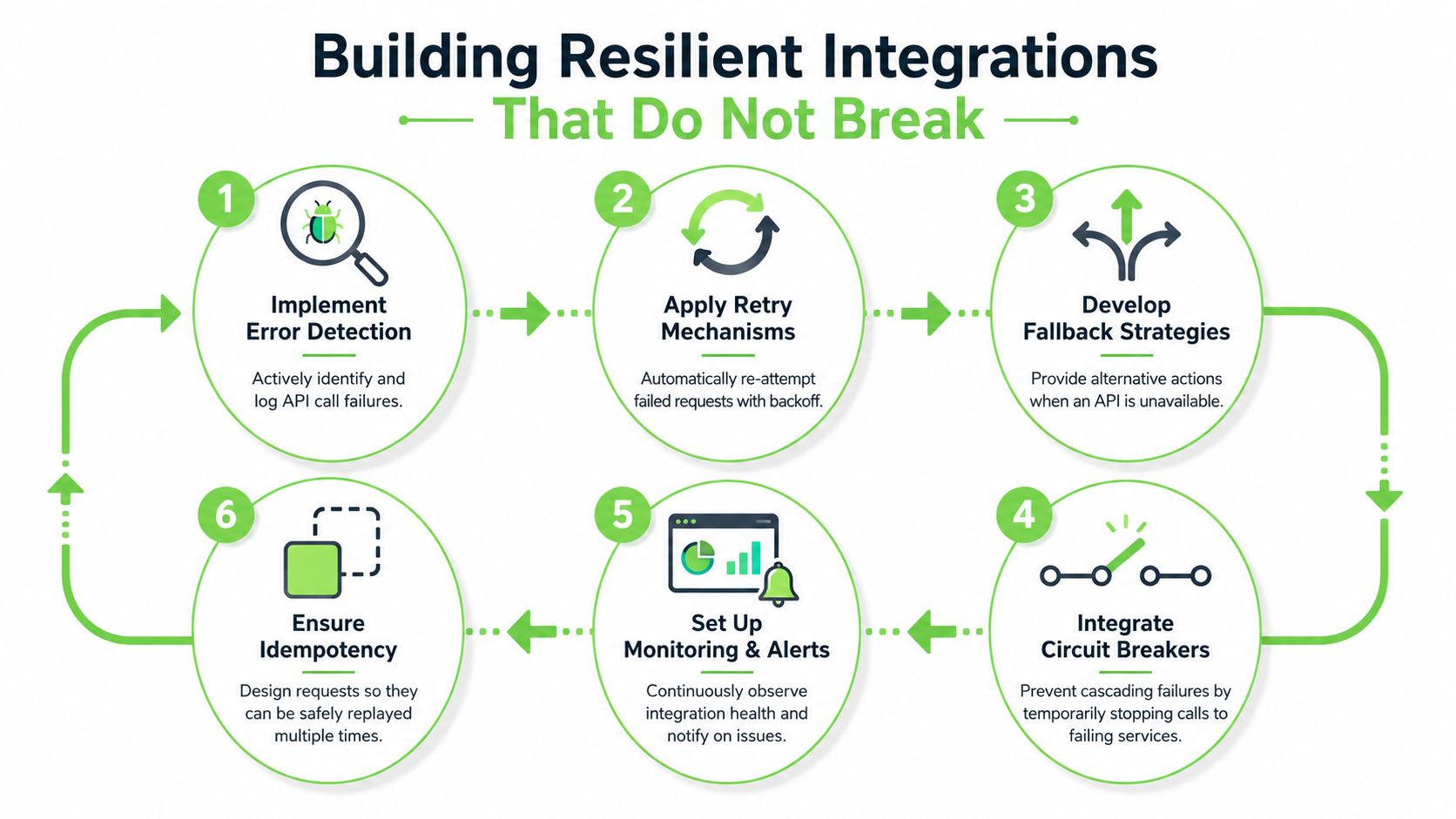
A hobby script assumes success. A production integration assumes partial failure and keeps going anyway.
That distinction matters more than is often realized. Networks are noisy. Providers deploy changes. Files arrive malformed. Rate limits kick in at the worst possible time, usually after a backlog has built up and the system is under pressure.
Treat failure as part of the design
The first step is simple. Stop treating non-200 responses as exceptional edge cases. They are part of the contract.
A resilient integration should explicitly handle at least these categories:
| Status range or code | Meaning | What your code should do |
|---|---|---|
401 or 403 |
Auth or permission problem | Stop retrying and surface an actionable alert |
429 |
Rate limited | Retry with backoff |
500 range |
Provider-side failure | Retry selectively, then escalate |
| Unexpected schema | Contract drift or undocumented change | Fail loudly and capture the payload |
The Markdown Converters API error reference is the kind of page you should map directly into code paths, not just read once.
One best practice is absolutely essential: Automatic retry logic with exponential backoff for 429 responses is a critical integration pattern, and ClicData's API integration guidance notes that this approach significantly reduces failure rates in high-volume ETL and ingestion workflows. That applies directly to document pipelines where batch jobs may submit many files in short bursts.
Here's the practical shape in Python:
import time
import requests

def post_with_backoff(url, headers, payload, retries=5):
    delay = 1

    for attempt in range(retries):
        response = requests.post(url, headers=headers, json=payload, timeout=120)

        if response.status_code == 429:
            time.sleep(delay)
            delay *= 2
            continue

        response.raise_for_status()
        return response.json()

    raise RuntimeError("Request failed after retries")
Use retries carefully and log with intent
Not every failure should be retried. Authentication errors won't improve on the next attempt. Bad payloads won't either. Retries are for transient problems, not for hiding broken logic.
This is also where structured error design matters. A source on API integration best practices reports that over 60% of enterprise incidents correlate with a lack of standardized error handling schemas, and it recommends consistent machine-readable error objects, correlation IDs, and OpenAPI-based contracts in part because they make clients much more resilient, as outlined in these API integration best practices. When your client can inspect an error code instead of guessing from prose, your fallback behavior gets much safer.
A few logging rules help immediately:
- Include request identifiers when available. They make provider support conversations much faster.
- Log response status and machine-readable error code. Human-readable messages are useful, but codes are what your client should branch on.
- Separate transient failures from permanent failures. They need different alerts and different dashboards.
Here's a good engineering test. If the provider changes one response field name, will your integration fail visibly in staging, or will it produce bad data in production? The second outcome is the one to design against.
A short walkthrough helps before you build your own retry and fallback logic:
Example AI Workflows with API Integration
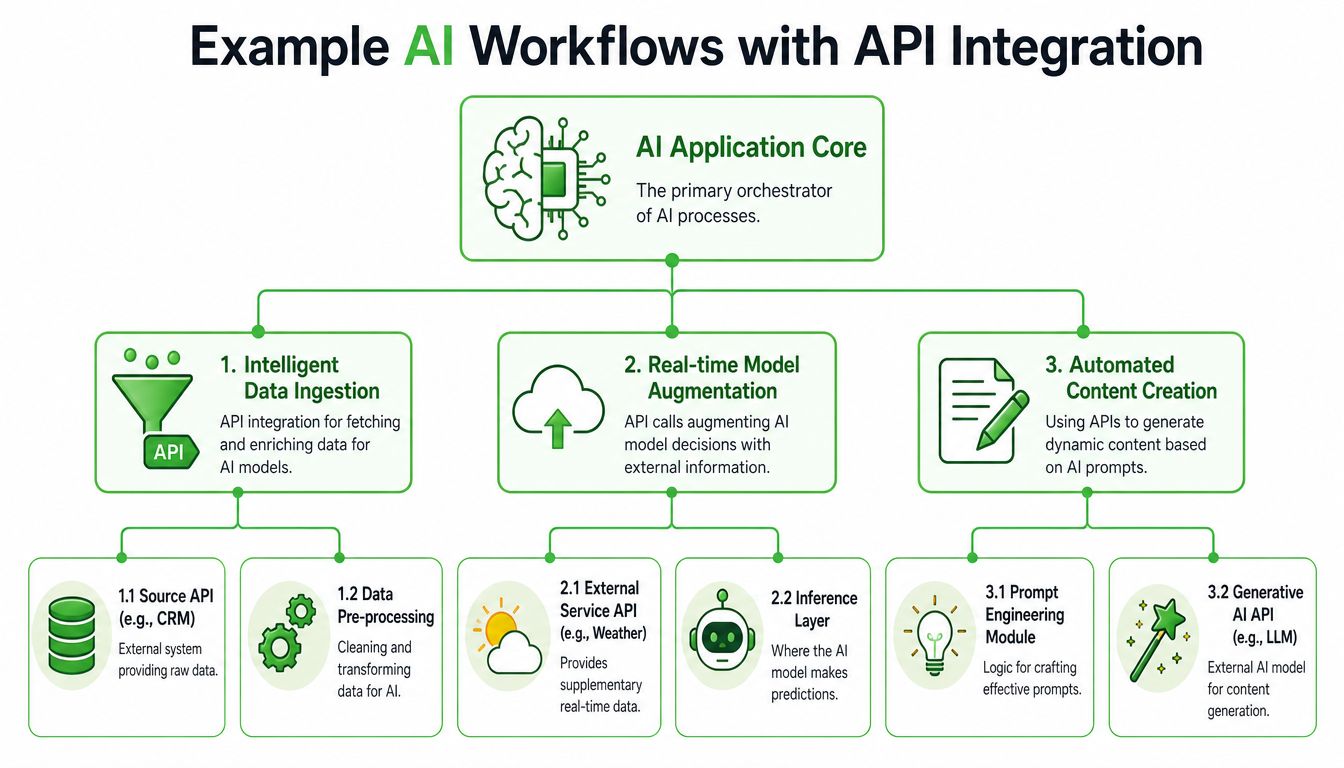
Once the basics are stable, individual API calls stop being the interesting part. The interesting part is chaining them into workflows that solve a real problem without human cleanup in the middle.
Document ingestion for RAG
A common pattern is a watcher job that scans a folder or object store for new files, sends each item to a conversion API, validates the returned Markdown, and writes the normalized output to a staging location for chunking and embedding.
The architecture is usually simple:
- detect new file
- submit conversion request
- validate response
- save Markdown and metadata
- chunk content
- push chunks into the vector store
Machine-readable API definitions help in a very practical way. OpenAPI or Swagger specs can reduce integration time by up to 40% by improving SDK generation and reducing versioning mismatches, according to this discussion of OpenAPI-based integration practices. For ingestion services that need stable client code across environments, that matters.
Real-time enrichment and agent workflows
Another pattern is just-in-time retrieval. A user asks a question in chat. Your application identifies a relevant document reference, converts or fetches normalized content through an API, and injects the result into the model context before response generation.
That same pattern shows up in agent systems that gather external information, preprocess it, and combine it with prompt logic. If you want a broader view of how external data collection fits into agent-style systems, Scrapfly's piece on AI agent scraping is useful because it frames web extraction as one component in a larger automated reasoning loop.
You can also keep the implementation practical and boring, which is usually a compliment in infrastructure work:
- One queue for inbound documents
- One worker for conversion
- One validator for response shape
- One downstream consumer for embeddings or indexing
Stable AI pipelines usually come from simple workflow boundaries, not clever orchestration.
In that stack, a document conversion service such as Markdown Converters can sit at the normalization layer, turning mixed source formats into Markdown before chunking and retrieval. That's a narrow role, which is exactly what you want from an integration point.
From Integration to Innovation
Strong API integration work doesn't look flashy from the outside. It looks predictable. Requests are authenticated correctly. Payloads are validated. Failures are classified. Retries happen only when they should. Logs tell you what broke and why.
That discipline is what lets you build larger systems with confidence. A document pipeline becomes a RAG ingestion service. A one-off script becomes an internal platform capability. A manual process turns into a repeatable workflow other teams can use without asking you to babysit every run.
If you've been learning how to integrate APIs through trial and error, that's normal. Most engineers do. The useful shift is moving from “I can call this endpoint” to “I can depend on this connection in production.” That's where the true advantage starts.
If you need a document conversion layer for AI workflows, Markdown Converters provides API-based file and web page conversion to structured Markdown, including OCR support for scanned inputs, which can fit neatly into RAG ingestion, ETL jobs, and chat-assisted retrieval workflows.
Related Articles
Markdown Reader Windows: Best Tools for 2026
Markdown reader windows - Find the best markdown reader for Windows in 2026. Compare top tools to open, edit, and preview Markdown files effortlessly
Read articleHow to Download a Folder from Dropbox Without Losing Your
Learn how to download a folder from Dropbox quickly and easily, with step-by-step instructions for 2026.
Read articleOCR Handwriting Recognition: A Practical Guide for 2026
Unlock the power of your handwritten data. Our guide to OCR handwriting recognition covers methods, metrics, and how to integrate it into RAG workflows.
Read article