
You need to turn a pile of PDFs into Markdown for a RAG pipeline, so you do the sensible thing and sort GitHub by stars. MarkItDown is at the top with over 150,000. Docling and Marker follow. You pick the most-starred one, run it on a report, and the tables come out as loose columns of numbers.
The star count answered a question you didn't ask. Popularity isn't conversion quality, and it definitely isn't conversion quality for your kind of document. So we ran the three names everyone compares, plus one lightweight tool that rarely makes these lists, on the same PDF and measured what came out.
The short version: the tool leaderboards are built on hard documents, and most documents aren't hard. On an ordinary business PDF, the fastest lightweight parser matched the heavyweight, at a twenty-seventh of the time.
Here's the data, and how to actually choose.
The three tools, and what each is built for
These aren't interchangeable. They come from different design goals, and that shapes where each wins.
- MarkItDown (Microsoft): a broad file-to-Markdown converter, strongest on Office formats. For PDFs it uses plain text extraction, not layout analysis. MIT-licensed, Python.
- Docling (IBM): a document-understanding toolkit with dedicated layout and table models. Built for fidelity on complex documents; heavier to run.
- Marker: a GPU-accelerated, accuracy-first PDF converter, the "safe default" in many 2026 open-source roundups for hard PDFs. Needs a GPU to be practical, and carries a commercial-use license threshold.
I added a fourth to the bench: PyMuPDF4LLM, a lightweight layout-aware parser that's far less famous and, as it turns out, hard to beat on ordinary documents.
One honesty note up front: Marker needs a GPU to run at a sensible speed, so I couldn't include it in the same local, CPU-only harness as the others. I ran MarkItDown, Docling, and PyMuPDF4LLM myself, and I use published benchmarks for Marker's position. Where a number is measured, I say so.
The benchmark: same PDF, measured locally
The test document was a three-page vendor security review: two data tables, seven sections, headings, and lists. A realistic business PDF, born-digital, not a scan. Each tool ran once on the same machine, CPU only, and I checked the output by hand for two things that matter to an LLM: did the tables survive as tables, and did the headings survive.
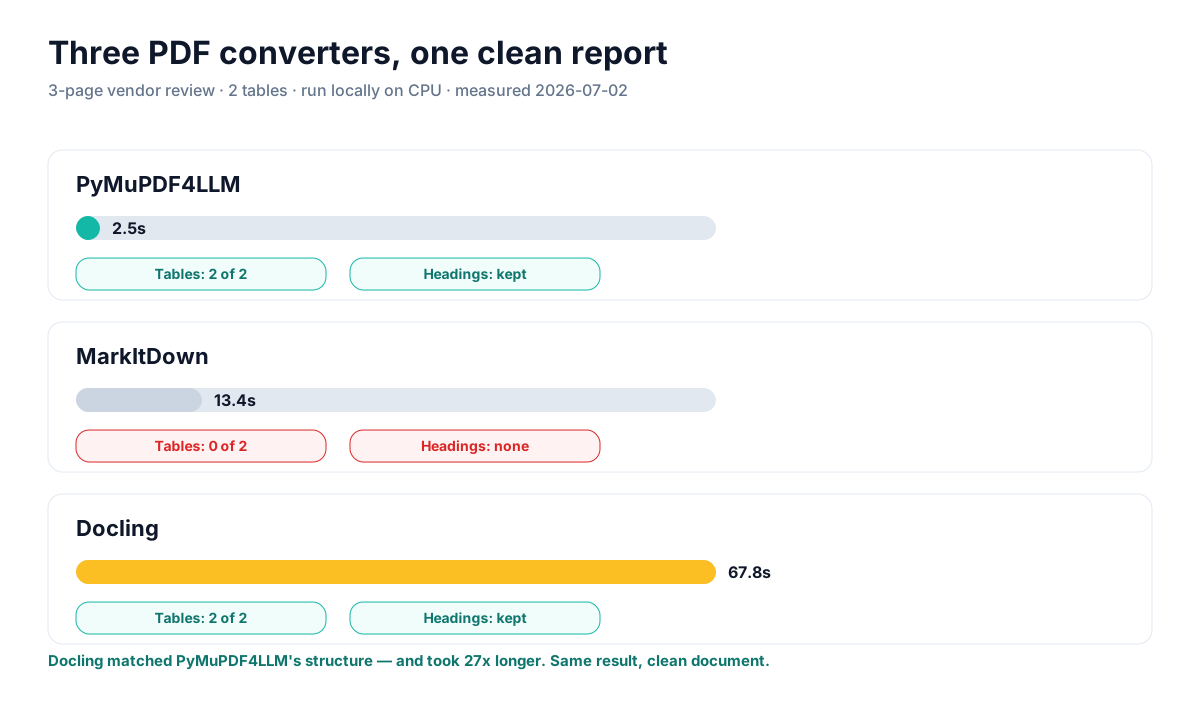
Measured 2026-07-02, macOS, CPU. Docling's first run includes model load. Marker not run (GPU); see below.
MarkItDown flattened the PDF, as it does. The regional-routing table came out as prose lines, no pipe table, no heading markers. It read every character and lost every relationship. That's the expected result for a text-extraction backend, and it's why MarkItDown belongs on Office files, not PDFs.
Docling did the job properly: both tables reconstructed as clean, aligned pipe tables, all headings intact. Its output was, if anything, the tidiest of the three. It also took 67.8 seconds.
PyMuPDF4LLM produced the same structural result as Docling, both tables, all headings, in 2.5 seconds. Same tables. Same headings. One twenty-seventh of the runtime. On this document, Docling's heavy layout and table models bought nothing that the lightweight parser didn't already deliver.
Architecture rule: on a clean, born-digital PDF, layout-aware extraction is a solved problem. Paying for heavyweight ML models here buys latency, not accuracy.
So when do Docling and Marker earn their keep?
When the document gets hard. My fixture was clean, and clean is where lightweight tools tie the heavyweights. The published benchmarks tell the other half of the story, because they're built from difficult documents: multi-column academic papers, dense financial tables with merged cells, forms, and scans.
On the READoc benchmark, which scores conversion across those harder document types, the order flips: MinerU and Marker lead, Docling sits in the middle, and PyMuPDF4LLM trails. That's not a contradiction of my test, it's the completion of it. The heavy models exist for the cases my clean report didn't contain: a table that spans a page break, a two-column layout, a scanned invoice where the text has to be recovered from pixels before any structure can be found.
Marker specifically is the tool people reach for on those cases, and its cost profile matches: it wants a GPU, and it's slow even with one. That's a fair trade when accuracy on a gnarly document is the whole point. It's a bad trade for a folder of clean PDFs.
Head-to-head
| Tool | Clean PDFs | Hard PDFs | Speed | Main friction |
|---|---|---|---|---|
| PyMuPDF4LLM | Excellent | Weaker | Fastest (2.5s) | AGPL license |
| Docling | Excellent | Strong | Slow (67.8s) | Heavy, slow on CPU |
| Marker | Good (overkill) | Strongest | Slow, needs GPU | GPU + license threshold |
| MarkItDown | Poor (flattens) | Poor | Medium (13.4s) | Not for PDFs; great for Office |
Which one to actually pick
Choose by the hardest document in your set, not the average one. If your PDFs are clean, born-digital reports and exports, PyMuPDF4LLM is the pragmatic default: it matched Docling's structure at a fraction of the time and compute, and you'll only feel its ceiling when a genuinely complex layout shows up.
If your set includes dense financial tables, multi-column papers, or scans, that's when Docling or Marker pay for themselves; budget the GPU and the seconds per page, because on those documents the lightweight tools will drop structure the heavy models recover. And if you're converting Office files, DOCX, PPTX, XLSX, keep MarkItDown for that job and route PDFs elsewhere.
There's also the no-code path, which none of these libraries offer. If you don't want to run Python, manage a GPU, or check an AGPL clause, a hosted converter wraps this same decision for you: our PDF to Markdown converter targets clean structure for ordinary documents and runs vision OCR on the scans where the heavy tools would otherwise be your only option.
The mistake is treating this as a single ranking. There isn't one. There's a fast tool for easy documents, heavy tools for hard ones, a specialist for Office files, and a star count that predicts none of it.
Frequently asked questions
Is Docling better than MarkItDown?
For PDFs, clearly, Docling kept the tables and headings MarkItDown flattened. For Office files, MarkItDown is the better pick. They win at different formats.
Is Docling worth it over PyMuPDF4LLM?
Only on hard documents. On a clean PDF they produced identical structure and Docling took ~27x longer. Reach for Docling (or Marker) when layouts get complex or documents are scanned.
What's the best open-source PDF to Markdown tool?
There isn't one winner. PyMuPDF4LLM for clean PDFs at speed, Docling or Marker for complex ones, MarkItDown for Office files. Pick by document difficulty.
Do they handle scanned PDFs?
Marker and Docling have OCR paths; MarkItDown and plain PyMuPDF4LLM don't by default. For a no-code option that OCRs, a hosted converter with AI Vision is simpler than assembling the libraries yourself.
If you'd rather not benchmark parsers, manage a GPU, or read license clauses, MarkdownConverters handles the clean-vs-complex-vs-scanned decision in one browser upload, with OCR for the documents the libraries can't read.
Related reading
Best PDF to Markdown converters 2026
The wider field, including hosted and web tools.
MarkItDown alternatives by use case
Hosted, no-Python, and OCR options.
PDF vs Markdown for AI tokens
Why structure matters more than token count.