
OCR Scanned Documents: A Guide to LLM-Ready Markdown
Learn the complete workflow to OCR scanned documents into clean, structured Markdown. A practical guide for RAG pipelines, token savings, and quality control.
You've probably got one open right now. A scanned PDF that looks fine to a human and behaves like a brick to software. Ctrl+F returns nothing. Your parser sees a giant image. Your RAG pipeline ingests it anyway, then answers with half a clause, a missing table row, or a citation that points to the wrong page.
That's the trap with OCR scanned documents. Getting text out is only the first mile. The harder problem is turning a dead scan into structured, reliable, token-efficient Markdown that an LLM can retrieve from cleanly. If the output loses headings, merges columns, breaks tables, or flattens footnotes into the body, the model isn't reasoning over a document anymore. It's guessing over damaged input.
From Dead Scans to Live Data
A scanned legal agreement is the perfect example of false digitization. The file sits in cloud storage, has a filename, and opens instantly. But if it's image-only, your systems can't read it. They can't search a clause, extract parties, compare revisions, or answer a grounded question about indemnification language on a specific page.
That's why teams still lose hours inside supposedly digital archives. The document exists, but the data inside it doesn't. OCR fixes part of that by converting image text into machine-readable text. The wider market says a lot about how central that capability has become. The global OCR market was valued at USD 11.84 billion in 2023 and is projected to reach USD 43.26 billion by 2032, according to SNS Insider's OCR market report.
The mistake is stopping there.
For modern AI workflows, raw extracted text isn't enough. If you're building a document data extraction workflow, the output has to preserve enough structure to survive chunking, retrieval, and downstream reasoning. A clause heading should still be a heading. A signature block should still be separate from the body. A table should still behave like a table.
Practical rule: If the result reads like a wall of text, your LLM will treat it like one.
That's why teams dealing with OCR scanned documents increasingly convert them into Markdown instead of plain text. Markdown gives you a stable intermediate format. Headings, lists, tables, notes, and citations stay visible to both humans and machines. If you need a direct path for that conversion step, a scanned document to Markdown workflow is the right shape of toolchain.
The shift is simple. Don't think “make this PDF selectable.” Think “make this document usable by retrieval systems.”
Preprocessing Scans for Maximum Accuracy
Most OCR failures start before OCR runs. They start with bad scans, low-contrast copies, page skew, shadows near the spine, or aggressive black-and-white settings that wipe out faint characters. Once that damage is in the image, the recognizer has to guess.
RGB is the decision that matters most
For preservation-grade OCR on older or discolored documents, RGB scanning is the indispensable choice. The U.S. Government Publishing Office's white paper notes that reaching the 99% character accuracy standard for digital preservation depends on scanning in RGB, because it preserves the image data OCR needs to distinguish text from background noise. The same paper also notes that grayscale or single enhancement techniques don't reliably reach that threshold, and that individual enhancement methods such as downsampling don't solve the problem on their own, as explained in the GPO white paper on optimizing OCR accuracy.
That matters most on paper that has aged badly. Yellowed forms, faded carbon copies, and low-contrast typewritten pages often look “readable enough” to a person. OCR sees a much messier signal.
A practical preflight routine
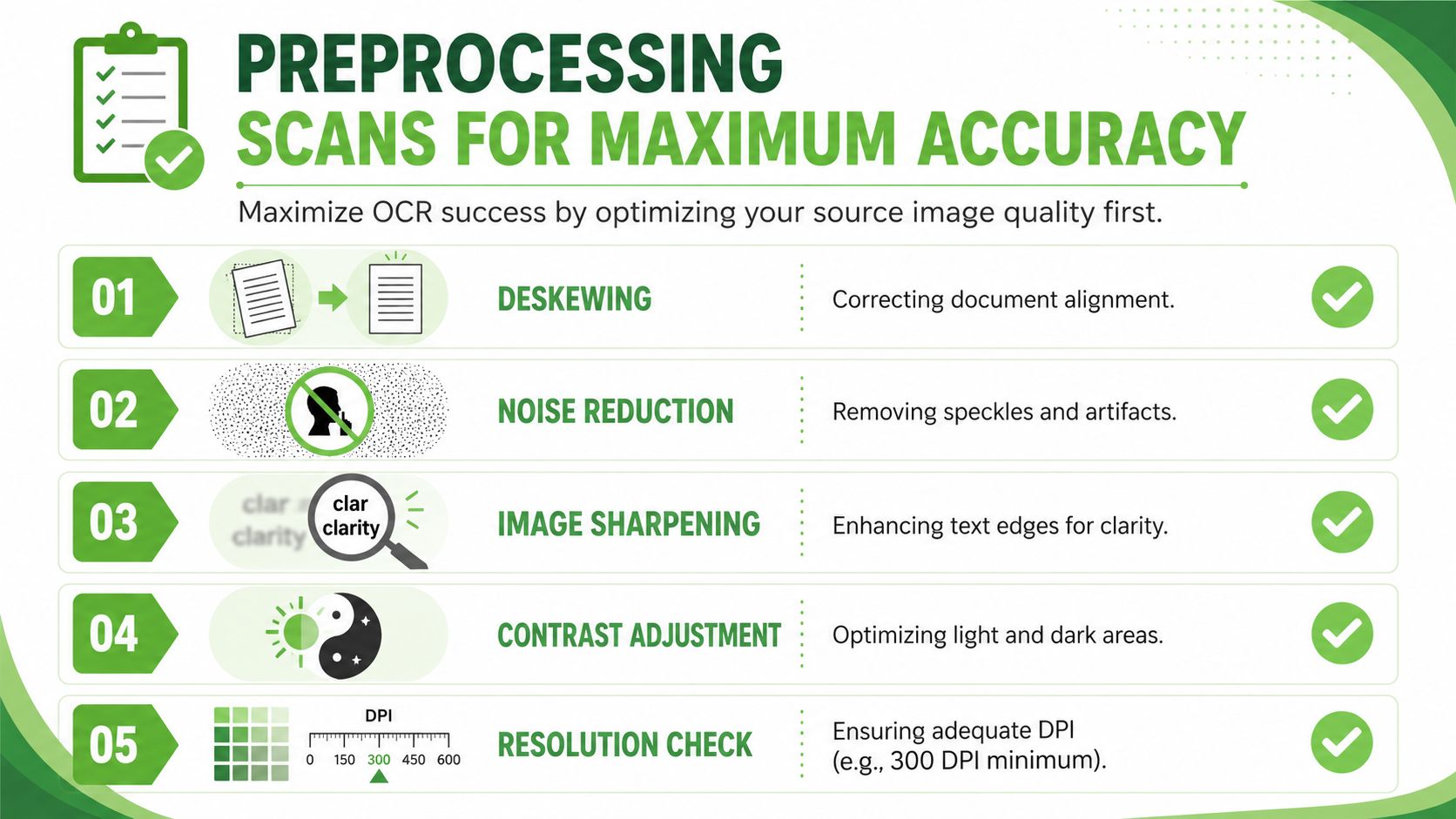
Before running OCR, use a short preprocessing pass:
- Check scan mode first. If the source is being rescanned, use RGB. Don't accept grayscale as “close enough” on difficult pages.
- Deskew every page. Slight rotation is enough to break line detection, table boundaries, and reading order.
- Normalize contrast carefully. Faint type often improves after contrast balancing, especially on degraded scans.
- Reduce visible noise. Speckles, dust, and copier artifacts can look like punctuation or diacritics.
- Separate marginal notes from body text. Handwritten annotations can contaminate nearby paragraphs if the OCR engine merges zones.
- Review page edges. Cropped page numbers, clipped headers, and dark spine shadows often create recurring extraction errors.
The common bad habit is to throw more DPI at the problem and hope the model sorts it out. In practice, degraded scans usually need cleanup, not just larger files. Adobe's guidance on OCR troubleshooting points to poor contrast, skew, and low-quality inputs as major causes of errors, and notes that preprocessing steps such as contrast normalization and image straightening can improve outcomes on degraded scans, discussed in Adobe's guide on why OCR fails and how to fix it.
Bad scans don't produce one dramatic failure. They produce hundreds of tiny ones that poison retrieval later.
A few trade-offs matter in real workflows:
| Issue | What usually works | What usually doesn't |
||---|---|
| Faded text | RGB rescan, contrast balancing | Pure black-and-white conversion |
| Crooked page | Deskew before OCR | Hoping layout analysis corrects it |
| Speckled background | Light denoising | Heavy filtering that erases thin characters |
| Marginal handwriting | Region separation or manual review | Letting OCR merge notes into the body |
| Multi-generation photocopy | Rescan from earlier source if possible | Repeated enhancement passes |
If a document is legally sensitive, clinically important, or headed into a retrieval system that people will trust for answers, preprocessing isn't cosmetic work. It's data quality work.
Choosing Your OCR Strategy From Image to Text
Not every OCR engine is solving the same problem. Some are built to recognize characters quickly from clean printed pages. Others try to understand the whole page as a document, including hierarchy, tables, lists, and reading order. If you choose the wrong class of tool, you may still get text, but you won't get a usable artifact.
OCR itself is the conversion of images of text into machine-encoded, editable text. That process turns static scans into searchable files with an invisible text layer, as described in Rutgers Policy Lab's overview of Smart OCR and AI-assisted digitization.
What classic OCR does well
Traditional OCR is still the right answer for a lot of jobs.
If you have:
- clean printed text
- simple page layouts
- consistent fonts
- no important table geometry
- no need for semantic hierarchy
then a standard OCR engine is usually fast, predictable, and cheap to operate. It's especially good for archives where the main goal is searchability. You want selectable text, not document intelligence.
That said, classic OCR often flattens structure. Two-column reports become scrambled reading order. Footnotes drift into paragraphs. Tables lose cell boundaries. Bullets collapse into line breaks. Once that flattening happens, the cleanup cost moves downstream into parsing rules, regex patches, and manual verification.
Where AI Vision changes the outcome
AI Vision systems are better when the output needs to preserve layout intent, not just characters. That includes contracts, clinical records, research papers, technical manuals, and scanned reports with mixed formatting.
A useful way to think about the trade-off:
| Need | Basic OCR | AI Vision OCR |
||---|---|
| Selectable text | Strong | Strong |
| Clean printed pages | Strong | Strong |
| Reading order in complex layouts | Weak to mixed | Better |
| Tables and lists | Often flattened | More likely to preserve structure |
| Heading hierarchy | Minimal | Better semantic recovery |
| RAG-ready Markdown | Usually requires extra reconstruction | Better starting point |
AI Vision matters most when you care about what the text is doing on the page. A line in all caps at the top isn't just text. It may be a section heading. A left-aligned cluster of short lines may be a list. A grid of numbers isn't just line-separated text. It's a table with relationships.
Here's a quick walkthrough format if you want to see that category of workflow in action:
The practical choice comes down to failure cost. If your downstream use is search, basic OCR is often enough. If your downstream use is extraction, summarization, or RAG over structured knowledge, preserving layout early saves far more time than it costs.
The cheapest OCR run is often the most expensive document pipeline.
Refining OCR Output into Flawless Markdown
Even strong OCR output still needs a cleanup pass. During this stage, many teams lose patience and push noisy text directly into embeddings. That shortcut usually shows up later as retrieval misses, duplicate chunks, broken citations, or answers that quote the wrong sentence because the source text was malformed.
The reason is simple. OCR accuracy on printed text can look high on paper, but extraction pipelines still hit a gap. Docsumo notes that standard OCR for printed text often reaches 98 to 99% accuracy, yet a 3% OCR accuracy gap is common in data extraction workflows. Their guidance points to confidence thresholding as the practical way to separate likely-correct output from fields that need review, covered in Docsumo's article on OCR accuracy and confidence scores.
Fix errors by confidence not by rereading everything
Don't review every line equally. Review where the engine is uncertain.
A practical workflow looks like this:
- Capture confidence scores per block or field. If your OCR tool exposes token, line, or region confidence, keep it.
- Sort low-confidence output first. That's where “rn” becomes “m”, “I” becomes “1”, and dates or section references get corrupted.
- Flag risky zones by document type. Tables, signature blocks, marginal notes, and stamps deserve extra scrutiny.
- Route only uncertain spans to a human. That keeps review time focused.
This works better than broad manual proofreading because OCR errors cluster. Once you learn the engine's weak spots, you can target them.
Field note: Confidence scores aren't just diagnostics. They're routing signals for human review.
Convert document intent into Markdown structure
Once the text is trustworthy enough, rebuild the page as a document, not a transcript.
Here's the difference.
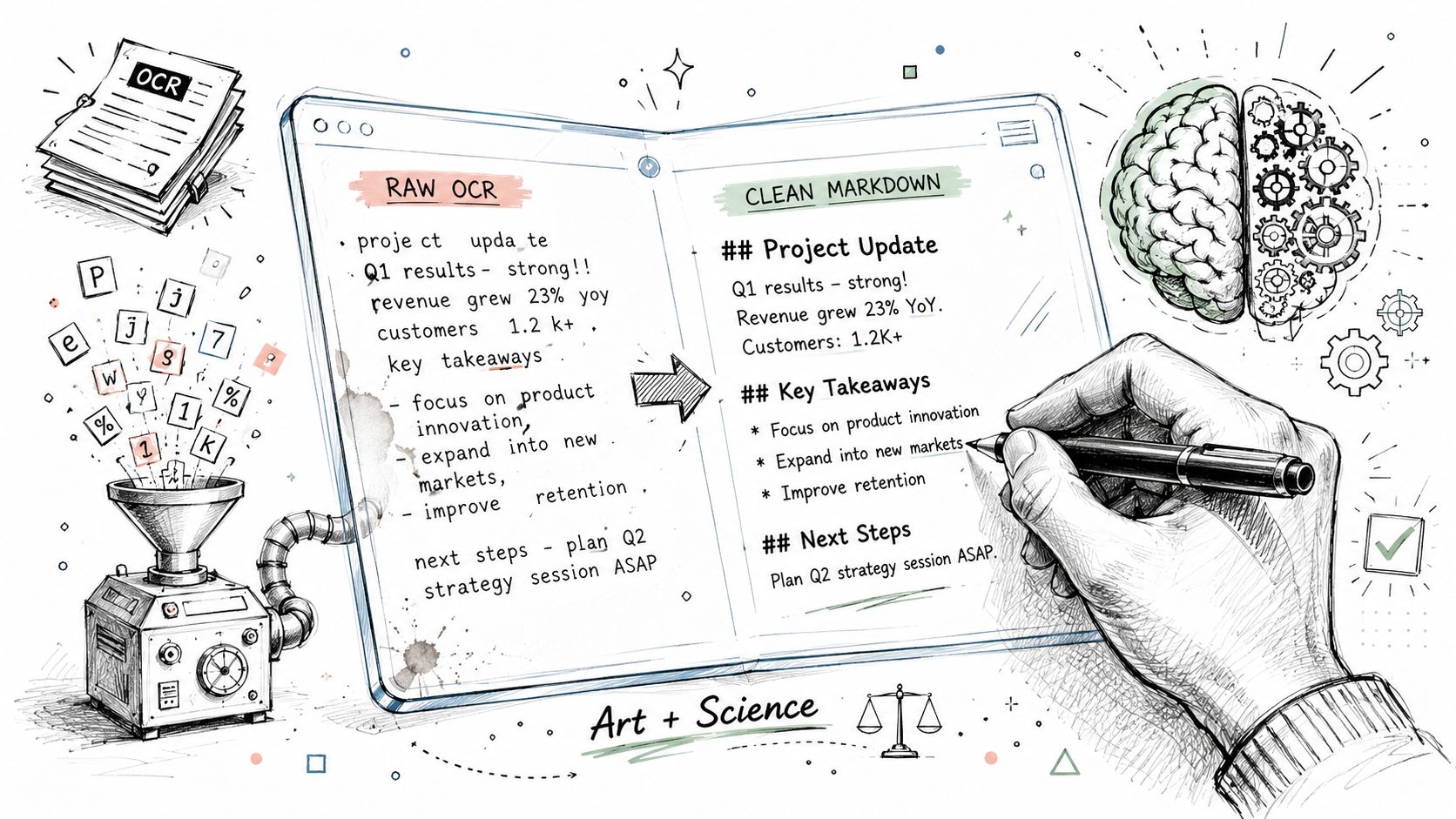
Raw OCR output might look like this:
ARTICLE 4 TERMINATION
Either party may terminate this agreement upon written notice
if the other party materially breaches this agreement and fails
to cure such breach within thirty days
Useful Markdown looks like this:
## Article 4 Termination

Either party may terminate this agreement upon written notice if the other party materially breaches this agreement and fails to cure such breach within thirty days.
That seems minor. It isn't. The heading creates a chunk boundary. The normalized paragraph improves semantic retrieval. The cleaned sentence reduces token waste.
The same principle applies to lists and tables.
A flattened list:
Required Attachments
passport copy
proof of address
signed application
Should become:
### Required Attachments

- Passport copy
- Proof of address
- Signed application
And a table-like region shouldn't stay as stacked lines if the relationships matter. Reconstruct it:
| Test | Result | Unit |
||---|---|
| Hemoglobin | 12.5 | g/dL |
| Platelets | 210 | x10^9/L |
A simple cleanup checklist
When converting OCR scanned documents into Markdown, I'd validate these items before the file enters a vector store:
- Heading recovery: Major section labels should become
#,##, or###based on document hierarchy. - Paragraph repair: Merge broken line wraps inside prose, but keep true paragraph boundaries.
- List reconstruction: Restore ordered and unordered lists where indentation or bullets were lost.
- Table rebuilding: Preserve row and column relationships when values depend on position.
- Artifact removal: Delete duplicated headers, footers, page numbers, and scan noise that repeat across pages.
- Source markers: Keep page-level traceability where the document will support question answering.
A small amount of disciplined cleanup does more than perfect the text. It protects the meaning of the document. That's what the retriever needs.
Optimizing Markdown for RAG and LLMs
This is where structured output starts paying rent.
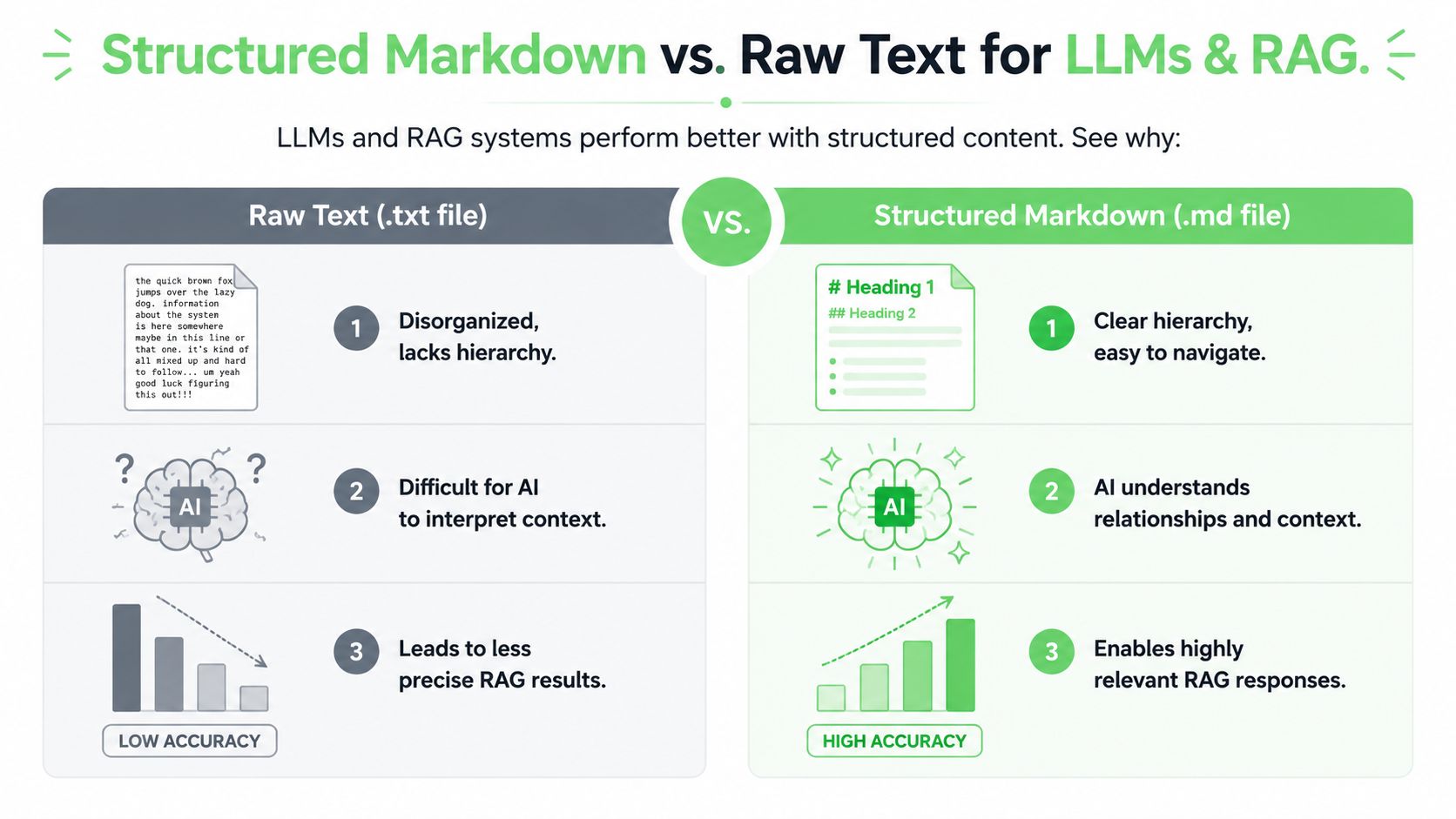
The biggest misunderstanding in document AI is that retrieval quality depends mostly on embeddings or model choice. In practice, many failures start earlier, in the shape of the input. SciSpace reports that 68% of enterprise RAG failures stem from poorly structured input tokens, and also notes that AI Vision-enhanced OCR systems that convert scanned documents into structured Markdown can reduce token usage by up to 70% compared to raw PDF uploads, as discussed in SciSpace's piece on OCR-aware chat for nonselectable PDFs.
Structure is retrieval infrastructure
A retriever works better when the source has stable boundaries. Markdown gives you those boundaries naturally.
A heading marks topic scope. A list groups sibling items. A table preserves relationships that line-based text destroys. A blockquote or note can be segmented separately from the body. That means your chunking logic can follow document semantics instead of arbitrary token counts.
Raw text often forces crude chunking. Split every fixed number of tokens and hope the break doesn't land in the middle of a clause, a procedure, or a dosage table. That's how one answer ends up stitched from two unrelated sections.
Markdown creates better chunks than raw text
Good RAG chunks aren't merely short. They're coherent.
For OCR scanned documents, a clean Markdown file lets you chunk by:
- Section heading
- Subsection
- List group
- Single table
- Appendix item
- Page-bounded note with provenance
That gives the retriever clearer anchors and makes reranking easier. If a user asks for a termination clause, the chunk titled ## Termination is a much cleaner candidate than a random span cut from the middle of six merged pages.
Here's a useful pattern for chunk metadata:
| Markdown element | Why it helps RAG |
||---|---|
| ## Section headings | Gives semantic labels and stable chunk starts |
| Bullet lists | Preserves sibling relationships |
| Tables | Keeps values tied to labels and units |
| Page markers | Supports traceable answers |
| Clean paragraphs | Reduces fragmented embeddings |
A retriever can recover from imperfect wording more easily than it can recover from broken structure.
Provenance belongs in the file not in your memory
If the document will support legal, research, or clinical work, keep provenance attached to the content. Don't rely on a separate notebook that says “that clause was on page 34 somewhere.”
In practice, that means embedding source information close to the extracted text. For example:
## Limitation of Liability
source_page: 34

The total liability of either party...
Or for chunk pipelines:
---
title: Limitation of Liability
source_file: master-services-agreement-scan.pdf
source_page: 34

---
This makes verification easier during answer generation and during human review. It also reduces the chance that a model returns a correct sentence with an uncheckable citation.
The token savings matter too. Raw PDFs often carry layout noise, duplicated text layers, and extraction debris. Structured Markdown strips away much of that waste while keeping the parts the model needs. That means more room in the context window for useful evidence instead of formatting junk.
Automating the Workflow with APIs and Chat
Manual cleanup is fine for one exhibit, one manuscript, or one batch of archived reports. It breaks as soon as the backlog gets real. The scalable version is a pipeline that takes files in, preprocesses or routes them, converts them, and returns Markdown plus metadata in a repeatable format.
For bulk work, that usually means an API-driven job. A script can watch a folder, submit scanned files, receive structured output, and push the result into storage, a vector index, or an internal review queue. For teams processing large batches, a batch conversion API endpoint is the kind of primitive that removes copy-paste operations and keeps ingestion consistent.
Chat-based workflows solve a different problem. They cut friction for ad hoc analysis. A lawyer can drop in a scanned exhibit and ask for the indemnity section. A researcher can upload a scanned paper and request a Markdown outline. An operations team can inspect a photographed manual page without leaving the assistant they already use.
The best setups combine both paths. APIs handle throughput. Chat handles immediacy. The key is that both should land on the same output contract: clean, structurally aware Markdown with enough traceability to trust the answer that comes later.
If you need a tool built specifically for this workflow, Markdown Converters turns scanned PDFs, images, and mixed-format documents into clean, LLM-ready Markdown with OCR, AI Vision, API automation, and chat integrations for day-to-day retrieval work.
Related Articles
Batch PDF Conversion: A Practical Guide for 2026
Learn practical batch PDF conversion workflows, from simple UI uploads to automated API processing. Convert scanned PDFs with OCR and create AI-ready Markdown.
Read articleMaster Image Text Recognition for AI Success
Master image text recognition for AI pipelines. Learn techniques, tools, & best practices to turn scanned documents into structured, LLM-ready data.
Read articleAngular Markdown Editor: A Guide to AI-Ready Integration
Learn how to integrate an Angular Markdown editor into your app. This step-by-step guide covers setup, autosave, and preparing content for LLM workflows.
Read article