
What Is XML Conversion? Transform XML to JSON & CSV in 2026
Understand what is XML conversion. Learn to transform XML into JSON, CSV, HTML, & Markdown. Get 2026 best practices, avoid pitfalls, & see automation examples.
You open a file expecting a quick import, then see pages of angle brackets, nested tags, attributes, and repeated elements that don't line up cleanly with the system you need to feed next. That's a normal XML day.
A developer might need JSON for an API. A research team might need CSV for analysis. A legal operations team might want clean Markdown for search and review. An AI engineer might need the same document in a format that won't waste context window space on closing tags.
That last problem matters more than most XML guides admit. Raw XML is precise, but it's also verbose. In AI workflows, converting XML to Markdown can reduce token usage by up to 70% compared to raw XML tags, which matters when you're packing documents into prompts or retrieval pipelines (InputiX on XML conversion and token usage).
If you've been asking what is XML conversion, the short answer is simple. It's the process of taking XML data and reshaping it into another format without breaking the meaning, structure, or relationships inside it.
Introduction with XML Conversion Scenario
A data engineer downloads an XML export from a legacy system. The file is valid, but not usable yet. Product details sit inside nested elements, IDs live in attributes, and related records appear at different levels of the tree. Nothing is flat enough for a spreadsheet, and nothing is clean enough for an LLM.
That same pattern shows up outside engineering. Publishers transform XML into web pages. Healthcare teams move structured records between systems. Legal and research teams receive XML from archives, regulators, and document repositories. Everyone starts with the same problem. The data exists, but the format doesn't match the task.
Raw XML is often excellent for storage and exchange, but awkward for direct use in analytics, search, and AI ingestion.
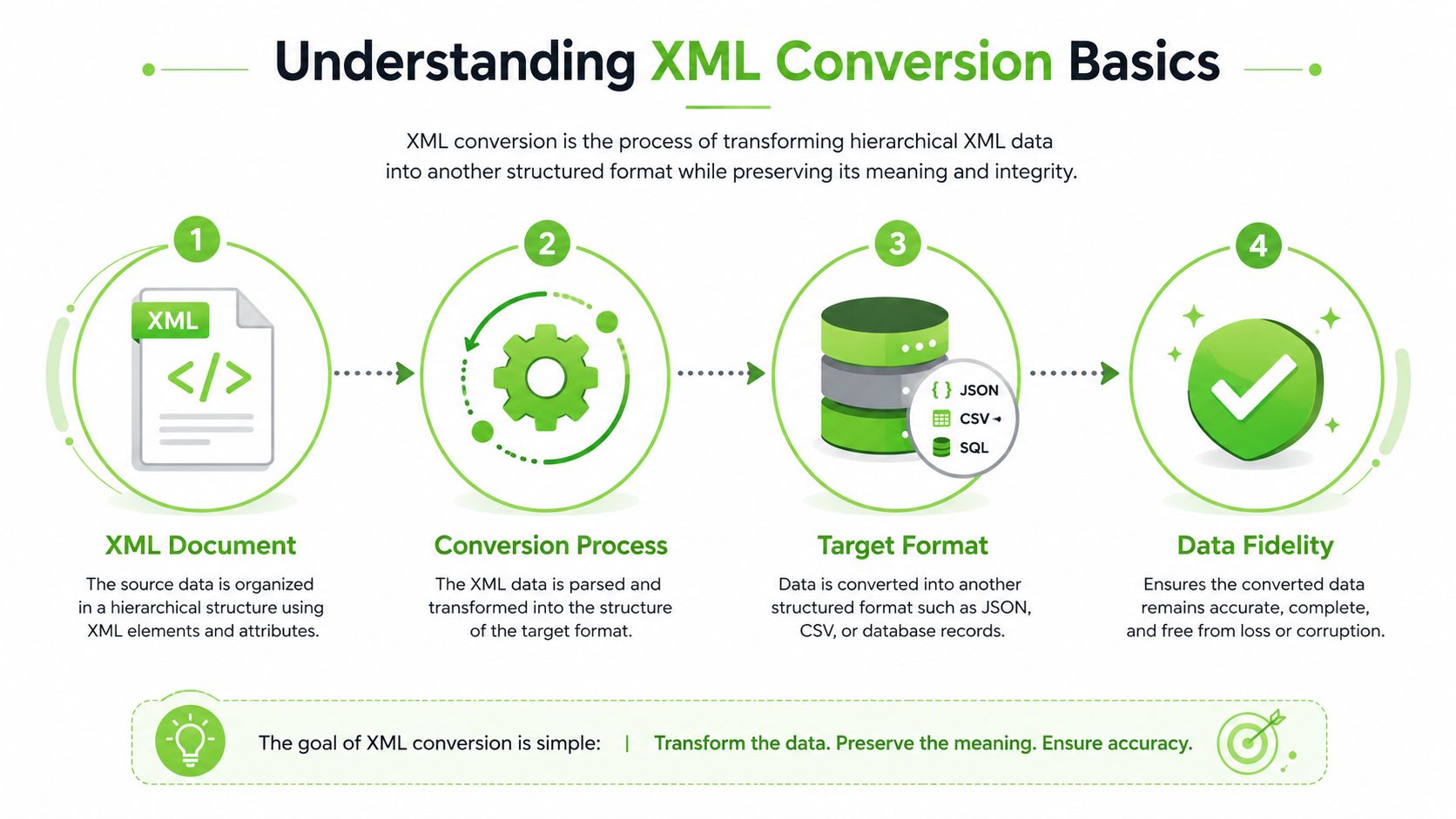
XML conversion is the bridge. It turns source XML into formats people and software can work with more easily, such as JSON, CSV, HTML, database rows, or Markdown.
Understanding XML Conversion Basics
XML didn't appear by accident. It became an official W3C Recommendation on February 10, 1998, created to simplify SGML and support machine-readable, extensible document formats (W3C XML background summary). That history explains why XML is still everywhere in publishing, integration, configuration, and older enterprise systems.
Why XML exists in the first place
Think of XML as a labeled storage box system. Every item has a name, can contain smaller boxes, and may include side labels called attributes. That makes XML good at expressing hierarchy.
A small example:
<book id="b1">
  <title>XML Basics</title>
  <author>
    <first>Ada</first>
    <last>Ng</last>
  </author>
</book>
This isn't hard to read. The confusion starts when your target format doesn't support hierarchy the same way. A CSV row can't naturally hold nested author objects. A relational database wants tables and keys. A Markdown document wants headings, lists, and readable text.
What conversion really changes
So, what is XML conversion in practical terms? It's not just changing file extensions. It's structural transformation.
Most conversions involve four moves:
- Parse the XML so software can read elements, attributes, and text.
- Map the structure from the XML tree to the target format's shape.
- Transform the content into that new shape.
- Validate the result so relationships and values still make sense.
Three terms often trip readers up:
- Schema or XSD: A formal description of what the XML is allowed to contain.
- Namespace: A way to distinguish similar element names from different vocabularies.
- Transformation logic: The rules that decide where each value goes.
Practical rule: If you don't decide how attributes, repeated elements, and nested sections should map before converting, you'll usually get messy output later.
Common Targets and Use Cases
The target format should follow the job, not the other way around. XML is the source language. The output depends on who needs the data next.
Choosing the output by job type
If you're feeding an API or a web app, JSON is usually the most natural fit. It matches modern application structures better than XML in many workflows. If you're comparing XML and JSON outputs for application work, this XML to JSON conversion guide is a useful reference point.
CSV works when the destination is a spreadsheet, BI tool, or a simple import pipeline. It's great for flat records, but weak for rich hierarchy. Teams often flatten XML into rows only after deciding which nested values matter and which relationships can be simplified.
HTML is common in publishing and web display. Markdown has become useful for documentation, search indexing, and AI ingestion because it preserves readable structure without carrying around lots of markup overhead.
Format comparison and use cases
| Target Format | Key Use Case | Conversion Approach |
|---|---|---|
| JSON | APIs, web apps, app integrations | Map elements and attributes into objects and arrays |
| CSV | Analytics, spreadsheets, simple imports | Flatten selected fields into rows and columns |
| HTML | Web display, publishing output | Use transformation templates to render presentable pages |
| Markdown | Documentation, RAG pipelines, AI prompts | Convert structure into headings, lists, tables, and plain text |
| Database records | Warehousing, operational systems | Split hierarchy into related tables with keys |
A few practical matches help:
- JSON for application exchange: Useful when repeated XML elements should become arrays and nested sections should stay nested.
- CSV for analysts: Best when the XML describes records with predictable fields.
- HTML for content teams: Helpful when the XML is content-rich and meant for browsers.
- Markdown for AI pipelines: Strong choice when humans and language models both need clear, compact structure.
One mistake is assuming every XML file has a single obvious target. A publisher may create HTML for a site, search-oriented XML for indexing, and Markdown for internal AI tools from the same source content. Different outputs can coexist.
Methods and Tools for XML Conversion
Some conversions are simple enough for a short script. Others need a formal transformation layer. The right tool depends on whether your challenge is layout, scale, data typing, or pipeline automation.
When XSLT and XPath make sense
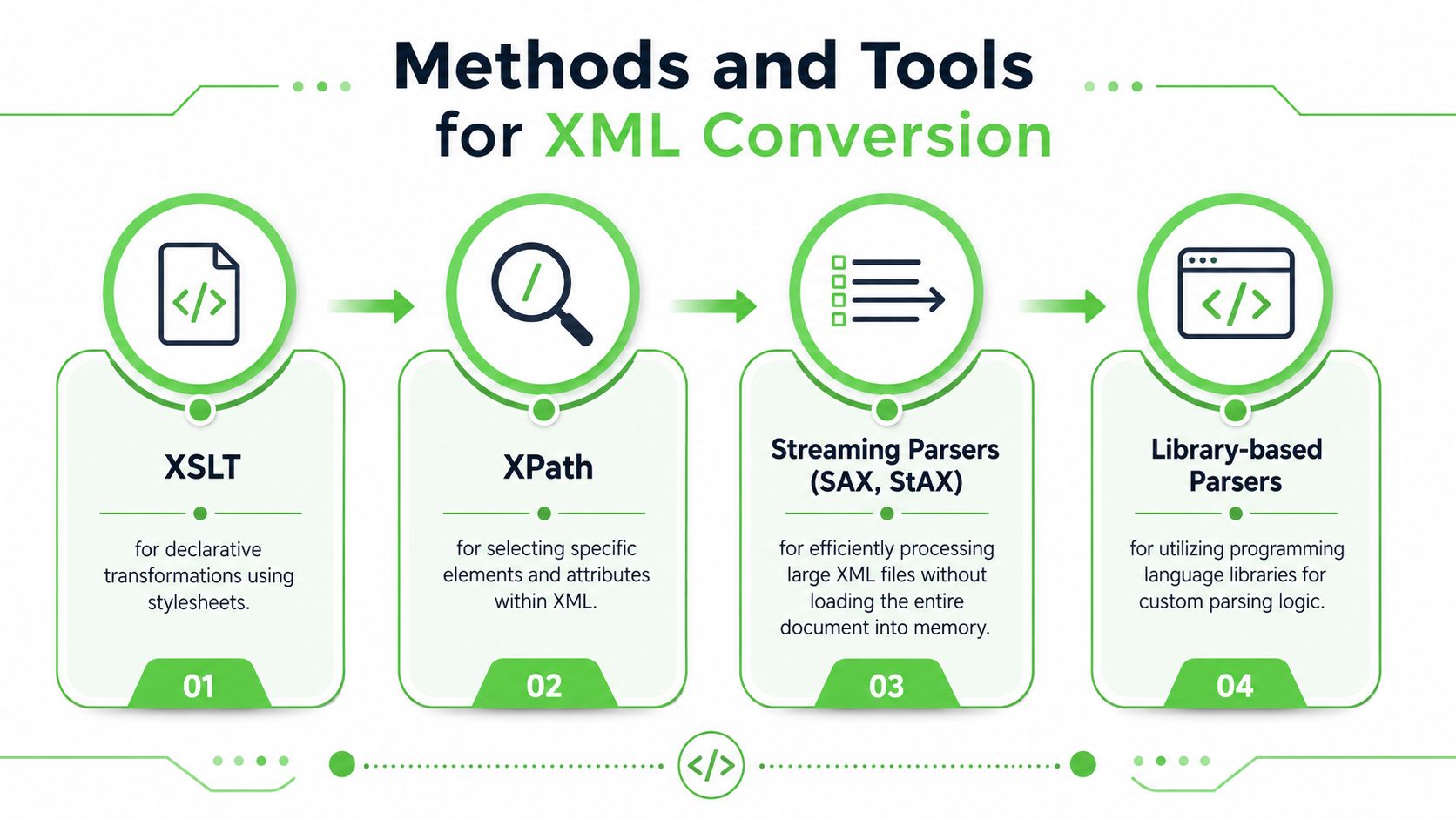
XSLT is one of the classic XML transformation tools. It's designed to turn source XML into another output by applying template rules. In practice, teams often use XSLT to create web-viewable HTML or other specialized XML renditions without changing the underlying data (Oracle XML conversion and XSLT overview).
Here's a minimal XSLT example that converts XML book titles into HTML list items:
<xsl:template match="/">
  <html>
    <body>
      <ul>
        <xsl:for-each select="catalog/book">
          <li><xsl:value-of select="title"/></li>
        </xsl:for-each>
      </ul>
    </body>
  </html>
</xsl:template>
XPath often works alongside XSLT. It's the selection language that tells your transformer or parser where to look. If XML is a tree, XPath is how you point to a branch or leaf.
Use XSLT when:
- The output rules are stable: Publishing workflows often fit this pattern.
- Structure matters more than custom business logic: Templates stay cleaner than large procedural scripts.
- You need repeatable rendering: The same source can produce multiple outputs reliably.
When code based parsing is the better fit
When XML gets large or business rules get complicated, code-based parsers often win. Libraries in Python, Java, JavaScript, and .NET let you inspect nodes, handle exceptions, enrich values, and write custom mapping rules.
In .NET, XmlConvert is useful for converting between CLI types and XML Schema types while keeping values locale-independent. That matters when dates, numbers, or booleans might otherwise be interpreted differently across regions (Microsoft XmlConvert reference)).
A short C# style example looks like this:
string xmlDate = "2026-01-15";
DateTime parsed = XmlConvert.ToDateTime(xmlDate, XmlDateTimeSerializationMode.RoundtripKind);
string backToXml = XmlConvert.ToString(parsed, XmlDateTimeSerializationMode.RoundtripKind);
For very large files, streaming parsers such as SAX or StAX help because they don't require loading the entire document into memory. That makes them a good fit for ETL and ingestion pipelines. If you're weighing where conversion belongs in a broader data flow, Ryware's data pipeline insights give helpful context on transformation timing and architecture choices.
If you want a conversion step exposed as a service rather than embedded in custom parsing logic, the Markdown Converters API endpoint documentation shows one example of an automation-friendly interface.
Choose declarative tools when the rules are mostly about shape. Choose code when the rules are about exceptions, enrichment, or system behavior.
Pitfalls and How to Avoid Them
Most XML conversion failures aren't dramatic. They're subtle. A field disappears, a namespace breaks selection logic, or a massive file turns a routine job into a memory problem.
Where conversions usually break
XML conversion is usually a multi-stage, labor-intensive workflow involving schema analysis, explicit mapping, parsing, and post-processing such as validation and indexing to protect data integrity (Sonra XML conversion guide). Because there are many stages, there are many places to fail.
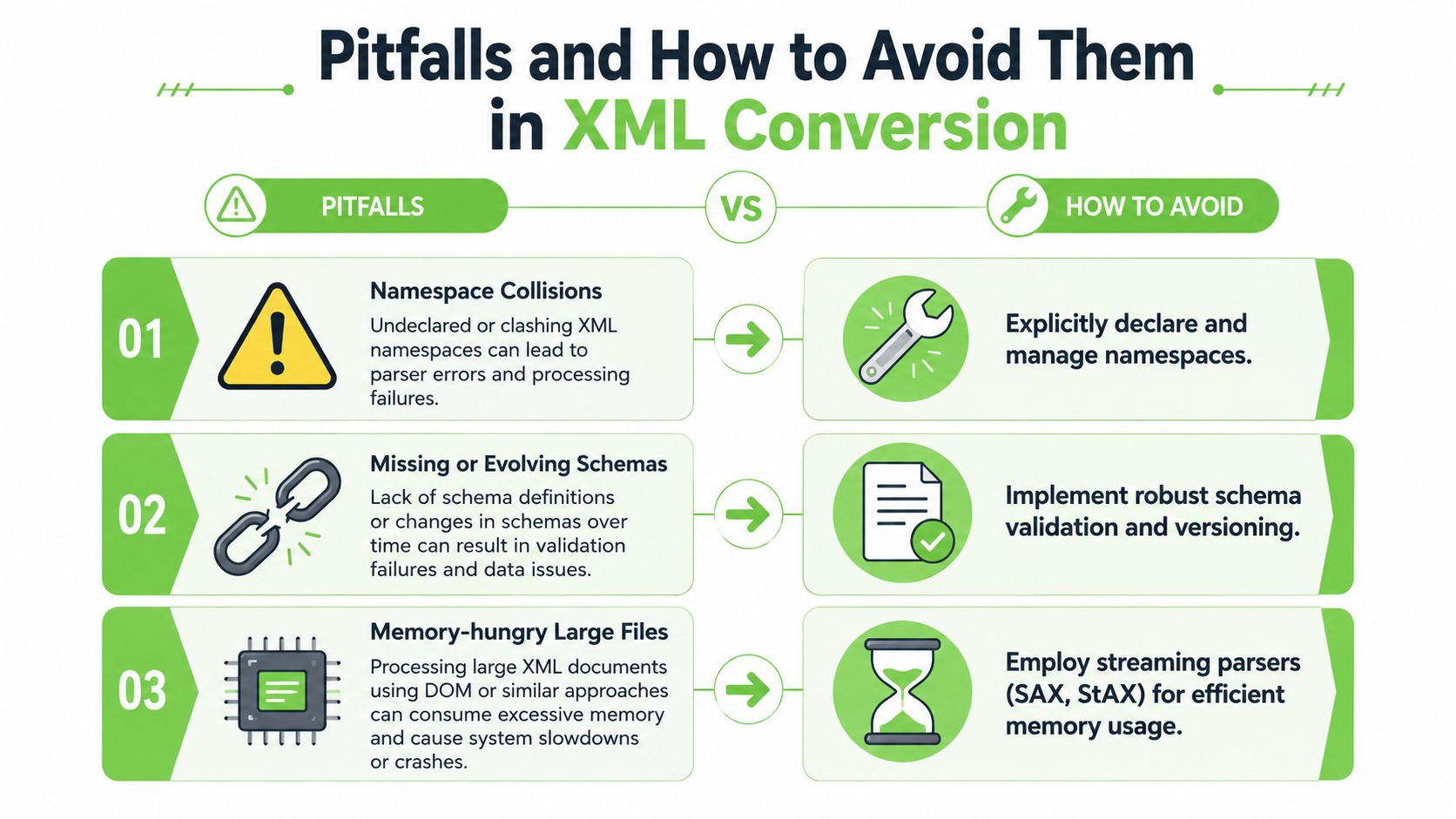
Three common trouble spots show up often:
- Namespace collisions: Two elements may look similar but belong to different vocabularies. If your parser ignores namespaces, you can select the wrong node or no node at all.
- Schema drift: An XML feed changes over time. A new attribute appears, an optional field becomes required, or an element moves.
- Large file handling: A DOM-style parser can become clumsy when files are huge or extensively nested.
Practical ways to reduce failure
A few habits prevent most production issues:
- Declare namespaces explicitly: Don't rely on local element names alone when selecting nodes.
- Version your mapping rules: Treat schema changes as changes to software, not as surprises.
- Use streaming where size demands it: Process records incrementally when memory pressure matters.
- Validate after transformation: Check the output, not just the input.
- Keep samples that represent edge cases: Repeated elements, optional attributes, and mixed content deserve test coverage.
A conversion can succeed syntactically and still fail operationally if the output no longer matches how downstream users query or interpret the data.
Best Practices You Need to Know
Reliable XML conversion is less about a clever script and more about discipline. Teams that handle XML well tend to make their transformations inspectable, testable, and repeatable.
Habits that keep conversions maintainable
Start with a written mapping document, even if it's short. List which elements become fields, how attributes are handled, what happens to repeated nodes, and how missing values should appear in output.
Then keep the transformation modular:
- Break rules into units: Small XSLT templates or parser functions are easier to review.
- Preserve provenance: Keep source paths or identifiers when the downstream system needs traceability.
- Make jobs idempotent: Running the conversion twice shouldn't produce conflicting results.
- Test with realistic samples: Include malformed input, optional sections, and unexpected ordering.
What good output should preserve
Good conversion doesn't preserve every tag. It preserves meaning.
If a parent-child relationship matters, keep it. If sequence matters, don't flatten it away carelessly. If metadata explains origin, timestamp, or status, carry that forward where possible.
A useful checklist is simple:
- Can a person inspect the output and recognize the source record?
- Can a machine process the output without hidden assumptions?
- Can you trace a suspicious value back to the original XML path?
That's the difference between quick conversion and dependable conversion.
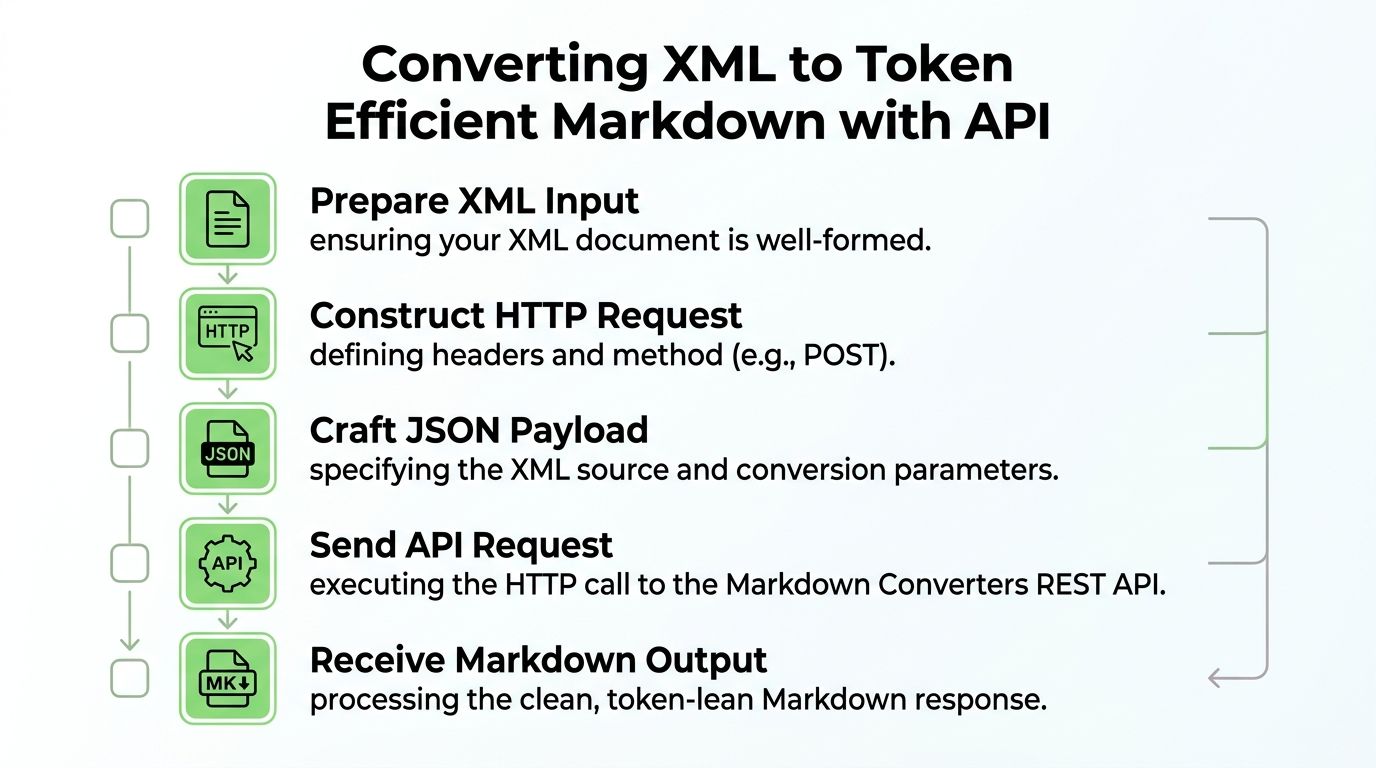
Converting XML to Token Efficient Markdown with API
AI pipelines expose a weakness in raw XML that older workflows could ignore. XML is readable, but its tags consume space that language models still have to tokenize. For retrieval, summarization, and agent workflows, cleaner structure often matters more than preserving every original wrapper tag.
The underexplored part is the AI cost angle. Converting XML to Markdown can cut token usage by up to 70%, which directly affects LLM context costs and prompt efficiency, as noted earlier in the article's linked source. That's one reason many teams now normalize source documents before embedding or prompting.
A simple API workflow
A practical XML-to-Markdown pipeline usually looks like this:
- Check the XML input for well-formedness.
- Send it to a conversion API with the desired output settings.
- Receive normalized Markdown with headings, lists, tables, and optional metadata.
- Chunk the Markdown for embedding or retrieval.
- Store the result in your vector database, search index, or document store.
If your broader workflow already connects external systems through APIs, this idea is similar to how teams connect SEO tools via API to automate repetitive data movement. XML conversion fits naturally into that same pattern.
For XML-specific ingestion into AI workflows, the XML to Markdown workflow page shows the kind of target format many RAG systems prefer.
Example request patterns
A generic REST request often includes:
- Authentication header: Your API key or bearer token
- Input definition: Raw XML content or a URL to the XML file
- Output preference: Markdown
- Optional metadata flags: Provenance, section markers, or formatting controls
A cURL example might look like this:
curl -X POST "https://api.example.com/convert" \
  -H "Authorization: Bearer YOUR_API_KEY" \
  -H "Content-Type: application/json" \
  -d '{
    "input_format": "xml",
    "output_format": "markdown",
    "source": {
      "type": "url",
      "value": "https://example.com/document.xml"
    },
    "options": {
      "include_provenance": true
    }
  }'
A Python pattern is similarly straightforward:
import requests

payload = {
    "input_format": "xml",
    "output_format": "markdown",
    "source": {
        "type": "text",
        "value": "<article><title>Sample</title><section><p>Hello</p></section></article>"
    },
    "options": {
        "include_provenance": True
    }
}

response = requests.post(
    "https://api.example.com/convert",
    headers={"Authorization": "Bearer YOUR_API_KEY"},
    json=payload,
    timeout=60
)

markdown_text = response.json().get("markdown")
print(markdown_text)
The key design choice isn't the HTTP library. It's the output contract. Good Markdown for AI use should preserve heading levels, list structure, tables when they exist, and enough metadata to trace back to the source if retrieval returns a questionable chunk.
Field note: For RAG, readable structure often beats raw fidelity. A clean heading hierarchy is usually more useful than keeping every XML wrapper node.
That's why XML-to-Markdown conversion works well for AI ingestion. The result is easier for humans to inspect, easier for chunkers to split predictably, and easier for language models to consume efficiently.
Conclusion and Future Directions
XML isn't going away. Too many archives, enterprise systems, and content pipelines still rely on it. But the way teams use XML is changing.
If you've been asking what is XML conversion, the durable answer is this. It's the process of reshaping structured XML into formats that fit the next job without losing the meaning that made the XML useful in the first place. Audit your XML sources, choose conversion methods that match file size and schema complexity, and favor output formats that downstream systems can use well, especially in AI workflows.
If your team needs a practical way to turn XML, PDFs, web pages, and other source files into AI-ready Markdown, Markdown Converters offers a web app, API, OCR support, and chat-based integrations for document conversion and retrieval workflows.
Related Articles
Markdown Reader Windows: Best Tools for 2026
Markdown reader windows - Find the best markdown reader for Windows in 2026. Compare top tools to open, edit, and preview Markdown files effortlessly
Read articleHow to Download a Folder from Dropbox Without Losing Your
Learn how to download a folder from Dropbox quickly and easily, with step-by-step instructions for 2026.
Read articleOCR Handwriting Recognition: A Practical Guide for 2026
Unlock the power of your handwritten data. Our guide to OCR handwriting recognition covers methods, metrics, and how to integrate it into RAG workflows.
Read article