
JS Markdown Editor: A Developer's Guide for 2026
Learn to choose, integrate, and optimize a JS Markdown editor for modern web apps, CMS, and AI pipelines. Create clean, LLM-friendly content.
You're probably here because you need rich text editing in a web app, but you don't want the usual mess that comes with a browser WYSIWYG editor. Users want buttons for headings, lists, links, and code blocks. You want output that won't break your rendering, your diff history, or your ingestion pipeline six months from now.
That tension is exactly where a good JS Markdown editor earns its keep. It gives writers a usable editing experience while keeping the stored content plain text, reviewable, portable, and far easier to process downstream. That matters for docs and CMS workflows, but it matters even more if your content ends up in embeddings, retrieval pipelines, agent memory, or model training data.
If your team is still treating the editor as a UI detail, it's time to move it up the stack. The editor determines what kind of content your system will produce. For AI-heavy products, that means it also shapes chunk quality, token usage, and retrieval reliability.
Why Your Next Project Needs a JS Markdown Editor
Traditional rich text editors solve the wrong problem for many apps. They optimize for visual formatting first, which usually means you inherit unpredictable HTML, inconsistent nesting, inline styles you didn't ask for, and painful content cleanup later. That's tolerable in a marketing page builder. It's a liability in a product that stores knowledge.
A JS Markdown editor flips that model. The user still gets formatting controls and preview, but the source of truth stays readable. That alone improves debugging, version control, migrations, API portability, and long-term maintainability.
Markdown is no longer a niche developer format. WhatsApp, GitLab, and Stack Overflow support Markdown natively, and a 2024 analysis found that 68% of new web development projects include Markdown support in their initial feature sets according to the CommonMark community discussion. The same reference notes that modern editors can enable up to 50% faster content creation compared to raw HTML.
That adoption changes the default question. It's no longer “should this app support Markdown?” It's “how much editor complexity do we need on top of Markdown?”
If you want a quick way to test UX expectations before wiring a full editor into your app, the Digital ToolPad markdown editor is useful for checking how non-technical users react to plain syntax, toolbar shortcuts, and preview flow.
Practical rule: If your content needs to be diffed, reviewed, exported, embedded, or reused by AI systems, store Markdown, not editor-generated HTML.
Three product categories benefit immediately:
- Knowledge products where teams write docs, SOPs, notes, release logs, or internal references.
- Content systems where you need a stable interchange format between frontend, backend, and APIs.
- AI applications where output structure affects chunking, retrieval, and prompt quality.
Anatomy of a Modern Markdown Editor
A modern editor isn't one thing. It's three cooperating layers. If you don't separate them mentally, you'll choose tools based on a screenshot instead of the behavior that matters in production.
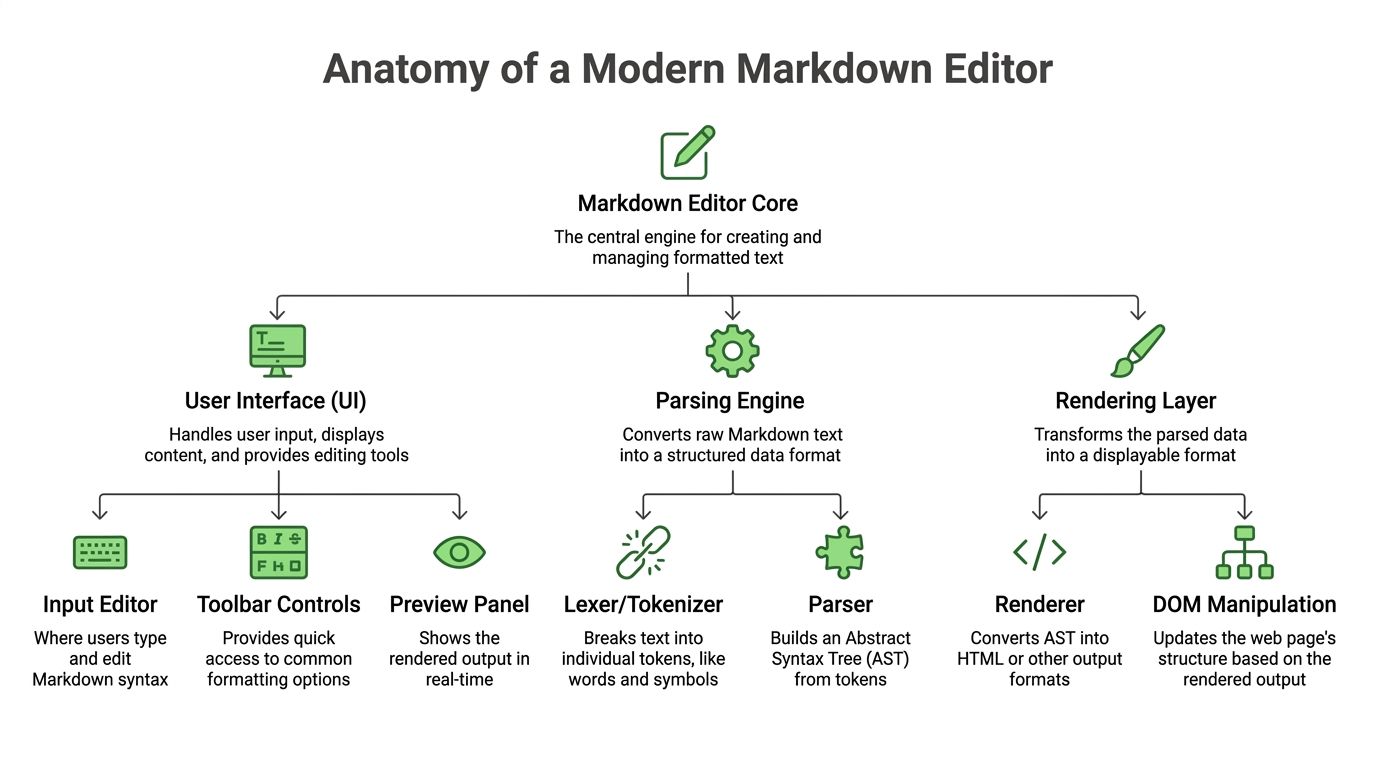
The three layers that matter
The UI layer is what users touch. That includes the textarea or editor surface, toolbar buttons, keyboard shortcuts, selection handling, and preview behavior. This area often receives undue attention due to its visibility.
The parsing layer converts Markdown text into a structured representation. Depending on the stack, that may be tokens, an AST, or a normalized intermediate form. At this point, flavor differences, syntax edge cases, and plugin behavior start to matter.
The rendering layer turns parsed Markdown into HTML or another output format. This layer decides what happens to tables, task lists, fenced code blocks, links, images, and embedded content. It also determines how much sanitization and post-processing you'll need.
A useful perspective:
- UI handles intent
- Parser handles structure
- Renderer handles presentation
When teams complain that an editor “feels buggy,” the bug often isn't in typing at all. It's usually a mismatch between what the UI allowed, what the parser interpreted, and what the renderer emitted.
For a closer look at the visual-editing side of this problem, this guide to a WYSIWYG Markdown editor is a helpful reference.
Why semantic WYSIWYG is hard
The hardest promise in this space is semantic WYSIWYG. Users want to click bold, see bold, and still keep exact Markdown underneath. That sounds simple until the editor has to preserve list indentation, fenced code blocks, table pipes, blockquotes, and escaping rules without drifting into malformed syntax.
That's why many “rich Markdown” editors disappoint experienced developers. They either show too much raw syntax and scare off casual users, or they hide syntax behind a rich view and corrupt the source, with changes that go unnoticed.
A 2025 study found that 74% of RAG pipeline developers face token inflation from inconsistent editor output, highlighting the cost of editors that fail to preserve semantic fidelity, as discussed in this NiceGUI community thread.
If the editor can't preserve meaning at the text layer, it's not AI-ready, no matter how polished the toolbar looks.
When evaluating an editor, inspect the generated Markdown after real user actions:
- Paste a document with headings, lists, and links.
- Edit the middle of a nested list.
- Insert and remove code fences.
- Round-trip through preview and compare the source.
- Run the output through your chunker if the content feeds an LLM pipeline.
That last step is where many editors fail.
How to Choose the Right Editor for Your Use Case
There isn't one best JS Markdown editor. There's a best fit for your output requirements, framework constraints, and tolerance for hidden complexity. The mistake is choosing by feature list alone.
Start with the output, not the toolbar
A headless CMS, a team notes app, and a retrieval pipeline do not need the same editor. The CMS cares about extensibility and authoring controls. The notes app cares about responsive typing, drafts, and collaboration hooks. The RAG system cares about clean structure and stable text output.
Framework compatibility can block a good choice before features even matter. A 2024 Angular discussion highlighted how few modern editors support Angular cleanly without forcing Bootstrap, and the same discussion notes that fewer than 15% of open-source editors offer native Angular support despite Angular's use in 68% of enterprise projects in that context, which is exactly the kind of constraint that bites teams late in implementation, as described in the Angular community thread.
That's not just an Angular problem. It's a reminder to check for dependency assumptions early.
Don't ask “does it support Markdown?” Ask “what exact Markdown does it emit after users paste, edit, and save?”
If you want a broader survey of trade-offs in self-hosted and extensible options, this roundup of the Markdown editor open source field is worth scanning.
Selection criteria by product type
| Criterion | Headless CMS | Note-Taking App | RAG/AI Pipeline |
|---|---|---|---|
| Authoring UX | Toolbar, preview, media insertion | Fast typing, drafts, keyboard flow | Minimal friction, strict structure |
| Output quality | Consistent Markdown for publishing | Readable source with low ceremony | Clean headings, lists, tables, code fences |
| Framework fit | Easy theming and embedding | Lightweight and responsive | Native textarea or predictable source output |
| Plugin needs | Shortcodes, embeds, custom blocks | Mentions, checklists, local state | Validation, normalization, linting |
| Persistence model | Autosave and revision history | Offline-friendly draft handling | Source-first storage with preprocessing |
| Failure tolerance | Author-visible formatting glitches | Sync conflicts and edit recovery | Token waste, chunk instability, malformed syntax |
Use this as a filter:
- For a CMS, prioritize customization. You'll likely need custom toolbar actions, controlled rendering, and content validation before publish.
- For a notes product, prioritize speed. If each keystroke triggers heavy reconciliation, users will feel it immediately.
- For AI ingestion, prioritize plainness over gloss. The best editor may look simpler because it generates less noise.
A few trade-offs show up repeatedly:
- Drop-in textarea editors are easier to integrate and usually safer for downstream processing.
- Rich hybrid editors can improve usability, but they need stricter testing around output fidelity.
- Framework-wrapped editors reduce setup time, but wrappers often lag behind core libraries.
Key Integration and Architecture Patterns
Choosing the editor is only half the work. Most production issues come from how the editor plugs into storage, rendering, assets, and preview infrastructure.
Store Markdown source as the system of record
Persist the raw Markdown in your database. Treat rendered HTML as a cache or derived artifact, not the canonical document. That keeps migrations manageable and lets you re-render later if your parser, sanitizer, or presentation rules change.
A practical setup usually looks like this:
- Database field for source Markdown as the primary document body
- Optional rendered preview cache for read-heavy screens
- Asset upload endpoint that returns a URL and inserts Markdown image syntax
- Server-side rendering path for secure preview and publish rendering
If you need to normalize external files or imported content before it reaches your editor workflow, a developer-oriented Markdown converter for developers can be useful as a preprocessing layer.
Preview architecture that stays fast
For simple apps, client-side preview is enough. For professional workflows, especially when multiple services touch the content, server-rendered preview often gives you more consistency. The problem is latency.
The pattern that scales well is server-side memoization plus WebSocket diffs. Instead of re-rendering and shipping the whole document on every edit, the server loads the Markdown, converts it to HTML, memoizes the result, and sends only the diff when changes occur.
According to this Elixir forum discussion on Markdown editor architecture, that approach can reduce re-render overhead by up to 85% and achieve sub-50ms update latency in document-driven workflows.
That architecture works because it attacks both expensive steps:
- Memoization avoids redundant conversions
- Diff transmission avoids full HTML replacement
Architecture rule: If preview performance degrades with document size, stop tuning the toolbar and inspect your render pipeline.
For many, a sensible progression is:
- Start with local preview for drafts
- Move to server-rendered preview when parser parity matters
- Add diff-based updates when document size or collaboration starts to hurt responsiveness
Best Practices for Producing LLM-Friendly Markdown
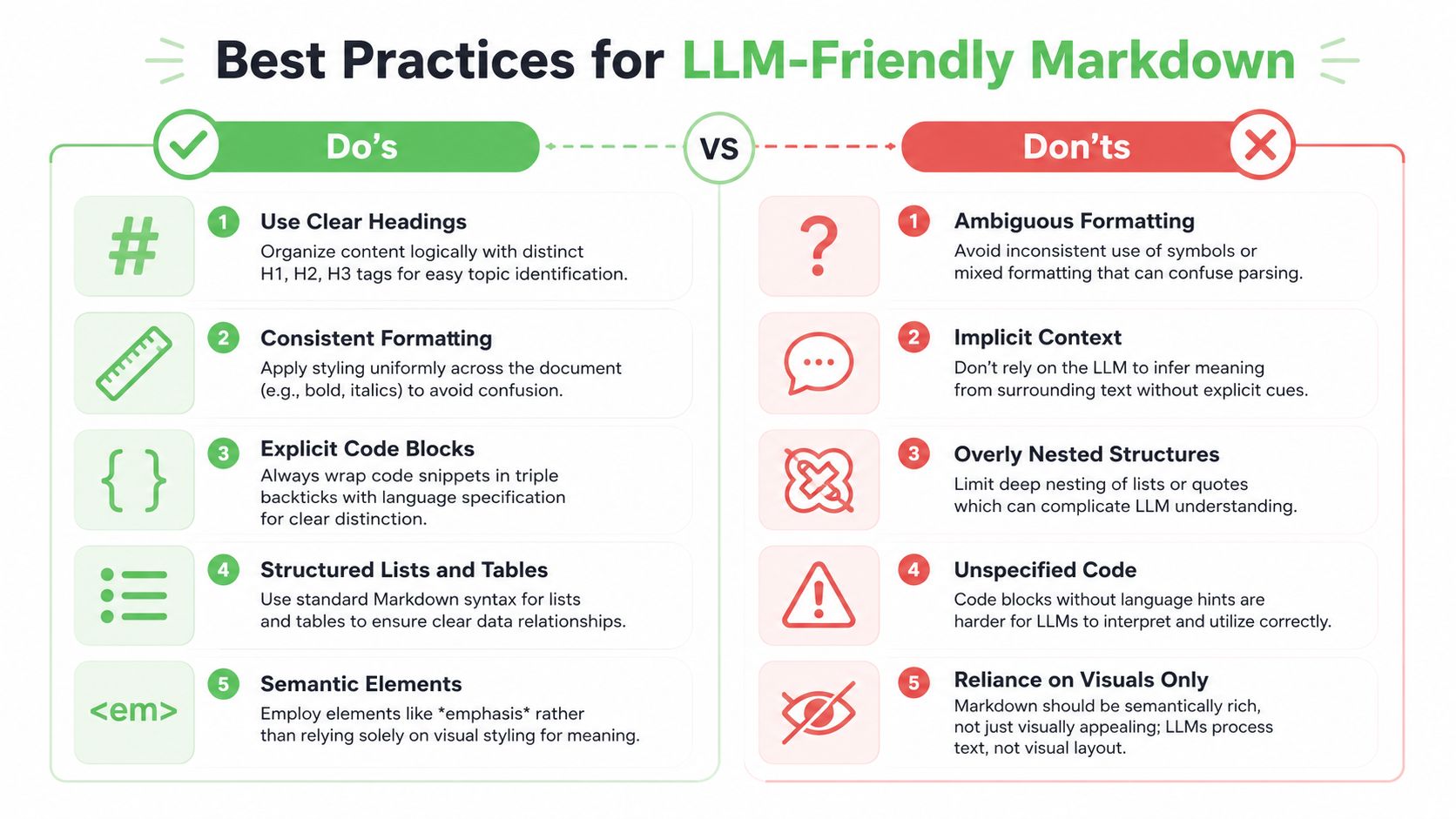
If your editor output feeds embeddings, retrieval, agents, or fine-tuning prep, “valid Markdown” isn't enough. You need LLM-friendly Markdown. That means documents are structured so models and chunkers can infer boundaries, relationships, and code intent without cleaning up editor noise first.
What clean Markdown looks like
Clean Markdown has stable heading levels, predictable list indentation, explicit fenced code blocks, normal links, and simple tables. It avoids presentational junk that only makes sense in HTML.
Lightweight JS Markdown editors with native textarea integration can produce highly token-efficient output, and compared with raw HTML or PDF uploads, that clean Markdown can deliver token savings of up to 70% according to the markdown-text-editor package reference.
That token difference changes pipeline economics and quality. It lets you fit more source material into the context window, reduce chunk pollution, and spend less effort stripping out layout artifacts.
Here's the kind of editorial discipline that helps:
- Use one heading hierarchy instead of skipping from H1 to H4 because it “looks right”
- Keep lists flat when possible because nested bullets are harder to chunk cleanly
- Fence every code sample and specify the language
- Prefer Markdown tables only when the relationships matter
- Keep links descriptive so the anchor text carries meaning on its own
Here's a bad pattern for retrieval:
A document with bold labels pretending to be headings, inconsistent bullets, pasted HTML fragments, and code examples without fences.
Here's a better one:
A document with explicit H2 and H3 sections, short paragraphs, fenced code, and lists that preserve one idea per item.
For the prompt side of the equation, these prompt engineering best practices pair well with well-structured Markdown because both rely on explicit structure instead of implied context.
A short walkthrough helps illustrate the difference in structure handling:
Editor settings that improve retrieval quality
Many organizations don't need a smarter model first. They need stricter editor defaults.
Configure your editor to encourage good output:
- Default to fenced code blocks instead of indented code.
- Constrain heading tools so users don't create chaotic level jumps.
- Normalize pasted content before it enters the document.
- Disable raw HTML where possible unless your renderer has a strong reason to support it.
- Lint before save for malformed tables, broken lists, and missing fences.
EasyMDE is a common starting point because it's widely used, has built-in autosaving and spell checking, and serves as a drop-in replacement for textareas. The project states that it has been embedded in thousands of web applications and had over 1.2 million weekly npm downloads in early 2025, with a 4.7-star rating across 3,500+ GitHub reviews, as shown in the EasyMDE repository. That doesn't make it right for every app, but it does make it a practical baseline for teams that want a proven editor surface.
Implementing Security and Accessibility
A Markdown editor is an input system. Input systems attract abuse and expose weak assumptions. Treat rendering and interaction as production-grade concerns from the first release.
Sanitize rendered output
Markdown itself isn't the dangerous part. The rendered HTML is. If your pipeline allows raw HTML in Markdown, pasted content, or custom embeds, you need to sanitize before injecting output into the DOM.
The safe pattern is simple:
- Parse Markdown
- Render to HTML
- Sanitize the HTML
- Insert sanitized output into the page
Libraries like DOMPurify are a common fit for browser-side sanitization. On the server, use the equivalent allowlist approach in your framework. Don't rely on “trusted users” as a security model. Internal tools still get abused accidentally through copied snippets, imported content, and old stored documents.
Raw preview HTML should be treated the same way you'd treat any other user-generated markup. Because that's what it is.
Also decide early whether your editor supports raw HTML at all. In many apps, the cleanest answer is no.
Accessibility is part of editor quality
A toolbar full of unlabeled icon buttons is not a complete editor. Keyboard users need to reach every control, understand every action, and return focus predictably to the writing surface.
A few essential requirements:
- Keyboard navigation for toolbar controls, dialogs, and preview toggles
- ARIA labels on icon-only buttons
- Visible focus states that don't disappear under custom styling
- Sufficient contrast in both editor and preview
- Screen reader clarity for formatting actions and status messages
Test with the keyboard before you ship. Then test with real content, not placeholder text. Editors often pass basic a11y checks and still fail once code blocks, tables, and dialogs show up.
The Future of Markdown Is AI-Aware
The next generation of Markdown editors won't just help people write. They'll help systems interpret, normalize, and route knowledge. That's already changing what “good editor output” means.
A solid JS Markdown editor now has to do three jobs well. It needs to feel good for humans, stay predictable for developers, and produce text that works cleanly in AI pipelines. That combination is why output fidelity matters more than cosmetic richness.
The practical direction is clear. Editors will keep adding AI-assisted drafting, cleanup, and structure suggestions. The useful ones won't stop at autocomplete. They'll help turn messy notes into stable Markdown that's ready for retrieval, versioning, and automation.
If you're evaluating where this is heading alongside broader AI-assisted coding tools, the same pattern shows up there too. The best tools don't just generate more text. They generate text with stronger structure and better downstream utility.
Frequently Asked Questions
Should I store Markdown or rendered HTML in the database
Store Markdown as the source of truth. Render HTML on demand or cache it as a derivative. That gives you cleaner diffs, easier parser upgrades, and fewer migration problems later.
Do I need a split preview pane
Not always. Split panes help when users write longer technical content or need immediate feedback on tables, code blocks, and links. For short-form input, a simpler write-or-preview toggle is often less distracting and easier to support on smaller screens.
Which Markdown flavor should I support
Pick one flavor and document it clearly. For most web apps, a CommonMark-compatible baseline with a small set of extensions is easier to maintain than a highly permissive parser. The bigger issue isn't the spec label. It's whether the editor, parser, and renderer all agree on the same rules.
A few implementation habits help keep things sane:
- Define supported syntax in product docs and internal tests
- Reject or normalize unsupported constructs instead of letting them fail
- Test paste behavior from docs, email clients, and office tools
- Snapshot output samples so parser upgrades don't change stored content unexpectedly
If your content is headed toward retrieval or agent workflows, the best choice is usually the flavor that preserves simple, explicit structure with the fewest surprises.
If you're converting existing documents, web pages, PDFs, or mixed file types into clean Markdown for AI workflows, Markdown Converters is worth a look. It's built for producing structured, LLM-ready Markdown that fits retrieval and document ingestion pipelines without the cleanup work that usually follows raw HTML or scanned files.
Related Articles
Batch PDF Conversion: A Practical Guide for 2026
Learn practical batch PDF conversion workflows, from simple UI uploads to automated API processing. Convert scanned PDFs with OCR and create AI-ready Markdown.
Read articleAngular Markdown Editor: A Guide to AI-Ready Integration
Learn how to integrate an Angular Markdown editor into your app. This step-by-step guide covers setup, autosave, and preparing content for LLM workflows.
Read articleMD File Reader Online: Convert for AI & LLM Workflows
Unlock the power of our MD file reader online. Convert any document to clean, AI-ready Markdown for RAG & LLM workflows. More than just viewing!
Read article